
EZCast – Cast Media to TV
com.actionsmicro.ezcast
by Winner Wave Limited
Screenshots



Ad slot: Top Leaderboard
About this app
Thank you for choosing EZCast!
EZCast app will help you cast any smartphone and laptop screen to an HDTV or a projector using EZCast’s wireless or connected display solutions.
#Features:
1. Faster Wi-Fi Setup – Supports Wi-Fi setup by scanning QRCode or using Bluetooth.
2. Create Your Own Video Playlists – Use EZChannel to watch videos across YouTube, Facebook and more, and add your favorite videos into your playlists.
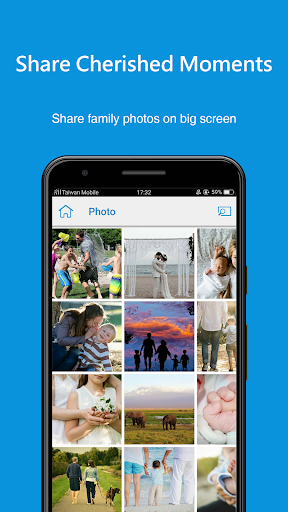
3. Share Cherished Moments – Re-live best moments with family photos on the big screen.
4. Immersive Viewing Experience – Play mobile videos on a big screen for the best viewing experience.
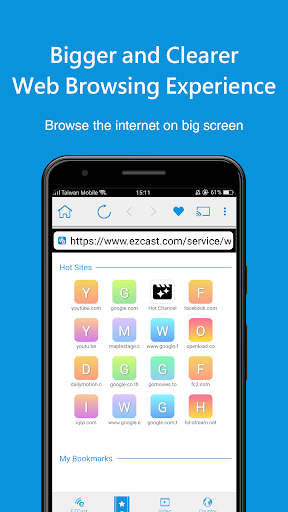
5. Bigger and Clearer Web Browsing Experience – Browse the internet on a big screen.
6. Supports Chromecast – Supports casting to your favorite wireless display receivers, including EZCast and Chromecast.
#Where to Buy EZCast Universal Display Receivers:
https://www.ezcast.com/product/ezcast
#Support:
Please feel free to contact us: [email protected]
EZCast app will help you cast any smartphone and laptop screen to an HDTV or a projector using EZCast’s wireless or connected display solutions.
#Features:
1. Faster Wi-Fi Setup – Supports Wi-Fi setup by scanning QRCode or using Bluetooth.
2. Create Your Own Video Playlists – Use EZChannel to watch videos across YouTube, Facebook and more, and add your favorite videos into your playlists.
3. Share Cherished Moments – Re-live best moments with family photos on the big screen.
4. Immersive Viewing Experience – Play mobile videos on a big screen for the best viewing experience.
5. Bigger and Clearer Web Browsing Experience – Browse the internet on a big screen.
6. Supports Chromecast – Supports casting to your favorite wireless display receivers, including EZCast and Chromecast.
#Where to Buy EZCast Universal Display Receivers:
https://www.ezcast.com/product/ezcast
#Support:
Please feel free to contact us: [email protected]
What's New
Adjustment for andorid target level and UI adjustment
App Information
Version Name
2.14.0.1315
Version Code
1315
File Size
75.3 MB
Minimum OS
Android 5.0+
Target SDK
Android 33
Developer
Winner Wave Limited
Contact
Website
Content Rating
Everyone
Package Name
com.actionsmicro.ezcastPermissions Required
This app may request the following permissions:
Recent Reviews

Cameron Kulow
1.0★
At first I was impressed, bought the cable to hook up to the tv HDMI port. Worked good for the first use. Noticed the quality of the screen wasn't the greatest but didn't really bother me much. Then, after a little more usage, the app kept freezing and then crashing, I would have to forcefully stop the app and disconnect everything and plug it back in and try again. Sometimes it takes a little for it to malfunction, or just within a few minutes. I would not recommend, it wasn't that great.

A Google user
3.0★
The app works as described, but I get constant ad notifications. At least a few a day. Of course, the notifications can be turned off in app settings, but I haven't tried that yet. Not sure if it will disable ezcast if I don't allow ad notifications. I'd prefer a paid pro version with no ads, but (as far as I can find) there isn't one.
A Google user
3.0★
You have to take the app slow through motions and menus or it will crash. Sometimes the visual is not synced with the audio. Mostly, I wish it wouldn't try to pop up when I plug in my charger. If I want to run an app, I will open it and apply it manually. I don't like apps that try to hijack my device. Also, it forces my phone to scan for WiFi. If I want it, I will turn it on... In other words, to run the app, I have to undo much of what it does to my phone to run it the way I like.

Nezuji Yarou
1.0★
When I first bought my EZCast Wire device, it worked very well. But every time that I have updated this app or the device's firmware, it has gotten a little worse (I have been using the same phone the entire time, and that phone has had no updates). Now, EZCast takes multiple attempts even to connect, and then it always drops out when I switch to the app I want to cast, and sometimes even while I'm still in the EZCast app. Now it wants to put ads in my notifications? Forget it.
A Google user
1.0★
Major data leak! I run a firewall and can see that even I haven't launched the app since phone restart, it is connecting to many unidentified networks and services on many different ports. In the last 10 minutes without even opening the app, it's attempted to contact 22 different servers/services and it's still requesting more! I don't have Facebook but it's even connecting there. Asks for many phone permissions too without any explanation. A very bad, bad app.
A Google user
5.0★
I found the way how to use my cell phone's data on mirroring but there's a problem with internal video player. firstly, When the video is playing, the interface is not running to control the video on Android 7. secondly, It can't handle Farsi subtitles and the font of subtitle is not right. finally, the is a suggestion for you and if it's possible let the users to use there players to play videos on big screen although it's possible right now to use mirroring but latency is more than normal.
Ad slot: In-Content