

Adobe Express: AI Photo, Video
com.adobe.spark.post
by Adobe
Screenshots




Ad slot: Top Leaderboard
About this app
Adobe Express is the quick and easy app to create on-brand content that helps your business stand out and make an impact. Regardless of your skill level, Adobe Express empowers you and your team to make high-quality marketing & business materials while maintaining brand consistency.
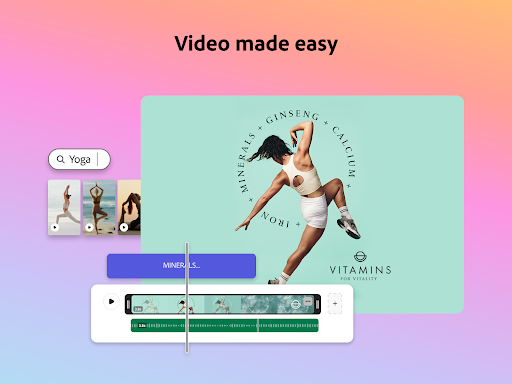
VIDEO MADE EASY
Edit videos with customizable templates. Upload clips right from your Gallery. Combine and trim clips, add text to videos, add music, sound effects and transitions to make content that stands out. Add captions automatically, reframe clips for different social channels, and easily remove background noise for quality videos.
AI CONTENT CREATOR
Jump-start creativity with Generate image. Instantly create photo art with our AI photo generator. Use AI tools to erase objects from photos or insert new objects from a prompt, and watch your imagination come to life with our AI photo generator.
BYE-BYE BACKGROUNDS
With Quick Actions, it’s easy to remove backgrounds, add video captions, transform images into GIFs, and resize your content in a single tap.
STAYING ON BRAND MADE EASY
With brand kits, it’s easy to create on-brand graphic design. Keep all your fonts, colors, and logos at your fingertips, ready to drop into any design. Apply your brand across all your social content with a tap. Maintain a cohesive look with Generate Similar. And refine designs with 30+ new filters powered by Photoshop.
CONTENT SCHEDULING SIMPLIFIED
Easily plan, preview, schedule and publish your social media posts in just a few clicks.
QUICK ACTION TOOLS
· Trim & resize designs for any digital marketing channel
· Remove video backgrounds, convert image files, crop photos & images for multiple social platforms & more
· Convert to GIF from images and videos
· Generate QR codes in different styles and colors
· Animate a character with your voice
· Generate and edit video captions
Some features are not currently supported on all devices, but good things are coming. Support for more devices is rolling out over time.
QUESTIONS?
Your feedback and engagement will help us make Adobe Express better for everyone.
Join our Discord community
[https://discord.gg/adobeexpress] to share your thoughts, connect with the community and get involved with creative challenges
Visit Uservoice [https://adobeexpress.uservoice.com/forums/951181-adobe-express] to request new features
Let us know about any bugs or issues you encounter in our Adobe Community Forum [https://community.adobe.com/t5/adobe-express/ct-p/ct-adobe-express]
PREMIUM MEMBERSHIP
Your Adobe Express Premium membership unlocks access to Premium features:
· Over 200M royalty-free Adobe Stock photos, videos, music tracks, design elements and fonts
· 250 generative credits to generate images, templates and more
· Remove Video Background, One-click Resize for multiple channels, brand kits and more
Use your Adobe Express Premium plan across your desktop browser and mobile phone. Also includes Adobe Photoshop Express on mobile.
Please refer to our full terms of service for more details. [http://www.adobe.com/go/terms_en]
Terms and conditions:
Your use of this Adobe application is governed by the Adobe General Terms of Use http://www.adobe.com/go/terms_en, and Adobe Privacy Policy http://www.adobe.com/go/privacy_policy_en and any successor versions thereto.
Do not sell or share my personal information: www.adobe.com/go/ca-rights
All trademarks are the property of their respective owners.
VIDEO MADE EASY
Edit videos with customizable templates. Upload clips right from your Gallery. Combine and trim clips, add text to videos, add music, sound effects and transitions to make content that stands out. Add captions automatically, reframe clips for different social channels, and easily remove background noise for quality videos.
AI CONTENT CREATOR
Jump-start creativity with Generate image. Instantly create photo art with our AI photo generator. Use AI tools to erase objects from photos or insert new objects from a prompt, and watch your imagination come to life with our AI photo generator.
BYE-BYE BACKGROUNDS
With Quick Actions, it’s easy to remove backgrounds, add video captions, transform images into GIFs, and resize your content in a single tap.
STAYING ON BRAND MADE EASY
With brand kits, it’s easy to create on-brand graphic design. Keep all your fonts, colors, and logos at your fingertips, ready to drop into any design. Apply your brand across all your social content with a tap. Maintain a cohesive look with Generate Similar. And refine designs with 30+ new filters powered by Photoshop.
CONTENT SCHEDULING SIMPLIFIED
Easily plan, preview, schedule and publish your social media posts in just a few clicks.
QUICK ACTION TOOLS
· Trim & resize designs for any digital marketing channel
· Remove video backgrounds, convert image files, crop photos & images for multiple social platforms & more
· Convert to GIF from images and videos
· Generate QR codes in different styles and colors
· Animate a character with your voice
· Generate and edit video captions
Some features are not currently supported on all devices, but good things are coming. Support for more devices is rolling out over time.
QUESTIONS?
Your feedback and engagement will help us make Adobe Express better for everyone.
Join our Discord community
[https://discord.gg/adobeexpress] to share your thoughts, connect with the community and get involved with creative challenges
Visit Uservoice [https://adobeexpress.uservoice.com/forums/951181-adobe-express] to request new features
Let us know about any bugs or issues you encounter in our Adobe Community Forum [https://community.adobe.com/t5/adobe-express/ct-p/ct-adobe-express]
PREMIUM MEMBERSHIP
Your Adobe Express Premium membership unlocks access to Premium features:
· Over 200M royalty-free Adobe Stock photos, videos, music tracks, design elements and fonts
· 250 generative credits to generate images, templates and more
· Remove Video Background, One-click Resize for multiple channels, brand kits and more
Use your Adobe Express Premium plan across your desktop browser and mobile phone. Also includes Adobe Photoshop Express on mobile.
Please refer to our full terms of service for more details. [http://www.adobe.com/go/terms_en]
Terms and conditions:
Your use of this Adobe application is governed by the Adobe General Terms of Use http://www.adobe.com/go/terms_en, and Adobe Privacy Policy http://www.adobe.com/go/privacy_policy_en and any successor versions thereto.
Do not sell or share my personal information: www.adobe.com/go/ca-rights
All trademarks are the property of their respective owners.
What's New
- Drop shadow - Draw attention to what matters. In just one tap, make key images or elements pop, adding instant depth and dimension to any design.
- Zoom in/out - Zoom in or out of photos and videos with customizable speed and duration for smooth, eye-catching effects.
- Spellchecker - Write with confidence. Spellchecker auto-detects the language of your content to identify misspelled words in real-time and provide context-aware suggestions, for polished content in just a tap.
- Zoom in/out - Zoom in or out of photos and videos with customizable speed and duration for smooth, eye-catching effects.
- Spellchecker - Write with confidence. Spellchecker auto-detects the language of your content to identify misspelled words in real-time and provide context-aware suggestions, for polished content in just a tap.
App Information
Version Name
25.0.3
Version Code
648
File Size
99.6 MB
Minimum OS
Android 10+
Target SDK
Android 34
Developer
Adobe
Contact
Website
Content Rating
Everyone
Package Name
com.adobe.spark.postPermissions Required
This app may request the following permissions:
Recent Reviews

Randall McGuire
4.0★
It's not good at recognizing numbers when you enter actual numbers or even when you type the word of the number. Ex: "Create...1,000 Days" OR "...one-thousand Days". The ease of navigation isn't complex and by far more simple than the alternative $20 subscription option. Some of the features, I have yet to see anything like it. The ability to generate similar images from something you've already been creating is fantastic. Pass me a 6 month trial for a detailed review on all features.

Rob G (DJ Phat Mac)
1.0★
This is by far the slowest, most ridiculous app I've ever used for video editing. I simply wanted to take a 55 second video I already stabilized, and edited using Google Photos, and add an MP3 song I made because the video had no audio for some reason when I recorded it. over an hour later, I still can't get the finished product to fully load without the app restarting on its own with no error messages or any reason to restart. And just to add my own file was very buried and cryptic.

CJ Skaggs
1.0★
*Edited (12/16/21) to say: SInce the recent change to this app, all I can say is that if I had subscribed, I would be greatly disappointed with the "new" changes and how much is no longer offered for Subscribers. Pity. Changing my original 5 stars to 1* I LOVE this app! I only wish I could purchase it instead of paying monthly/yearly, which I will not do. I'll continue to use the free version and hopefully, one day, changes will allow for a one time payment purchase.

Lew Morris
1.0★
Ever since they've forced your work to be "on the cloud," it's become almost unusable. For some reason they seem to think it's a good idea to take local graphics, make you upload them to work with them just to download them back except so many times, they either get stuck in the download or you have to wait forever for them to get "back online," and no, clearing the cache doesn't change anything.

Mica Tan
5.0★
This is the best editor app that i totally recommend. This app contains a lot of things for photos, videos and other things you probably need like creating your resume etc. I am excited to use this app for work related too since i don't have to keep jumping app by app just to find the right one that is useful in every aspect. Over all, 5/5! No pop up ads, no annoying subscription that will suddenly appear on screen so that's it. Download this app and you'll see what i mean.

Jack fred
2.0★
Not as good as Photoshop Mix, what has now become inaccessible. You need a premium account to use the eraser! Everything is "AI", when it works its quick and easy, but 99% of the time it churns out rubbish and you can't improve it without staring again, again and again. Would be greatly improved with the addition of 'specialist' tools like: Erase, select, magic select.
Ad slot: In-Content