

Music player
com.amapps.media.music
by Green Banana
Screenshots





Ad slot: Top Leaderboard
About this app
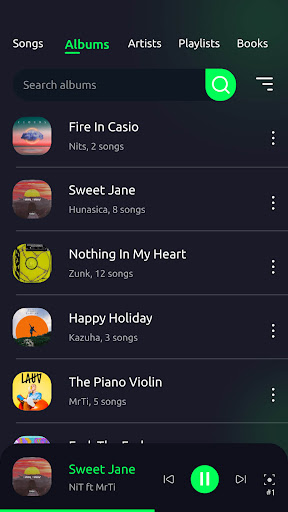
Music Player is one of the best free music players available today. The free offline music player app has a simple and eye-catching interface. With just a few taps, you can easily manage your favorite offline playlists and have the best music experience.
The free Music player is offline local mp3 player app. The Music Player application is optimally designed, so it takes up very little memory, saves device battery consumption when running in the background, but is extremely useful. The free offline music player has many features with simple design and easy to use. With a quality equalizer built into the application will help you have a great musical experience. You can easily express your own style right in the music player by creating your own themes and music player skins. The app scans all the songs on your Android device quickly. You can comfortably listen to your favorite music without internet.
Nice user interface. Many eye-catching themes. Application wallpapers can be replaced with color themes, available photos or choose from your gallery photos.
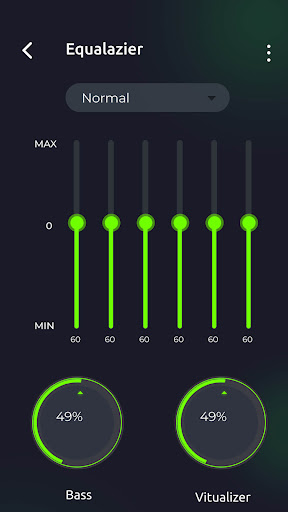
Powerful equalizer. The application supports 10 preset modes: normal, classical, dance, flat, folk, heavy metal, hip hop, jazz, pop, rock. In addition, users can customize 5 frequency bands, bass booster, music virtualizer at will.
Built-in MP3 cutter and ringtone maker. You can easily cut out the best part of a song and use it as a ringtone.
Lyrics. The free offline music player app supports adding lyrics to offline songs for you to have the best music experience.
Main features of the application:
- The app supports all audio and music formats like MP3, WAV, M4A, OGC, AAC, FLAC, APE, etc.
- The music app allows to play music by all songs, artists, albums, folders and playlists.
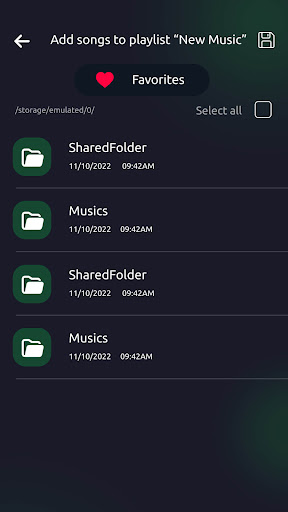
- Easily manage your favorite playlists with the music app.
- Edit lyrics. You can easily and quickly add lyrics. This is very useful for your training.
- The free offline music app easily search for songs, albums, artists, playlists and genres by keyword.
- Easily sort playlists, albums, artists and genres by many available options like sorting by name, date, album number, song number, etc.
- The free offline music app play songs sequentially, repeatedly or shuffled.
- Use song as ringtone.
- Sort tabs and hide tabs. You can easily hide rarely seen tabs for more convenient use.
- Change the theme to your own style. You can choose the wallpapers available in the app or upload your favorite wallpapers from your photo album.
- The free offline music app supports restoring or permanently deleting songs from your device.
- Powerful equalizer with bass booster, reverb effects, etc.
- The music app supports multi-languages: English, Vietnamese, Hindi, German, French, Chinese, Russian, Spanish, etc
- Hide songs shorter than 3s/5s/10s etc with just a few steps.
- Timer to turn off the music app. You don't have to worry about falling asleep forgetting to turn off the music. With just a few simple steps, the music will stop playing after a selected amount of time. It both helps you save device battery and does not affect your sleep quality.
- Change songs easily by shaking the device.
- Change album view to list or grid.
- Allows car speakers and some headphones to automatically play music when connected via bluetooth.
- Avoid abnormally stopped music. To prevent the music from stopping abnormally, please grant the necessary permission to the app to perform this function.
- Share music. You can easily share your favorite songs with your friends by nearby sharing or via social media.
Music Player is the best, most modern free music player, song player, audio player. With the extremely useful features that the free Music Player application brings, it becomes a perfect choice for you. Quickly download the application to have the best music experience right now.
The free Music player is offline local mp3 player app. The Music Player application is optimally designed, so it takes up very little memory, saves device battery consumption when running in the background, but is extremely useful. The free offline music player has many features with simple design and easy to use. With a quality equalizer built into the application will help you have a great musical experience. You can easily express your own style right in the music player by creating your own themes and music player skins. The app scans all the songs on your Android device quickly. You can comfortably listen to your favorite music without internet.
Nice user interface. Many eye-catching themes. Application wallpapers can be replaced with color themes, available photos or choose from your gallery photos.
Powerful equalizer. The application supports 10 preset modes: normal, classical, dance, flat, folk, heavy metal, hip hop, jazz, pop, rock. In addition, users can customize 5 frequency bands, bass booster, music virtualizer at will.
Built-in MP3 cutter and ringtone maker. You can easily cut out the best part of a song and use it as a ringtone.
Lyrics. The free offline music player app supports adding lyrics to offline songs for you to have the best music experience.
Main features of the application:
- The app supports all audio and music formats like MP3, WAV, M4A, OGC, AAC, FLAC, APE, etc.
- The music app allows to play music by all songs, artists, albums, folders and playlists.
- Easily manage your favorite playlists with the music app.
- Edit lyrics. You can easily and quickly add lyrics. This is very useful for your training.
- The free offline music app easily search for songs, albums, artists, playlists and genres by keyword.
- Easily sort playlists, albums, artists and genres by many available options like sorting by name, date, album number, song number, etc.
- The free offline music app play songs sequentially, repeatedly or shuffled.
- Use song as ringtone.
- Sort tabs and hide tabs. You can easily hide rarely seen tabs for more convenient use.
- Change the theme to your own style. You can choose the wallpapers available in the app or upload your favorite wallpapers from your photo album.
- The free offline music app supports restoring or permanently deleting songs from your device.
- Powerful equalizer with bass booster, reverb effects, etc.
- The music app supports multi-languages: English, Vietnamese, Hindi, German, French, Chinese, Russian, Spanish, etc
- Hide songs shorter than 3s/5s/10s etc with just a few steps.
- Timer to turn off the music app. You don't have to worry about falling asleep forgetting to turn off the music. With just a few simple steps, the music will stop playing after a selected amount of time. It both helps you save device battery and does not affect your sleep quality.
- Change songs easily by shaking the device.
- Change album view to list or grid.
- Allows car speakers and some headphones to automatically play music when connected via bluetooth.
- Avoid abnormally stopped music. To prevent the music from stopping abnormally, please grant the necessary permission to the app to perform this function.
- Share music. You can easily share your favorite songs with your friends by nearby sharing or via social media.
Music Player is the best, most modern free music player, song player, audio player. With the extremely useful features that the free Music Player application brings, it becomes a perfect choice for you. Quickly download the application to have the best music experience right now.
What's New
- Improve quality
- Optimized loading music
- Fix some minor bugs
- Optimized loading music
- Fix some minor bugs
App Information
Version Name
2.41.01
Version Code
41
File Size
14.2 MB
Minimum OS
Android 6.0+
Target SDK
Android 33
Developer
Green Banana
Contact
Content Rating
Everyone
Package Name
com.amapps.media.musicPermissions Required
This app may request the following permissions:
Recent Reviews

Joshua Rowland
5.0★
Just wish there was a button to adjust the pitch as well as the speed, preferably in the same spot. other than that, by FAR the best music app I've tried, up there with Musicolet, which doesn't even offer the speed or album art options nearly as conveniently as this one. Would pay the $4 for no ads if it were for this one thing I personally need. I'll keep looking, but at worst, I'll use this one and just have another app when I need the pitch down on the side. I'm really impressed!

Chad B
5.0★
This app was working just fine until I made the mistake of updating it to the latest version (as of sep 24) now I cannot play an album straight through in the order the artist intended. There's several ways to order/re-order the songs the only way I can't find is "original album order". Edit: Updated Oct 21 '24 they seem to have fixed a lot of it. Up from 1 star to 5 again.

Kirsti Baker
1.0★
Only now getting started, but so far so great. The one thing I wanted was for this to play albums in the song order in which they were created. I hate shuffle but it's probably there if you want it. This does what I want, seems easy and straight forward. Thanks! Edit: I CANNOT turn off shuffle even after spending hours making sure all tracks are numbered properly! Next app! I listen to albums, not songs.

A Google user
4.0★
It's a good app with sleep timer, playlists, smart share and other great features. I rated it four stars because of its limited song sorting and categorizing abilities. For example, there is no way to sort songs by genre, sub-genre, or nearly any of the ways that you can do so in iTunes or some of the better music players.

Lex Murphy
1.0★
Previous versions of this player had a "Shuffle" option to play all music randomly, which was perfect for my workouts. That option is now gone and it is impossible to change music in the middle of a 3 mile run let alone while sitting at my desk. If it doesn't change, I will have to find another player. I have switched to Music Player for Android.

B C
5.0★
So far, this is the best app for playing recorded music on my Samsung s22. I download my CDs to my computer in either MP3 or WAV. When I transfer them to my phone, this app plays both formats. The other thing I like about it is the "filing system" makes sense and is easy to follow. Now to rip some more as mobil audio has discontinued CD players from most higher end units.
Ad slot: In-Content