

MP3 Cutter and Ringtone Maker
com.atomic.apps.ringtone.cutter
by Atomic Infoapps
Screenshots


Ad slot: Top Leaderboard
About this app
Cut the best part of your audio song and save it as your Ringtone/Alarm/Music File/Notification Tone. The cut results are stored in "/mnt/sdcard/media/audio".
Make your own MP3 ringtones fast and easy with this app. You can even record a live audio and this MP3 editor can edit and trim the best parts from it for free. Supports MP3, WAV, AAC, AMR and most other music formats. This app is also a music editor/alarm tone maker/ ringtone cutter and notification tone creator.
How to use Mp3 Cutter and Ringtone Maker:
1.Select mp3/music from your mobile or from Recordings.
2.Select area to be chopped from your audio.
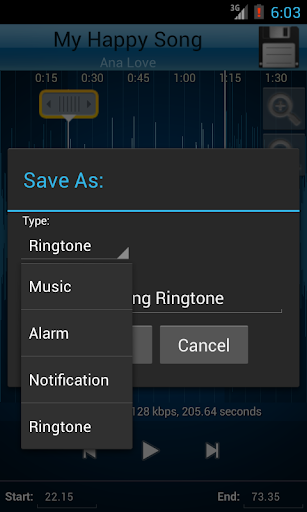
3.Save as Ringtone/Music/Alarm/Notification.
App Features:
♪ Record button at top left of app to record an audio/music for editing.
♪ An Inverted Red Triangle to Select and Edit Mp3/Music from your Mobile/SD.
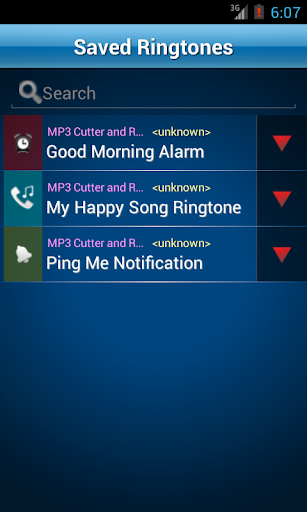
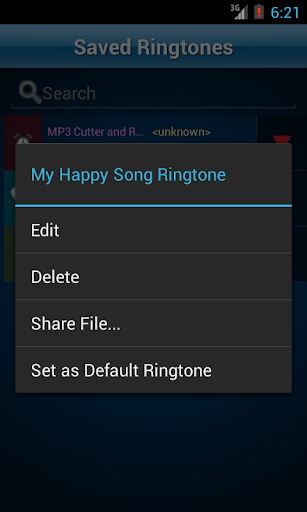
♪ Option to delete (with confirmation alert) the created Tone.
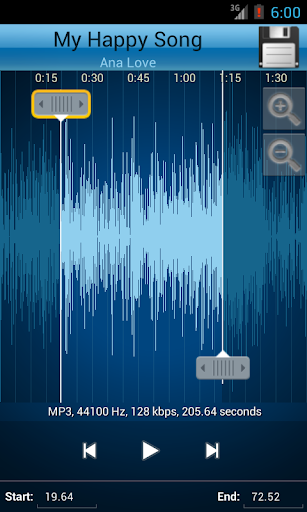
♪ View a scrollable waveform representation of the audio file at 4 zoom levels.
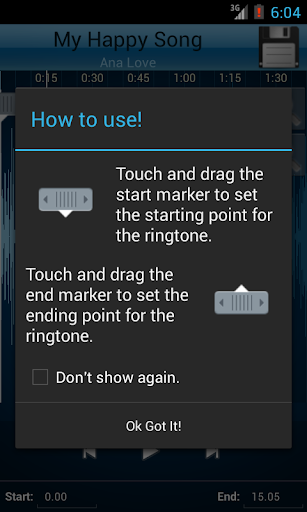
♪ Set start & end for the audio clip, using an optional touch interface.
♪ Tap anywhere on the wave & the built♪in Music player starts playing at that position.
♪ Option to Name the new cut clip while saving it.
♪ Set the new clip as default ringtone or assign to contacts, using this editor.
Use this audio cutter free of cost and make the best ringtone ever from your old songs.
Make your own MP3 ringtones fast and easy with this app. You can even record a live audio and this MP3 editor can edit and trim the best parts from it for free. Supports MP3, WAV, AAC, AMR and most other music formats. This app is also a music editor/alarm tone maker/ ringtone cutter and notification tone creator.
How to use Mp3 Cutter and Ringtone Maker:
1.Select mp3/music from your mobile or from Recordings.
2.Select area to be chopped from your audio.
3.Save as Ringtone/Music/Alarm/Notification.
App Features:
♪ Record button at top left of app to record an audio/music for editing.
♪ An Inverted Red Triangle to Select and Edit Mp3/Music from your Mobile/SD.
♪ Option to delete (with confirmation alert) the created Tone.
♪ View a scrollable waveform representation of the audio file at 4 zoom levels.
♪ Set start & end for the audio clip, using an optional touch interface.
♪ Tap anywhere on the wave & the built♪in Music player starts playing at that position.
♪ Option to Name the new cut clip while saving it.
♪ Set the new clip as default ringtone or assign to contacts, using this editor.
Use this audio cutter free of cost and make the best ringtone ever from your old songs.
What's New
Fixed some critical bugs
App Information
Version Name
4.1
Version Code
400001
File Size
5.5 MB
Minimum OS
Android 4.4+
Target SDK
Android 33
Developer
Atomic Infoapps
Contact
Website
Content Rating
Everyone
Package Name
com.atomic.apps.ringtone.cutterPermissions Required
This app may request the following permissions:
Recent Reviews

Sarah Jane
3.0★
Amazingly simple to use. Allows you to slide to select which part of the song to use, or enter the exact minutes and second you want to hear. As well as allows you to choose which type of audio you want the clip to be used for; i.e. ringtone, notification, alarm. I have reduced my rating bc, before and after every single edit there is a Tiktok ad. I could tolerate various ads, but it is always Tiktok. And there is no option for an ad free experience. I would happily pay to remove the Tiktok ads.

A Google user
5.0★
A great free ringtone maker. Simple to use and no confusion or complicated and unnecessary steps. Just choose the track, splice it, and save! Then the track is right where you need it on your phone and you don't have to rely on the app to set the ringtone or notification at all. By far, this is the best one I've found and I've tried many of them.
A Google user
5.0★
I have had this app for 7 years now, Everytime I switch a phone I automatically download it. Shame on me that I'm finally making a review. I love this app, it is very easy to use. You cut clips from your favorite songs which are then saved to your ringtone or notification tabs in sound settings. I recommend this app to anyone trying to make a catchy ringtone of a favorite song

Miss Angelia
3.0★
App was always great but..... The reason it's a 3 star nowadays is because it says I need to update but every time I click update it opens a whole different app opens up! I have tried to update app on 2 different phones which ends up bringing 2 whole different apps! So if I go directly into the Play Store App it doesn't show an update is available and instead shows Uninstall and Open! When I click open it actually opens the app without asking for an update! These extra steps make it a 3 star!

Kem Ravy
5.0★
Best app for cutting audio files!!! I have one issue that happened while I use it to cut the .mp3 file. Some .mp3 files didn't make a new file with .mp3, but it goes to .m4a and It cannot play and open because it just outputs .m4a file with size 0KB. It makes me so annoyed. What's wrong with it? I have used it for a long time it had never happened like this.

Peter Chan
5.0★
I'm totally shocked & amazed! UI is simple & quite easy to use! Made my first ringtone within a minute. Previously, used Audacity on computer but they don't have a version for phones! 5 stars to the developers of this app! Keep up the good work!! Thank you!!
Ad slot: In-Content