

YouCut - Video Editor & Maker
com.camerasideas.trimmer
by InShot Video Editor
Screenshots


Ad slot: Top Leaderboard
About this app
YouCut is a free Video Editor and YouTubeVideo Maker, offering powerful tools alongside other top video editing apps. With YouCut, you can effortlessly create photo videos and make professional-quality edits—with music for all social media.
Whether making stop motion videos or blurring video background, YouCut stands out among editing apps as the go-to choice for seamless, high-quality video edits.
FREE & No Watermark!
Features:
AI Video Boost
*Auto Captions: AI-powered speech-to-text for talking videos.
*Remove Background: Erase backgrounds instantly.
*Enhance Videos/Photos for better quality in a tap!
*Smooth Slow-Mo: Enjoy buttery-smooth videos.
Experience the magic of AI editing! Download now for amazing videos. 🚀✨
Free Video Editor & Movie Maker
YouCut it is free and has no banner ads movie maker unlike other video editing apps or video cutter. Multi-layer timeline, chroma key and green screen features to help you make cinematic videos with music for social media.
Video Merger
Merge videos into one video, a top-tier video maker for YouTube, also pro video cutter and joiner, helps compress and combine videos without losing quality.
Video Cutter
Cut & trim video as you want. Edit video with music, export video in HD quality. Easy-to-use movie maker, the best video cutter & music video editor with stunning transitions.
Video Slicer
Slice & split video into two separate video clips. Free movie maker and video editor for android.
Video Speed Control
Brand new fast/slow motion feature (Adjust video speed from 0.2× to 100×) , Editing video and adjust video speed with video filters and effects.
Photo Slideshow Maker
Free music video editor with photos, merge photos to create slideshow.
Combine videos with photos, edit videos with music like a pro.
Slideshow maker, helps create slideshow in minutes.
No Watermark
As a free music video editor and full screen video maker for YouTube, YouCut never add Watermark to your video.
No ads when editing videos
There is no banner ads on the screen, unlike other video editing apps.
Add Music to Video
It is a professional TikTok editing app, YouTube intro maker and Instagram story cutter that meets all your needs.
1. Add free featured music by YouCut.
2. Edit videos with your music.
3. Adjust the original video volume.
Video Filters & FX Effects
Add beautiful movie style video filters and FX effects to video. Movie maker and film editor without watermark.
Video Color Adjust
Adjust video brightness, contrast, saturation, etc. Custom video filters and effects.
Change Video Aspect Ratio
Crop your video in any Aspect Ratios like 1:1, 16:9, 3:2, etc. Free video maker and video cutter. Zoom in/out your video.
Change Video Background
Best chroma key video editor app & video background changer editor.
1. Change the background color of your video and blur background
Video Compressor & Converter
1. Best HD video maker free & TikTok editor.
2. YouCut - Pro video maker supports resolution up to 4K.
3. Save more than 90% size without losing much quality.
Share Video
Use Slow Motion to make your video run in fast/slow motion, share video to YouTube, Instagram, Twitter…to go viral!
Crop Video, Video merger, Cut, Trim, Split, Blur, Photo Slideshow Maker, AI Templates. Add music, Add text to video, Apply FX video filters, No crop video, Rotate video, Share to YouTube... Fast/Slow motion video editor without losing video quality!
If you have any question about YouCut (pro video editor free, video cutter & movie maker, photo video maker), please email us at: [email protected]
For more YouCut news or tutorials, subscribe us on YouTube: https://youtube.com/@YouCutApp
Disclaimer:
YouCut is not affiliated, associated, sponsored, endorsed by, or in any way officially connected with YouTube, Instagram, TikTok, Facebook.
Whether making stop motion videos or blurring video background, YouCut stands out among editing apps as the go-to choice for seamless, high-quality video edits.
FREE & No Watermark!
Features:
AI Video Boost
*Auto Captions: AI-powered speech-to-text for talking videos.
*Remove Background: Erase backgrounds instantly.
*Enhance Videos/Photos for better quality in a tap!
*Smooth Slow-Mo: Enjoy buttery-smooth videos.
Experience the magic of AI editing! Download now for amazing videos. 🚀✨
Free Video Editor & Movie Maker
YouCut it is free and has no banner ads movie maker unlike other video editing apps or video cutter. Multi-layer timeline, chroma key and green screen features to help you make cinematic videos with music for social media.
Video Merger
Merge videos into one video, a top-tier video maker for YouTube, also pro video cutter and joiner, helps compress and combine videos without losing quality.
Video Cutter
Cut & trim video as you want. Edit video with music, export video in HD quality. Easy-to-use movie maker, the best video cutter & music video editor with stunning transitions.
Video Slicer
Slice & split video into two separate video clips. Free movie maker and video editor for android.
Video Speed Control
Brand new fast/slow motion feature (Adjust video speed from 0.2× to 100×) , Editing video and adjust video speed with video filters and effects.
Photo Slideshow Maker
Free music video editor with photos, merge photos to create slideshow.
Combine videos with photos, edit videos with music like a pro.
Slideshow maker, helps create slideshow in minutes.
No Watermark
As a free music video editor and full screen video maker for YouTube, YouCut never add Watermark to your video.
No ads when editing videos
There is no banner ads on the screen, unlike other video editing apps.
Add Music to Video
It is a professional TikTok editing app, YouTube intro maker and Instagram story cutter that meets all your needs.
1. Add free featured music by YouCut.
2. Edit videos with your music.
3. Adjust the original video volume.
Video Filters & FX Effects
Add beautiful movie style video filters and FX effects to video. Movie maker and film editor without watermark.
Video Color Adjust
Adjust video brightness, contrast, saturation, etc. Custom video filters and effects.
Change Video Aspect Ratio
Crop your video in any Aspect Ratios like 1:1, 16:9, 3:2, etc. Free video maker and video cutter. Zoom in/out your video.
Change Video Background
Best chroma key video editor app & video background changer editor.
1. Change the background color of your video and blur background
Video Compressor & Converter
1. Best HD video maker free & TikTok editor.
2. YouCut - Pro video maker supports resolution up to 4K.
3. Save more than 90% size without losing much quality.
Share Video
Use Slow Motion to make your video run in fast/slow motion, share video to YouTube, Instagram, Twitter…to go viral!
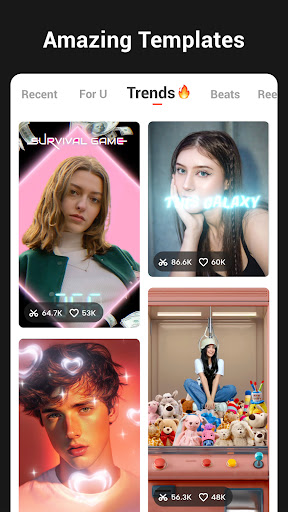
Crop Video, Video merger, Cut, Trim, Split, Blur, Photo Slideshow Maker, AI Templates. Add music, Add text to video, Apply FX video filters, No crop video, Rotate video, Share to YouTube... Fast/Slow motion video editor without losing video quality!
If you have any question about YouCut (pro video editor free, video cutter & movie maker, photo video maker), please email us at: [email protected]
For more YouCut news or tutorials, subscribe us on YouTube: https://youtube.com/@YouCutApp
Disclaimer:
YouCut is not affiliated, associated, sponsored, endorsed by, or in any way officially connected with YouTube, Instagram, TikTok, Facebook.
What's New
* New fresh filter
* Bug fixes and other improvements
Any ideas or suggestions? Feel free to share your thoughts with us at [email protected]. We can't wait to hear from you!
* Bug fixes and other improvements
Any ideas or suggestions? Feel free to share your thoughts with us at [email protected]. We can't wait to hear from you!
App Information
Version Name
1.624.1189
Version Code
1189
File Size
44.0 MB
Minimum OS
Android 8.0+
Target SDK
Android 33
Developer
InShot Video Editor
Contact
Website
Content Rating
Everyone
Package Name
com.camerasideas.trimmerPermissions Required
This app may request the following permissions:
Recent Reviews

Henry E
5.0★
I've been using this app for years to CONVENIENTLY edit videos. You could edit any video that you have on your phone; whether it's important stuff or inappropriate stuff. This app works as advertised. It has most of what you'd need for editing ANY video all from your phone. You could even take various videos and stitch them together! And in all, it's a great program to KEEP on your phone. Because, you might actually NEED it! And it'll thus, be on your phone ready to go!

Dan L
4.0★
Best video editor for the buck. Has all the features, if not more, than that of expensive video apps or ones that have subscriptions. Bravo to the devs. Would be nice if it would let you select multiple photos / videos from cloud storage and allow you to select whole folders and add all the photos / videos to a movie. Overall, it's an awesome app that's updated frequently. Support it and it's developers and purchase the pro version.

Joe Allen
5.0★
Love using this app! May not do all the fancy stuff like cutting out and green screening, all though it might and I haven't tried it 😂, but you can do all the basic editing needs for free. I ended up buying it because it's a small 1 time purchase, not a monthly subscription. Great editing app that I use for Instagram reels and YouTube shorts!

Corey Warren
5.0★
Great app. Only downside? The license doesn't transfer over to my secure folder so I'm sort of forced to buy it twice. However, it is nice that I have the ability to even buy a permanent license. I really like that. Many apps will force you to pay like 30-50 bucks a year (yes, Adobe is much worse than even that). Screw that. So thanks, YouCut devs. I prefer this over capcut. OH one note? When I trim the video from the beginning, don't move the audio way ahead! Forces me to resync audio!!!

Bret
5.0★
Best video editor I've came across on the app store after looking through tons. Great features that I may find bits and pieces of in other apps, but this app has them all in one place. Only downside I've found was the large file size after editing some files, but that's just because the app doesn't compress the image quality, so I view it as a trade off for keeping good video quality rather than a pure negative.

Jon Diaz
5.0★
Great Video Editor! I was trying to edit some videos on my Pixel 10 Pro Fold but light room would not work on it. I'm sure it's related to the driver issues that have been talked about. Anyway...this editor worked quickly and smoothly! I have been editing videos on my laptop through Adobe for years. This is a great quick and easy mobile solution for moments you want to make something on the go!
Ad slot: In-Content