
Call Recorder - Cube ACR
com.catalinagroup.callrecorder
by Cube Apps Ltd
Screenshots


Ad slot: Top Leaderboard
About this app
The most technically advanced call recorder. Records phone calls and VoIP. Supports call recording for most versions of Android devices. If you have already tried to record calls using other applications for recording calls and did not get a satisfactory result, try Call Recorder - Cube ACR, it just works the best.
Call recorder - Cube ACR lets you easily record your incoming and outgoing phone calls and VoIP conversations.
The best part? It's FREE!
►Cube Call Recorder supports:
- Phone calls
- Signal
- Skype 7, Skype Lite
- Viber
- WhatsApp
- Hangouts
- Facebook
- IMO
- WeChat
- KAKAO
- LINE
- Slack
- Telegram 6, Plus Messenger 6
- more coming soon!
※NOTE
This app uses Accessibility services.
WARNING:
- Premium subscription grants access to extra features only. It won’t improve your call recording experience. Please check how the basic version works before purchasing the subscription.
- Not all devices support VoIP calls recording. Below you can find the list of tested devices where VoIP call recording is supported. But we recommend running your own test on the exact device you have. https://goo.gl/YG9xaP
►Crystal Clear Sound Quality!
Record your calls and conversations in the best possible quality.
►Easy to Use!
- Automatically record every call. Record each conversation the moment it starts;
- Automatically record selected contacts. Create a list of people you want to always record;
- Exclusion list. Create a list of contact who won't be recorded automatically;
- Manual recording. Tap the record button mid-call to record only the selected conversations or parts of them;
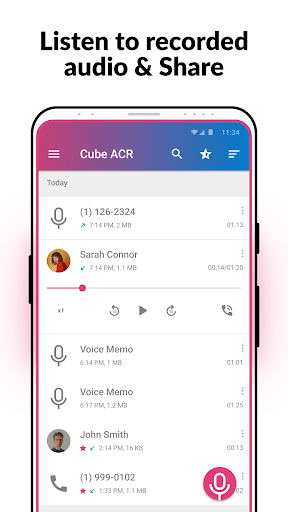
- In-App playback. Cube ACR has a built-in file explorer for managing your recordings, playing them, deleting on the fly or exporting to other services or devices;
- Smart speaker switching. Bring the phone to your ear on playback to switch from loudspeaker to earspeaker to privately listen to your recordings.
- Starred recordings. Mark important calls and filter them for quick access;
- Call back and open contacts right from the app.
Premium features:
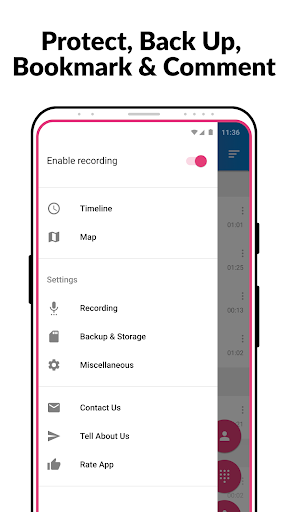
★ Cloud backup. Save your call recording to Google Drive and restore them if something goes wrong.
★ Pin lock. Protect your recording from prying eyes and ears.
★ More audio formats. Record calls in MP4 format and change their quality.
★ Save to SD card. Move your recordings to an SD card and use it a default save location.
★ Shake-to-mark. Shake your phone while recording your calls to mark the important parts of a conversation.
★ Smart storage management. Automatically delete overtime old unimportant (non-starred) calls and ignore recording short calls.
★ Post-call actions. Immediately play, share or delete a recording once you stop a conversation.
►Works on tablets
Even if your device doesn't support cellular calls, you can use Cube Call Recorder to record Skype, Viber, WhatsApp and other VoIP conversations.
※NOTE
If it doesn't work on your device or you hear only yourself on playback, try changing the recording source in the Settings, or use auto-on speaker mode.
※Legal notice
The legislation regarding phone call recording varies in different countries and states. Please, make sure that you're not breaking the legislation of your or your callee/caller country. Always notify the callee/caller that your conversation will be recorded and ask for their permission.
※Contact us
If you have any questions or issues, please, send us a message at [email protected]
Call recorder - Cube ACR lets you easily record your incoming and outgoing phone calls and VoIP conversations.
The best part? It's FREE!
►Cube Call Recorder supports:
- Phone calls
- Signal
- Skype 7, Skype Lite
- Viber
- Hangouts
- IMO
- KAKAO
- LINE
- Slack
- Telegram 6, Plus Messenger 6
- more coming soon!
※NOTE
This app uses Accessibility services.
WARNING:
- Premium subscription grants access to extra features only. It won’t improve your call recording experience. Please check how the basic version works before purchasing the subscription.
- Not all devices support VoIP calls recording. Below you can find the list of tested devices where VoIP call recording is supported. But we recommend running your own test on the exact device you have. https://goo.gl/YG9xaP
►Crystal Clear Sound Quality!
Record your calls and conversations in the best possible quality.
►Easy to Use!
- Automatically record every call. Record each conversation the moment it starts;
- Automatically record selected contacts. Create a list of people you want to always record;
- Exclusion list. Create a list of contact who won't be recorded automatically;
- Manual recording. Tap the record button mid-call to record only the selected conversations or parts of them;
- In-App playback. Cube ACR has a built-in file explorer for managing your recordings, playing them, deleting on the fly or exporting to other services or devices;
- Smart speaker switching. Bring the phone to your ear on playback to switch from loudspeaker to earspeaker to privately listen to your recordings.
- Starred recordings. Mark important calls and filter them for quick access;
- Call back and open contacts right from the app.
Premium features:
★ Cloud backup. Save your call recording to Google Drive and restore them if something goes wrong.
★ Pin lock. Protect your recording from prying eyes and ears.
★ More audio formats. Record calls in MP4 format and change their quality.
★ Save to SD card. Move your recordings to an SD card and use it a default save location.
★ Shake-to-mark. Shake your phone while recording your calls to mark the important parts of a conversation.
★ Smart storage management. Automatically delete overtime old unimportant (non-starred) calls and ignore recording short calls.
★ Post-call actions. Immediately play, share or delete a recording once you stop a conversation.
►Works on tablets
Even if your device doesn't support cellular calls, you can use Cube Call Recorder to record Skype, Viber, WhatsApp and other VoIP conversations.
※NOTE
If it doesn't work on your device or you hear only yourself on playback, try changing the recording source in the Settings, or use auto-on speaker mode.
※Legal notice
The legislation regarding phone call recording varies in different countries and states. Please, make sure that you're not breaking the legislation of your or your callee/caller country. Always notify the callee/caller that your conversation will be recorded and ask for their permission.
※Contact us
If you have any questions or issues, please, send us a message at [email protected]
What's New
- Initial presets updated;
- Minor fixes and improvements.
- Minor fixes and improvements.
App Information
Version Name
2.4.258
Version Code
258
File Size
13.6 MB
Minimum OS
Android 6.0+
Target SDK
Android 33
Developer
Cube Apps Ltd
Contact
Website
Content Rating
Everyone
Package Name
com.catalinagroup.callrecorderPermissions Required
This app may request the following permissions:
Recent Reviews

Marky Mark
4.0★
Although this app in the 3 day trial period I have used it in has worked far better than I would expect any recording phone application would, I am giving it 4 stars due to there being no option to truly purchase the app. That means you can only "rent" it, and you are stuck with payments forever. If there was an option to purchase this app for a reasonable price (e.g. $10-20), I would. For the devs, you could easily continue making money on the app by more and more continous downloads, for one.

Thomas Fisher (Fish1552)
5.0★
This app just WORKS. It records it automatically so you don't forget. And that "second app" is due to Google Android security lockdowns. It wasn't always needed. Being able to upload the files to the cloud is nice so you don't lose things if you lose you phone. It's handy for businesses where you talk to clients and need to refer to details discussed to ensure you don't miss anything. Well worth the money.

Janice Brodowsky
5.0★
This app has helped me enormously. I have problems with short term memory and this app helpes relieve my anxiety especially when I receive phonecalls from doctors where I have to take notes while they are talking. The problem is that I can't write and listen at the same time. I feel a sense of relief when I know the app will save the info I need so I can listen again and catch anything I've missed. UPDATE: I just subscribed. I'm looking forward to backing up my recordings to Google Drive.

Kallist Nemain
2.0★
Red magic 10 Pro: the app seems to only work for a little while, then the connector stops working, and I have to wipe the connectors data/cache and goes through the setup process again. I'm sure it's a compatibility issue with my phone, but coming from an Asus ROG 3, it was pretty disappointing to not be able to record calls, something I've come to rely on with my work(it Support), so I was really counting on this working reliably.

Doug
1.0★
Great, IF IT WORKS. It will decide for no reason at times to just not record. And you will lose the incredibly important record of the call because of it. If this is for funsies, it's fine. If it's important, don't trust it. It just screwed me HARD. And yes, I downloaded helper, had all the settings (unchanged from when they were just working) and permissions allowed as you should, no battery optimization, should have had zero issues, yet here we are.

Jamie Todd
5.0★
Update*** see belowdownload and installation was a bit of a pain as you have to enable lots of permissions and change a few settings. I also had to download a helper app. However, the app works exactly as I hoped it would. **UPDATE 9/1/25. I deleted this app but after trying several other apps and reading reviews, I'm coming back. Most definitely the best call recording app on the play store as long as your phone is supported
Ad slot: In-Content