

Avee Music Player (Lite)
com.daaw.avee.lite
by Daaw Aww
Screenshots


Ad slot: Top Leaderboard
About this app
Are you a music enthusiast, music producer, or a social media music video channel maker?
You should definitely try out Avee Music Player app!
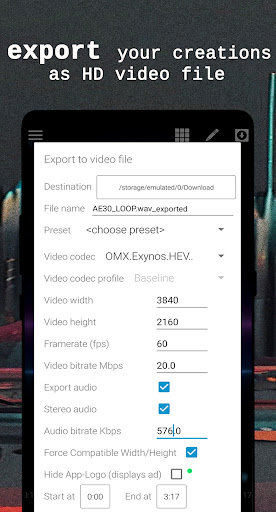
This is a kind of music player that gives you the option to listen and visualize all your favorite music beats with its built-in spectrum visualizer templates and, even more, you can edit and personalize music in video maker section to export your creations as unique musical video clips to share with friends and on social media like YouTube, TikTok, Facebook, Instagram, etc.
Explore Avee Music Player FEATURES:
For everyday users:
• Choose this lightweight music player for everyday use
• Enjoy its video player to view recorded content
• Use it to playback most popular formats, such as .mp4, .mp3, .wav, etc.
• Visualize audio beats in default spectrum visualizer templates
• Play music in the background while multitasking
• Directly browse content from device folders
• Customize folder shortcuts for fast music access
• Create and save playlists
• Search library, queue, files
• Create and save favorite music in playlists
• Enjoy the benefits of having an equalizer
• Lock screen orientation
• Use sleep timer for bedtime musical journey
• Use media and blue-tooth controls
• Listen to audio streams like internet radio, etc.
For creators:
• Customize or create and save your own visualizer templates
• Export music together with a visualizer to share music videos on YouTube, TikTok, etc.
• Use variable resolutions, such as SD, HD, or up to 4K* video files
• Use variable framerates, such as 25, 30, 50, and 60 FPS
• Use variable aspect ratios, such as 4:3, 16:9, 21:10
• Add image or animation files, such as .jpg, .png, .gif
• Tweak audio frequencies for desirable movement
• Add multiple art layers
* depends on the device
Unleash your creativity with customizable audio visualizers!
When watching music videos on YouTube, you will see music waves moving up and down to the beat of the music with beautiful colors. Have you ever thought of how to create them? Using this application you can easily create a music video for your favorite song right on your mobile phone or tablet.
These audio visualizers are extensively customizable, allowing you to tweak its color, shape, size, and audio reaction. You can even put your picture or animated .gif file. What is more, you can make your own templates or import the ones shared online. You can also export the present templates for future use.
The app’s library has various music browsing options, it also organizes your music into various categories, such as Albums, Artists, and Genres. You can also create your playlist or view songs in folders.
You are welcome to share the feedback on enjoyment of the Avee Music Player app at [email protected] with your suggestions about its improvement.
We wish you an enjoyable experience of music thrill, video making, spectrum visualizing and much more using the app!
With best regards,
Your Avee Music Player
Note when exporting files: some video codecs are phone specific and for the best user experience start by using “omx.google.h264” video codec.
Special note about Microphone permission:
While this app asks for Microphone permission, it does not access the microphone itself to listen for audio from the device but rather uses this permission to access the global audio stream at the software level. It is used by Native playback engine and is currently kept only for compatibility reasons.
Music used in app promo video:
Song: Curbi - What You Like [NCS10 Release]
Music provided by NoCopyrightSounds
Free Download/Stream: http://NCS.io/WhatYouLike
Watch: http://youtu.be/YQM6Gpyo6U8
You should definitely try out Avee Music Player app!
This is a kind of music player that gives you the option to listen and visualize all your favorite music beats with its built-in spectrum visualizer templates and, even more, you can edit and personalize music in video maker section to export your creations as unique musical video clips to share with friends and on social media like YouTube, TikTok, Facebook, Instagram, etc.
Explore Avee Music Player FEATURES:
For everyday users:
• Choose this lightweight music player for everyday use
• Enjoy its video player to view recorded content
• Use it to playback most popular formats, such as .mp4, .mp3, .wav, etc.
• Visualize audio beats in default spectrum visualizer templates
• Play music in the background while multitasking
• Directly browse content from device folders
• Customize folder shortcuts for fast music access
• Create and save playlists
• Search library, queue, files
• Create and save favorite music in playlists
• Enjoy the benefits of having an equalizer
• Lock screen orientation
• Use sleep timer for bedtime musical journey
• Use media and blue-tooth controls
• Listen to audio streams like internet radio, etc.
For creators:
• Customize or create and save your own visualizer templates
• Export music together with a visualizer to share music videos on YouTube, TikTok, etc.
• Use variable resolutions, such as SD, HD, or up to 4K* video files
• Use variable framerates, such as 25, 30, 50, and 60 FPS
• Use variable aspect ratios, such as 4:3, 16:9, 21:10
• Add image or animation files, such as .jpg, .png, .gif
• Tweak audio frequencies for desirable movement
• Add multiple art layers
* depends on the device
Unleash your creativity with customizable audio visualizers!
When watching music videos on YouTube, you will see music waves moving up and down to the beat of the music with beautiful colors. Have you ever thought of how to create them? Using this application you can easily create a music video for your favorite song right on your mobile phone or tablet.
These audio visualizers are extensively customizable, allowing you to tweak its color, shape, size, and audio reaction. You can even put your picture or animated .gif file. What is more, you can make your own templates or import the ones shared online. You can also export the present templates for future use.
The app’s library has various music browsing options, it also organizes your music into various categories, such as Albums, Artists, and Genres. You can also create your playlist or view songs in folders.
You are welcome to share the feedback on enjoyment of the Avee Music Player app at [email protected] with your suggestions about its improvement.
We wish you an enjoyable experience of music thrill, video making, spectrum visualizing and much more using the app!
With best regards,
Your Avee Music Player
Note when exporting files: some video codecs are phone specific and for the best user experience start by using “omx.google.h264” video codec.
Special note about Microphone permission:
While this app asks for Microphone permission, it does not access the microphone itself to listen for audio from the device but rather uses this permission to access the global audio stream at the software level. It is used by Native playback engine and is currently kept only for compatibility reasons.
Music used in app promo video:
Song: Curbi - What You Like [NCS10 Release]
Music provided by NoCopyrightSounds
Free Download/Stream: http://NCS.io/WhatYouLike
Watch: http://youtu.be/YQM6Gpyo6U8
App Information
Version Name
1.2.227-lite
Version Code
227
File Size
13.3 MB
Minimum OS
Android 5.0+
Target SDK
Android 34
Developer
Daaw Aww
Contact
Website
Content Rating
Everyone 10+
Package Name
com.daaw.avee.litePermissions Required
This app may request the following permissions:
Recent Reviews

A Google user
5.0★
It's "the" all-you-need app to get started. However, I'm disappointed about the fact that only certain countries have access to Pro Version. I'm not looking forward to stop using Avee Player, but I'm also not looking forward to "never being able to have access to Pro Version". So I'll wait for the day I wake up to available access to Avee Player Pro. Hopefully the creators are able to overcome this situation.

Deo Angelo Desamito
3.0★
Pretty good visualizer. My only problem is that when I try to enable hide app logo, it says that I need internet connection or the ad is loading. I ignored it and just exported the video until an ad played. I thought it could play ads now do I tried enabling hide app logo again, and same thing. It doesn't let me enable it because "I don't have internet connection" and it "can't load ad" even though it did
A Google user
4.0★
Okay so the app is very great but I only experienced two problems. 1.) Exporting quality seems to be a bit too terrible. If that's because it's the lite version, there comes my second problem. 2.) Can't find the premium version. All I can find is apks of the premium which might contain viruses if it's not uploaded by the devs themselves. Had a few crashes here and there but nothing too annoying and making a custom spectrum is complex but doable if you know what you're doing. Definitely would pay for the premium if I could find it. I'll send an email to the devs.

Paul “Canadian”
2.0★
As a TikTok content creator, speed is crucial for me. However, I'm facing a frustrating issue with the app. Despite having a stable Wi-Fi connection, I can't watch ads to unlock features. The error message, "Ad not loaded. Please try later," keeps popping up. Even after reaching out to support, there's been no response for over a day. Quick resolution is needed for seamless video creation. An urgent fix is needed.

Hiraeth Ponce
3.0★
First of all, the app is nice and I could definitely use this for my channel but... There's a problem, after I click the button to export, it says "Exporting Finished" and "Failed to initialize encoder" at the same time. Then the ending was... I got no chance to upload a video cuz I can't export. Please fix this right away, I really need to use this app so fix this please before I got to decide to delete this🙏

Rana Muizzuddeen
3.0★
The app has sometimes errors I waited for a few days for it to work again without errors and I am disappointed, it only worked for a few seconds and then it randomly stopped and then the error message occured again, I would be glad if I could find any way to get rid of this situation
Ad slot: In-Content