

VN - Video Editor & Maker
com.frontrow.vlog
by Ubiquiti Labs, LLC
Screenshots




Ad slot: Top Leaderboard
About this app
VN is an easy-to-use and free video editing app with no watermark. The intuitive interface makes video editing simple, with no prior knowledge needed. It offers all the features required to create professional and high-quality videos, satisfying both the needs of professional and amateur video editors.
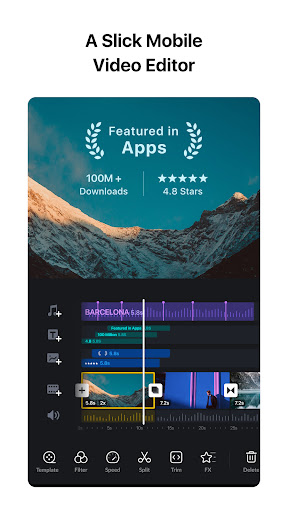
Intuitive Multi-Track Video Editor
• Quick Rough Cut: The track edit design feature for PC versions is built in the VN app. This makes it easier for you to zoom in/out any materials and select keyframes as short as 0.05 seconds. You can make video editing as precise as you want.
• Delete & Reorder Easily: Swipe your finger up or down the screen to delete the selected video clips. Reorder your video materials simply by drag-and-drop.
• Multi-track Timeline: Easily add picture-in-picture videos, photos, stickers, and texts to your videos, and personalize them using the Keyframe animation feature.
• Save Drafts Anytime: Save a draft and undo/redo an action as many times as you want. The support for non-destructive editing allows you to make changes to an image without overwriting the original image data.
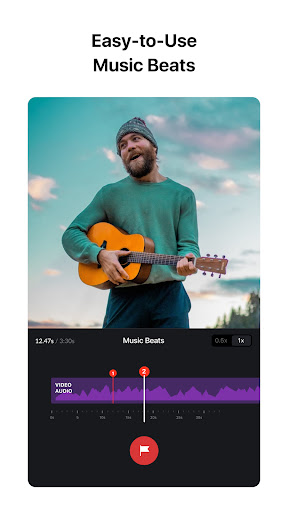
Easy-to-use Music Beats
• Music Beats: Add markers to edit video clips to the beat of the music and take your videos to the next level.
• Convenient Recording: Easily add high-quality voice-overs to make your videos more lively in minutes.
Trending Effects & Color Grading Filters
• Speed Curve: In addition to the regular speed change tool, Speed Curve helps to make your videos play out faster or slower. This feature is similar to Time Remapping in Adobe Premiere Pro. VN offers 6 preset curves for you to choose from.
• Transitions & Effects: Make your videos more lively by using the transitions and effects such as overlay and blur and setting their timing and speed.
• Rich Filters: Import LUT (.cube) files to make your videos more cinematic. Rich cinematic filters make it easy to create stunning visual effects.
Advanced Video Editor
• Keyframe Animation: Create awesome video effects using the 19 built-in keyframe animation effects to customize the products, you can also add other keyframes or curves to your footage to customize the results.
• Reverse & Zoom: Enjoy the novelty and fun to reverse your video clips, and use the zoom effects to make them more engaging.
• Freeze Frame: Create a time freeze effect simply by selecting and tapping a video frame to generate an image with 1.5 seconds duration.
• Creative Templates: Create music and video templates and share them with your friends and family.
Flexible Use of Materials
• Flexible Impor Method: Import music, sound effects, fonts, and stickers to VN via Wi-Fi, WhatsApp, or Telegram. You can also import files in bulk via Zip files. Using your materials for video editing is that simple.
• Material Library: Use the many stickers, fonts, and other materials available to add more fun to your videos.
Rich Text Templates
• Text Templates: Choose from the many text templates and fonts to match your video styles.
• Text Editing: Choose from various font styles and adjust the font color, size, spacing, and more in any way you like.
Create Effectively & Share Securely
• Seamless Collaboration: Transfer projects between mobile and desktop devices via Google Drive or OneDrive with ease. This allows for video editing anytime and anywhere.
• Protection Mode: Set expiration dates and passwords for your drafts and templates to secure your assets.
• Custom Export: Customize the video resolution, frame rate, and bit rate. 4K resolution, up to 60 FPS.
Discord: https://discord.gg/eGFB2BW4uM
YouTube: @vnvideoeditor
Email: [email protected]
Terms of Service: https://www.ui.com/legal/termsofservice
Privacy Policy: https://www.ui.com/legal/privacypolicy
Official Website: www.vlognow.me
Intuitive Multi-Track Video Editor
• Quick Rough Cut: The track edit design feature for PC versions is built in the VN app. This makes it easier for you to zoom in/out any materials and select keyframes as short as 0.05 seconds. You can make video editing as precise as you want.
• Delete & Reorder Easily: Swipe your finger up or down the screen to delete the selected video clips. Reorder your video materials simply by drag-and-drop.
• Multi-track Timeline: Easily add picture-in-picture videos, photos, stickers, and texts to your videos, and personalize them using the Keyframe animation feature.
• Save Drafts Anytime: Save a draft and undo/redo an action as many times as you want. The support for non-destructive editing allows you to make changes to an image without overwriting the original image data.
Easy-to-use Music Beats
• Music Beats: Add markers to edit video clips to the beat of the music and take your videos to the next level.
• Convenient Recording: Easily add high-quality voice-overs to make your videos more lively in minutes.
Trending Effects & Color Grading Filters
• Speed Curve: In addition to the regular speed change tool, Speed Curve helps to make your videos play out faster or slower. This feature is similar to Time Remapping in Adobe Premiere Pro. VN offers 6 preset curves for you to choose from.
• Transitions & Effects: Make your videos more lively by using the transitions and effects such as overlay and blur and setting their timing and speed.
• Rich Filters: Import LUT (.cube) files to make your videos more cinematic. Rich cinematic filters make it easy to create stunning visual effects.
Advanced Video Editor
• Keyframe Animation: Create awesome video effects using the 19 built-in keyframe animation effects to customize the products, you can also add other keyframes or curves to your footage to customize the results.
• Reverse & Zoom: Enjoy the novelty and fun to reverse your video clips, and use the zoom effects to make them more engaging.
• Freeze Frame: Create a time freeze effect simply by selecting and tapping a video frame to generate an image with 1.5 seconds duration.
• Creative Templates: Create music and video templates and share them with your friends and family.
Flexible Use of Materials
• Flexible Impor Method: Import music, sound effects, fonts, and stickers to VN via Wi-Fi, WhatsApp, or Telegram. You can also import files in bulk via Zip files. Using your materials for video editing is that simple.
• Material Library: Use the many stickers, fonts, and other materials available to add more fun to your videos.
Rich Text Templates
• Text Templates: Choose from the many text templates and fonts to match your video styles.
• Text Editing: Choose from various font styles and adjust the font color, size, spacing, and more in any way you like.
Create Effectively & Share Securely
• Seamless Collaboration: Transfer projects between mobile and desktop devices via Google Drive or OneDrive with ease. This allows for video editing anytime and anywhere.
• Protection Mode: Set expiration dates and passwords for your drafts and templates to secure your assets.
• Custom Export: Customize the video resolution, frame rate, and bit rate. 4K resolution, up to 60 FPS.
Discord: https://discord.gg/eGFB2BW4uM
YouTube: @vnvideoeditor
Email: [email protected]
Terms of Service: https://www.ui.com/legal/termsofservice
Privacy Policy: https://www.ui.com/legal/privacypolicy
Official Website: www.vlognow.me
What's New
- Bugfixes and performance improvements.
If you encounter problems during using VN app, please feedback in the Settings on the VN app and contact us at [email protected] for emergency. We will help you out as soon as possible.
If you encounter problems during using VN app, please feedback in the Settings on the VN app and contact us at [email protected] for emergency. We will help you out as soon as possible.
App Information
Version Name
2.2.5
Version Code
5576
File Size
197.9 MB
Minimum OS
Android 7.0+
Target SDK
Android 33
Developer
Ubiquiti Labs, LLC
Contact
Website
Content Rating
Teen
Package Name
com.frontrow.vlogPermissions Required
This app may request the following permissions:
Recent Reviews

Rox Nichols
5.0★
This is actually the best editor I have found, and thank god for that. So many were unavailable on mobile or had a watermark or like 'only 2 drafts for free'. I don't think I'll even need 100 drafts, lol. Now, I will say that the app is laggy, and I don't mean it in the way of, 'It will crash on me 30+ times for a 2 and 40 second video' I mean it as if you are using a lot of overlays it might take a moment to actually move to where you need it to, but that's the only thing. Love this so much! ♡

Ayorinde Olamidipupo
4.0★
It's a new experience for me while using phone video editors. No add, that's game. Beautiful transitions, numerous fonts to choose from, nice sound catalogue. And most especially FREE, that's mind bugging. However, there is room for improvement.

Raymond Dunne
2.0★
The function of the editor itself seems to work very well, that's the only reason for a second star. The folders organization is confusing to say the least, saving projects seems to be fairly easy but the ones I thought I'd saved didn't work, when I went back to play, I got an error that the originals had disappeared. There are no clear inductions on how to save them permanently and export doesn't work nor any instructions on that either. Waste of time from my experience, too complicated.

Keyur Navneet
3.0★
The app is easy to use for beginners. So far, the only and the biggest trouble I have had is with the downloaded final cut. In the app, video plays absolutely fine but upon downloading the final edit cut, the audio starts lagging, unnecessary pauses appear in audio making it out of sync with the video. And this has happened with me multiple times in just 24 hours. The developer team shall check for any bugs in the video editor.

FF GAMING
5.0★
I came to this expert physiotherapist in Chembur after a sports injury, and my recovery has been amazing. They offer different treatments in Chembur using advanced techniques. The sessions were result-oriented and comfortable. The physiotherapist kept track of my progress closely. The place is neat, organized, and easy to reach. Highly recommend to anyone needing quick and professional recovery!

John kenneth Bayson
5.0★
I like this app. For a long time I've been using this, everytime that I need to edit some videos, I always use VN. But it's much much better if I can download music with in the app, something like no need to go to the other apps to search some music. It's just my suggestion but yes, still it's my favorite app for editing, cause also I can edit while offline.
Ad slot: In-Content