

Health Connect
com.google.android.apps.healthdata
by Google LLC
Screenshots
Ad slot: Top Leaderboard
About this app
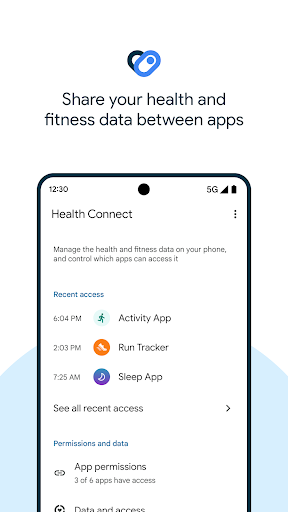
Health Connect by Android gives you a simple way to share data between your health, fitness, and wellbeing apps without compromising on privacy.
Once you've downloaded Health Connect, you can access it through your settings by going to Settings > Apps > Health Connect, or from your Quick Settings menu.
Get more from your favorite apps. Whether you're focused on activity or sleep, nutrition or vitals, sharing data between your apps can help you better understand your health. Health Connect gives you simple controls, so you only share the data you want to.
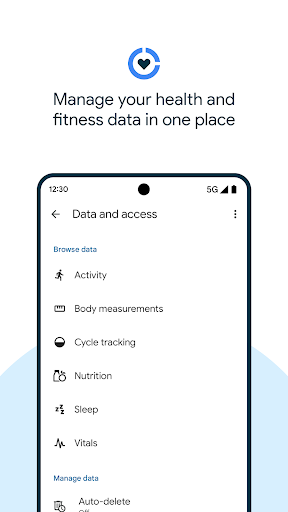
Keep your health and fitness data in one place. Health Connect stores the health and fitness data from your apps in one place, offline and on your device, so you can easily manage the data from your different apps.
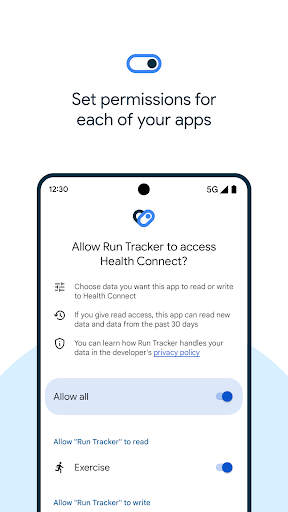
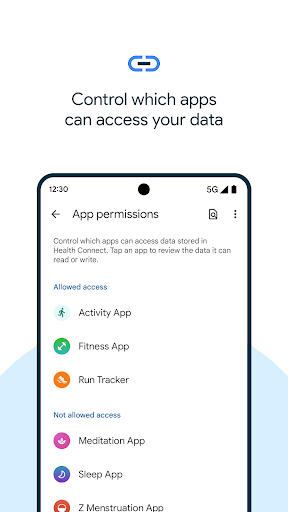
Update privacy settings in a few taps. Before a new app can access your data, you can review and choose what you want to share. If you change your mind, or want to see which apps recently accessed your data, find it all in Health Connect.
Once you've downloaded Health Connect, you can access it through your settings by going to Settings > Apps > Health Connect, or from your Quick Settings menu.
Get more from your favorite apps. Whether you're focused on activity or sleep, nutrition or vitals, sharing data between your apps can help you better understand your health. Health Connect gives you simple controls, so you only share the data you want to.
Keep your health and fitness data in one place. Health Connect stores the health and fitness data from your apps in one place, offline and on your device, so you can easily manage the data from your different apps.
Update privacy settings in a few taps. Before a new app can access your data, you can review and choose what you want to share. If you change your mind, or want to see which apps recently accessed your data, find it all in Health Connect.
What's New
Try Health Connect out with your compatible health and fitness apps: https://g.co/android/CompatibleWithHealthConnect
App Information
Version Name
2024.03.21.01.release
Version Code
127084
File Size
8.0 MB
Minimum OS
Android 9+
Target SDK
Android 34
Developer
Google LLC
Contact
Website
Content Rating
Everyone
Package Name
com.google.android.apps.healthdataPermissions Required
This app may request the following permissions:
Recent Reviews

Randy Edge
1.0★
Doesn't work. Doesn't sync correctly between apps that should work with it. No user interface at all on my new Pixel 9A. Says you're supposed to be able to access it in Settings but it's not there. I have to access it through the swipe down at the top of my phone, but like I said, no interface at all. Just a section where you give your apps permissions, but still nothing works. All I'm trying to sync is Google Fit and My Air apps.

Ilia Kowalzik
1.0★
Impossible to use; I couldn't find it on my phone and had to open the play store and go to this page to open it. There's no icon in my app drawer and it doesn't show up in search results on my phone. Apparently you can only find it in Settings>Apps>See all apps. It doesn't seem like it's meant for the user. What's even the point of it? Truly baffling and frustrating. I can't in good conscience recommend an app that's supposed to let you control your data but is hidden on your phone.

Mindy Claggett
1.0★
This app is TERRIBLE. I am being forced to use it to connect to MyUHC app, but it won't sync. I have tried and tried, all permissions are open, everything -- still won't sync. Why did you stop letting Google Fit track data? That is a fantastic app that works well, and I loved it. I can't even FIND Health Connect on my phone. Absolute garbage.

J Rob
1.0★
Beside what everyone is saying "complications with accessibility to the app" it does not sync data very well at all. Tried with two different brands of smart rings & two different brands of fitness tracking watches. You would think at least one would work properly but none synced correctly if at all, some days won't even sync at all. Not sure what devices were used in their testing phase but it certainly was not the 3 widely used brands.

Amir Nahavandi
1.0★
Extremely problematic app. First, there is no way to create an icon or button to access the app - you either have to search for the app on the Play store/Google Search, and then click install (despite it already being installed) or access it...or oddly u can access it via Setting on Android phones, both of which are just ridiculous means of having to access it. Today, I uninstalled Health Connect. Much cleaner - now, some apps get data from my Garmin app, others via Google Fit.

Earl Daniels
5.0★
This app does what it's supposed to do very well. Users don't seem to understand what this app is for - it is simply a bridge to allow various fitness apps to share data between them. This app's not supposed to show your data or track anything. You only use it to add new apps and capabilities to your fitness tracking, such as using Google Fit as your central data hub and display. If you do not need to share data between apps, then don't install this app.
Ad slot: In-Content