

Google Photos
com.google.android.apps.photos
by Google LLC
Screenshots




Ad slot: Top Leaderboard
About this app
Google Photos is the home for all your photos and videos. Easily back up, edit, organize, and search your memories with the help of Google AI.
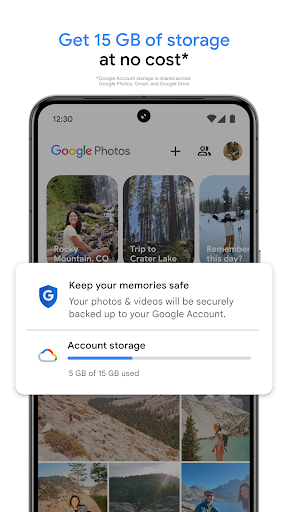
• 15 GB OF CLOUD STORAGE: Every Google account gets 15 GB of storage at no cost*, 3X more than many other cloud storage services. So you can backup and keep your memories safe automatically on all of your devices.
• AI-POWERED EDITING TOOLS: Make complex edits in just a few taps. Remove unwanted distractions with Magic Eraser. Improve out-of-focus blurry photos with Unblur. Enhance lighting and brightness with Portrait Light.
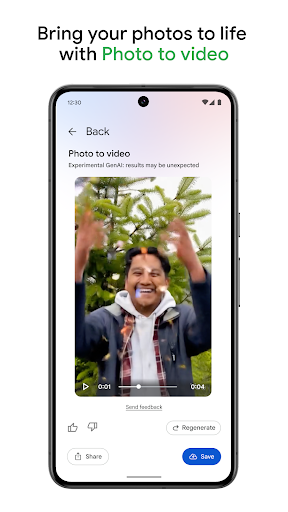
• CREATE WITH GOOGLE PHOTOS: Play with AI-powered tools to create content. Remix lets you bring your pictures to life transforming them into fun, unique styles, while Photo to video animates your photos, turning static memories into moving videos.
• SEARCH MADE SIMPLE: No more endless scrolling. Ask Photos helps you quickly find what you're looking for, from simple searches like dogs to complex searches such as what's my recipe for pine nut lemon rice?
• EASY ORGANIZATION: Google Photos helps declutter your gallery by automatically organizing duplicates and similar photos into Photo Stacks. It also offers smart, intuitive folders for screenshots, documents, custom albums and daily camera roll organization, making your gallery feel orderly and personalized. You can even save sensitive photos and videos to a locked folder protected by your device screen lock.
• RELIVE AND SHARE YOUR FAVORITE MEMORIES: Stroll down memory lane right in Google Photos. Share photos, videos, and albums with any of your contacts — even if they don't use Google Photos.
• ALL YOUR MEMORIES IN ONE PLACE: With backup on, you can easily transfer your photos from other apps, galleries and devices, so all of your content is in one place
• YOUR MEMORIES ARE SAFE: Your photos and videos are safe and secure from the instant you store them, protected by our advanced security infrastructure while in storage or when you share them.
• FREE UP SPACE: Never worry about running out of space on your phone again. Photos that are backed up in Google Photos can be removed from your device’s storage in just a tap.
• PRINT YOUR FAVORITE MOMENTS:
From your phone, to your home. Turn your favorite memories into photo books, photo prints, canvas wall art and more. Price varies by product.
• GOOGLE LENS: Search what you see. This preview enables you to identify text and objects in your photos to learn more and take action.
Google Privacy Policy: https://google.com/intl/en_US/policies/privacy
* Google Account storage is shared across Google Photos, Gmail, and Google Drive.
• 15 GB OF CLOUD STORAGE: Every Google account gets 15 GB of storage at no cost*, 3X more than many other cloud storage services. So you can backup and keep your memories safe automatically on all of your devices.
• AI-POWERED EDITING TOOLS: Make complex edits in just a few taps. Remove unwanted distractions with Magic Eraser. Improve out-of-focus blurry photos with Unblur. Enhance lighting and brightness with Portrait Light.
• CREATE WITH GOOGLE PHOTOS: Play with AI-powered tools to create content. Remix lets you bring your pictures to life transforming them into fun, unique styles, while Photo to video animates your photos, turning static memories into moving videos.
• SEARCH MADE SIMPLE: No more endless scrolling. Ask Photos helps you quickly find what you're looking for, from simple searches like dogs to complex searches such as what's my recipe for pine nut lemon rice?
• EASY ORGANIZATION: Google Photos helps declutter your gallery by automatically organizing duplicates and similar photos into Photo Stacks. It also offers smart, intuitive folders for screenshots, documents, custom albums and daily camera roll organization, making your gallery feel orderly and personalized. You can even save sensitive photos and videos to a locked folder protected by your device screen lock.
• RELIVE AND SHARE YOUR FAVORITE MEMORIES: Stroll down memory lane right in Google Photos. Share photos, videos, and albums with any of your contacts — even if they don't use Google Photos.
• ALL YOUR MEMORIES IN ONE PLACE: With backup on, you can easily transfer your photos from other apps, galleries and devices, so all of your content is in one place
• YOUR MEMORIES ARE SAFE: Your photos and videos are safe and secure from the instant you store them, protected by our advanced security infrastructure while in storage or when you share them.
• FREE UP SPACE: Never worry about running out of space on your phone again. Photos that are backed up in Google Photos can be removed from your device’s storage in just a tap.
• PRINT YOUR FAVORITE MOMENTS:
From your phone, to your home. Turn your favorite memories into photo books, photo prints, canvas wall art and more. Price varies by product.
• GOOGLE LENS: Search what you see. This preview enables you to identify text and objects in your photos to learn more and take action.
Google Privacy Policy: https://google.com/intl/en_US/policies/privacy
* Google Account storage is shared across Google Photos, Gmail, and Google Drive.
What's New
We are introducing a new storage management tool to help you easily manage the photos that count toward your storage quota. This tool will surface photos or videos you might want to delete — like blurry photos, screenshots and large videos.
App Information
Version Name
6.83.0.634830903
Version Code
48955820
File Size
136.7 MB
Min SDK
Android 23+
Target SDK
Android 34
Developer
Google LLC
Contact
Website
Content Rating
Everyone
Package Name
com.google.android.apps.photosPermissions Required
This app may request the following permissions:
Recent Reviews

Janette Martinez (JuiceBox J)
1.0★
Whenever I try to edit a photo by using the Magic Eraser tool, it never works properly, worse than the last update, which was already super frustrating, barely erasing anything you select.. Plus, every time I make one mark, it tells me I'm not connected to the internet, which I always am, and it works, then it tells me it can't edit and for me to stop editing. It's almost worthless, pretty much better off just photoshopping the images instead... So much for quick and easy..

Deb Tolley
1.0★
ugh! what have you done to the editing controls!! get rid of the inefficient and inaccurate AI garage and bring back the custom controls that let me rotate and keystone and crop! AI framing isn't even close to correct! and the manual controls are now so limited I can't even select the correct borders or rotate correctly. the old controls were so much better! one click would pretty closely grab the correct outline and then I could tweak. not anymore!!!

sue miller
1.0★
the AI that you added to photos is awful. I can never find anything. I don't want it on my phone. it never in the last couple of days has help me find a photo that I had notes on so so I could find it again. I can't find it. this is awful also game danger, why did you take away the perspective changer. literally it is the only thing that I use. PLEASE TURN IT BACK THE WAY IT IS NOW IT IS USELESS

Judy
1.0★
Your last update is terrible. You removed the blur option which was AMAZING for blurring the background of my photos of flowers. The flowers would just pop with a heavy blur. The portrait blur is not nearly as good, especially when I use blur and depth to get my flowers to look how I want them to. It DOES look good, but when I save it, the blur almost disappears. Your "upgrade" is really a downgrade.

Alicia Perez
3.0★
I HATE the new organization of Collections. Now I have to click through multiple menus to find my folders, it takes longer and I don't want or need it. I also wish I could default to open on my Device folders which is what I use the most. I do not care about Memories. I hate the pop-ups that constantly ask me to back up my photos (which I do not want to do). This app gets worse and worse with every update. At least allow us to customize our default view! Please!!

Tristin Gregorian
3.0★
I'm not the biggest fan of folders being on a second page, separated from the first page which only shows camera roll photos. And for some reason, I can't delete photos anymore? It just pulls up an infinitely-looping circle of doom and does nothing. Strange stuff. Otherwise, the app has amazing features that I really enjoy. I love that I can order photos through the app. While I haven't used it yet, I certainly plan to! Altogether, I really just use the app became it came pre-installed.
Ad slot: In-Content