

GPS Map Camera
com.gpsmapcamera.geotagginglocationonphoto
by GPS Map Camera
Screenshots








Ad slot: Top Leaderboard
About this app
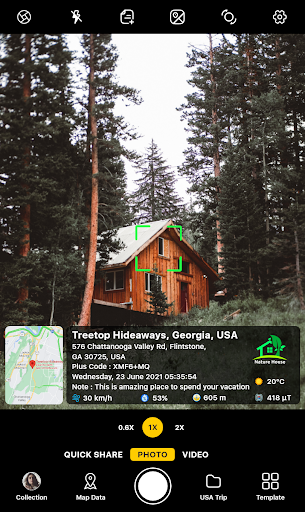
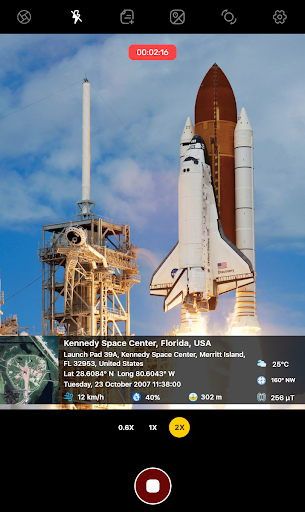
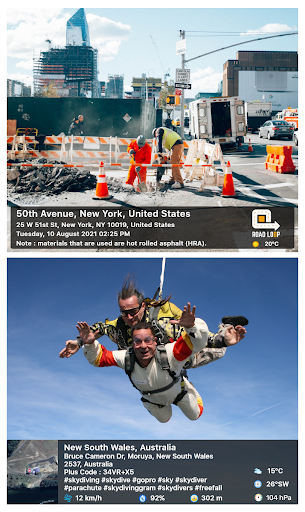
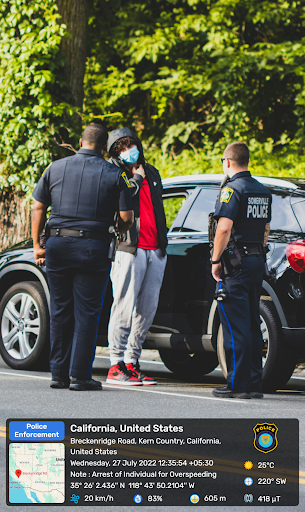
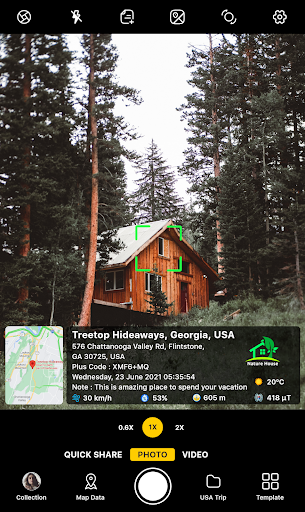
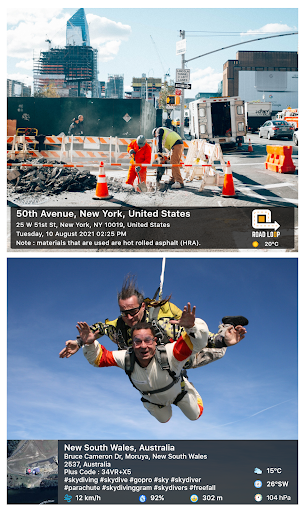
Looking for your travel memories or pictures of your visit to a particular place, with GPS map camera stamp application you can add datetime, live map, latitude, longitude, weather, magnetic field, compass & altitude to your camera photos.
Track live location along with your captured photos by GPS map camera: Geotag photos & add GPS location app. send geotagged location of street/place added photos to your family & friends, and let them know about your best earth travel memories.
How to add GPS map location on photos?
✔ Install GPS map camera: geotag photos & add GPS location application in your smartphone
✔ Open camera & select advanced or classic templates, arrange formats of stamps, change settings according to your requirement of GPS photomap location stamp
✔ Add geo location stamps automatically to your clicked pictures
Interesting features:
➤ Get custom GPS camera with Grid, Ratio, Front & selfie camera, Flash, Focus, Mirror, Timer, dashcamera level, capture sound support, scenes & filters
➤ Set photo map data as automatic or manual
➤ QR code scanner for fast & easy to use scanning
➤ Classic template contains automatically fetched stamp details
➤ Advanced template contains:
1. Map options: Change photo map type from Normal, Satellite, Terrain, Hybrid options
2. Short Address: Auto add short location on photo
3. Address: Add your selected manual/automatic location on image
4. Lat/Long: Set GPS coordinates from DMS/decimal options for GPS stamp
5. Plus code: Accurate or concise code
6. Date & Time: Add date & timestamp from various formats as an image tag
7. Time zone: GMT, UTC timezones
8. Logo: Upload your brand logo
9. Note: Write relatable notes
10. Hashtags: add hashtags to photos with this GPS app
11. Weather: Either in fahrenheit or celsius, measure temperature units
12. Compass: Auto compass direction
13. Magnetic Field: Auto magnetic field camera
14. Wind: Measure Wind speed
15. Humidity: Auto Humidity measurement
16. Pressure: Measure pressure of the place
17. Altitude: It will automatically calculate altitude
18. Accuracy: Get auto accuracy on image
Why have handy GPS camera app in your smartphone?
➝ To get satellite map stamp on photos while clicking
➝ For putting GPS map location stamp on photos
➝ Get focused clicks with geotag stamp & date stamp
➝ Find photo location stamp with geotagged camera at one place with this gps location tracker app
➝ To add date time stamp, which performs as both timestamper & date stamper
➝ Use as a date and time camera app to add date to your photos
➝ Works as GPS solocator & GPS note camera to stamp GPS details on photo
➝ Put Longitude, Latitude, Address, Date-Time, Location stamp to photos
➝ Utilize this quick & secure camera as GPS tracker on Photos
➝ To Get location image stamp with simple camera GPS
→ To get GPS stamp that have camera360 information of the place
→ Manually add GPS area in stamp to change location address
→ Work as a night hd camera+ to get clear pics
Most efficient app for following groups of people:
➥ Travelers & explorers can effectively utilize geo-tagging camera app
➥ People associated with business related to real estate, infrastructure, architecture can easily apply GPS map location stamp to their site photos
➥ Individuals having destination celebrations of events like wedding, birthday, festival, anniversary, etc. can have their current GPS location stamp on the picture & use the app as a moment camera
➥ Anyone who wants to add GPS data on their photo as a GPS notecam can use the app.
➥ Persons having outstation meetings, conferences, conclaves, meetups, events arranged by companies or institutions solving and serving a particular purpose
➥ Travel, food, fashion & art bloggers can advance their experiences by adding GPS location through GPS map cam
To experiment with such interesting features, MUST download GPS map camera: geotag photos & add GPS location app right now.
Share your best experiences with us through rate & review.
Track live location along with your captured photos by GPS map camera: Geotag photos & add GPS location app. send geotagged location of street/place added photos to your family & friends, and let them know about your best earth travel memories.
How to add GPS map location on photos?
✔ Install GPS map camera: geotag photos & add GPS location application in your smartphone
✔ Open camera & select advanced or classic templates, arrange formats of stamps, change settings according to your requirement of GPS photomap location stamp
✔ Add geo location stamps automatically to your clicked pictures
Interesting features:
➤ Get custom GPS camera with Grid, Ratio, Front & selfie camera, Flash, Focus, Mirror, Timer, dashcamera level, capture sound support, scenes & filters
➤ Set photo map data as automatic or manual
➤ QR code scanner for fast & easy to use scanning
➤ Classic template contains automatically fetched stamp details
➤ Advanced template contains:
1. Map options: Change photo map type from Normal, Satellite, Terrain, Hybrid options
2. Short Address: Auto add short location on photo
3. Address: Add your selected manual/automatic location on image
4. Lat/Long: Set GPS coordinates from DMS/decimal options for GPS stamp
5. Plus code: Accurate or concise code
6. Date & Time: Add date & timestamp from various formats as an image tag
7. Time zone: GMT, UTC timezones
8. Logo: Upload your brand logo
9. Note: Write relatable notes
10. Hashtags: add hashtags to photos with this GPS app
11. Weather: Either in fahrenheit or celsius, measure temperature units
12. Compass: Auto compass direction
13. Magnetic Field: Auto magnetic field camera
14. Wind: Measure Wind speed
15. Humidity: Auto Humidity measurement
16. Pressure: Measure pressure of the place
17. Altitude: It will automatically calculate altitude
18. Accuracy: Get auto accuracy on image
Why have handy GPS camera app in your smartphone?
➝ To get satellite map stamp on photos while clicking
➝ For putting GPS map location stamp on photos
➝ Get focused clicks with geotag stamp & date stamp
➝ Find photo location stamp with geotagged camera at one place with this gps location tracker app
➝ To add date time stamp, which performs as both timestamper & date stamper
➝ Use as a date and time camera app to add date to your photos
➝ Works as GPS solocator & GPS note camera to stamp GPS details on photo
➝ Put Longitude, Latitude, Address, Date-Time, Location stamp to photos
➝ Utilize this quick & secure camera as GPS tracker on Photos
➝ To Get location image stamp with simple camera GPS
→ To get GPS stamp that have camera360 information of the place
→ Manually add GPS area in stamp to change location address
→ Work as a night hd camera+ to get clear pics
Most efficient app for following groups of people:
➥ Travelers & explorers can effectively utilize geo-tagging camera app
➥ People associated with business related to real estate, infrastructure, architecture can easily apply GPS map location stamp to their site photos
➥ Individuals having destination celebrations of events like wedding, birthday, festival, anniversary, etc. can have their current GPS location stamp on the picture & use the app as a moment camera
➥ Anyone who wants to add GPS data on their photo as a GPS notecam can use the app.
➥ Persons having outstation meetings, conferences, conclaves, meetups, events arranged by companies or institutions solving and serving a particular purpose
➥ Travel, food, fashion & art bloggers can advance their experiences by adding GPS location through GPS map cam
To experiment with such interesting features, MUST download GPS map camera: geotag photos & add GPS location app right now.
Share your best experiences with us through rate & review.
App Information
Version Name
1.4.42
Version Code
72
File Size
21.9 MB
Minimum OS
Android 6.0+
Target SDK
Android 34
Developer
GPS Map Camera
Contact
Website
Content Rating
Everyone
Package Name
com.gpsmapcamera.geotagginglocationonphotoPermissions Required
This app may request the following permissions:
Recent Reviews

Marguerite Hendrie
1.0★
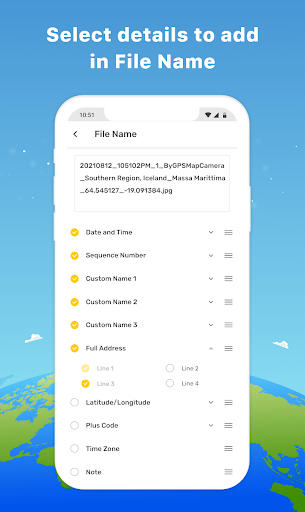
I downloaded this app for work. I needed something that would let me give a custom name to photos quickly without having to go back in and rename. I realized the unpaid version wouldn't allow so I bought the paid version. I soon realized there was no way to take the date code off the name. That very day I wrote to the company and asked for a refund because it didn't fit what I needed. After a week of back and forth, they are denying the refund..... I find this unacceptable and deceiving.

AJ Perry
1.0★
I was using this app for kayaking. I could make the stamp very small in the corner of the picture. With the new update, the GPS stamp is HUGE and the size cannot be changed. 3/4 of the options this app had have vanished. Id normally give it 5 stars. Also, I have taken pictures at known locations and checked the given coordinates on a map. 25% of the time it's dead on, other times it's miles off I ran this concurrent with a similar app that was dead on 100% of the time.

Lee Adams
2.0★
WAY too many ads! I get that ads have to be shown for the author to make money for providing a free app but each and every single time that I take a picture then go to view that picture to make sure it was in focus, I couldn't even get back to my camera to take another picture without some ridiculous full-page ad that I had to click out of just to be able to take another picture. It got really annoying so I uninstalled to find a better app that doesn't do that.

P M
3.0★
It's app does exactly what I was hoping it would. I'm just using the free version I wonder what the pro version would do? UPDATE 8/23. I uninstalled because after several months of using the app, it wouldn't refresh the location/coordinates. I would take pictures and it would give the same location and coordinates for a photo I took about a month earlier. It was like stuck. It took pictures fine, but didn't update the location.

Tri Handoyo
5.0★
I've been using this paid app, and so far I'm quite satisfied. There are a few suggestions, for example, for logos, perhaps there could be an option to enlarge the size. Also, for photos, is there a vignette setting? If you slide it to the right, it darkens, otherwise it becomes white. Oh yeah, the date settings in Indonesian seem to need improvement, for example, if you use Kamis or KAMIS, it's written KAMIs.

Lorraine Hoover
1.0★
Honestly this is as useless as any app can be - the overload of ads for having to use it for 2 minutes and the fact that they advertise their own app in the app. The location just remained at loading on one phone, camera doesn't open on another device, on the iPad it doesn't orient to landscape.
Ad slot: In-Content