

Video Compressor &Video Cutter
com.idea.videocompress
by MobileIdea Studio
Screenshots


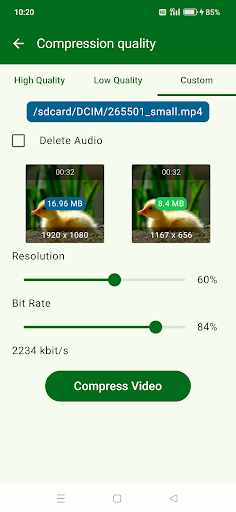


Ad slot: Top Leaderboard
About this app
Quickly compress video, convert to MP4, trim and cut video, extract MP3 audio from video. All without any watermark.
Reduce video size, shrink video, save your device's storage space.
Batch Image Compressor, support quickly batch compress images, save your storage space.
Key Features:
# Compress videos with high/normal/low quality
# Cut and compress video
# Fast forward and compress video
# Video to MP3 converter, can extract MP3 from video file
# Trim and cut videos without quality loss — keep original resolution
# Hardware-accelerated video compression for speed
# Batch compress images
# No watermark on compressed or edited videos
# Easily share compressed videos
# Simple, clean UI — completely free to use
Reduce video size, shrink video, save your device's storage space.
Batch Image Compressor, support quickly batch compress images, save your storage space.
Key Features:
# Compress videos with high/normal/low quality
# Cut and compress video
# Fast forward and compress video
# Video to MP3 converter, can extract MP3 from video file
# Trim and cut videos without quality loss — keep original resolution
# Hardware-accelerated video compression for speed
# Batch compress images
# No watermark on compressed or edited videos
# Easily share compressed videos
# Simple, clean UI — completely free to use
What's New
You can now trim and cut your video at the same time – making it easier to remove unwanted parts and keep only what you love.
App Information
Version Name
1.2.62
Version Code
75
File Size
13.1 MB
Minimum OS
Android 6.0+
Target SDK
Android 33
Developer
MobileIdea Studio
Contact
Website
Content Rating
Everyone
Package Name
com.idea.videocompressPermissions Required
This app may request the following permissions:
Recent Reviews

Peregrine Dalziel
2.0★
Does what it says. And quickly. update. oct 2025 the ability to share compressed files as a batch has been removed since last majoor update. one can no longer "multi select" but must transfer each individual file. real shame, was a great little app and a time saver. it is now faster for me to send the large image files to desktop and batch process them there.

Leila B
1.0★
While this app used to work excellently in the past, recently, when attempting to compress a video, the resolution decreases, but the file size often ends up larger than the original video. I have uninstalled and reinstalled the app multiple times, but the issue persists. I kindly request that you look into resolving this issue promptly. Your attention to this matter would be greatly appreciated. Thank you for your understanding and prompt action on this.

Len Joe
1.0★
Have to lower the rating. This used to be a good app but something happened. Recently when compressing a video the end result was a much larger file and a video that a video player can't play. Seems some videos won't work even as an .MP4 file such as downloaded from ⛳ rival game. I keep getting "error" when opening under this app. If I cut from another app then it works fine.

Hugh Jarvis
1.0★
Was great but lately the custom compression settings don't stick. The frame size is fine, but the bit rate doesn't lock in anymore. You pick 1000 kbit/s and you get a higher value. Sometimes I'm getting values higher than the original video. And the ads are constantly interrupting everything you do. Looking for a new app now ....

A Google user
5.0★
Home run, but not quite a grand slam! Amazing speed- my core2 quad PC takes 30 minutes to compress a video this app will do in 3 minutes! Does not eat my battery while it's working, seems to take very little resources. Very good quality compression, I use custom, original resolution, 10% compression, slams the notoriously-huge Samsung Galaxy S6 camera videos from 250mb down to a reasonable 30mb. Have not tried image compression, will do that next. Also love that after compressing the video, you can delete the original from the app. A couple suggestions: 1. Please allow an option for a 'retain original date' 2. Please allow a few custom presets, easily accessible 3. When you navigate back to your list of videos, the selected sorting method goes back to default, not what was previously selected. 4. Batch encoding of video files Other than that, I'm gaining back precious limited space on my phone! Why the S6 camera doesn't allow for selecting image/video compression values and instead uses a ridiculously high-quality setting is beyond me and is very frustrating. This app now reduces my frustration! Great, efficient, easy to use app. Used a few times, then happily paid for it.

Randy WL
1.0★
Horrible. I have to click away and reload two or three times to make adds go away. After watching the add, there is no X to close the add page. It's just nasty/ annoying. I'm downloading a different one. Tried again and I opened the app six times, each time getting an add that I can't click away..... Even after it fully plays. Total garbage. All the positive views are old ones before it doomed its existence with adds that won't even let you use the app. 😖 DON'T ...just DON'T
Ad slot: In-Content