

8Bit Photo Lab, Retro Effects
com.ilixa.ebp
by Ilixa
Screenshots



Ad slot: Top Leaderboard
About this app
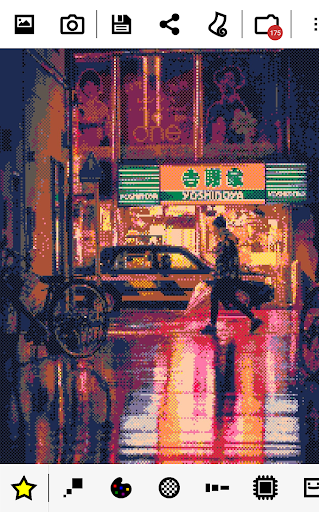
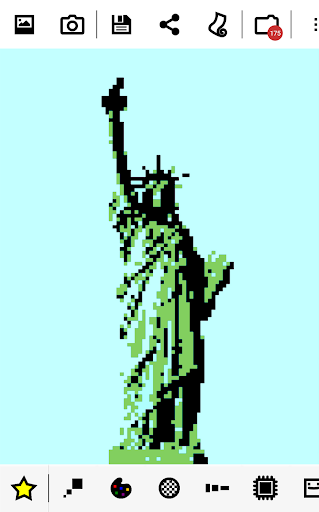
8Bit Photo Lab converts any picture on your phone or straight from your camera to retro 8-bit pixel art!
Choose a picture, scroll through a selection of pre-defined 8-bit filters and immediately review the vintage effect. Save or share the result in just one click!
Features
★ make pixel art, pixelate your photos, create memes, design flashy posters, have fun!
★ choose from over 50 color palettes: GameBoy, GameBoy Advance, NES, TO7/70, Amstrad CPC 6128, Apple II, ZX Spectrum, Commodore 16 & 64, VIC 20, CGA, EGA, Atari ST, Amiga, VGA (256 colors)...
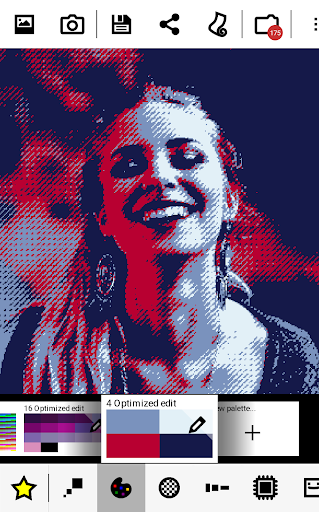
★ custom color palettes with the option to interpolate colors, allowing for duotone effects
★ 15 dithering types: error diffusion, noise, pattern, checkerboard...
★ huge finely selectable resolution range from 8 x 8 to 2048 x 2048
★ multiple pixel aspect ratios and attribute clash modes
★ output styles offer alternatives to regular flat pixels: fuse beads, bricks, puzzle, painted...
★ add retro 8-bit text and glitches
★ tastefully decorate with a selection of 8-bit stickers
★ flick right or left and immediately apply the filter to another picture from your collection!
★ high quality output, up to 4096 x 4096 in PNG
★ optional grid overlay for bead artists and cross-stitchers
The app has two goals: be dead simple to use and powerful enough to produce good-looking and effective results.
The reality of old school graphic conversions is that it can be tricky to get good results in all conditions. Low contrast or greyish images tend to be rendered as a murky mess if a straightforward downsampling is applied. 8Bit Photo Lab has a number of parameters that are key to optimizing the final look of your images. Every pixel counts when dealing with low resolution images.
Usage
Start off with one of the predefined looks (star icon) then mix and match colors, ditherings, resolutions and more until you get the effect you want.
Change a parameter and the result is immediately updated. Browse through multiple looks in an instant!
The three main parameters are resolution, palettes and dithering. Ditherings allow to simulate a larger range of colors than what the limited palette offers. Various options are offered here. Pattern dithering was often seen used in older paint software as well as the user interfaces for many operating systems. Checkerboard dithering was commonly employed in games. Error diffusion, gives the most faithful rendering.
Four parameters adjust color values for each pixel. You'll find familiar brightness, saturation and contrast settings as well as the very useful local contrast setting (also known as unsharp mask). Local contrast is very effective at bringing out detail and allowing to reduce resolution while retaining good subject definition. As an interesting side effect, reducing local contrast produces a soft focus effect which may take your art in another direction altogether. Giving saturation a boost can help make the most of some of the flashy color palettes.
Cropping will allow you to select just the part of your pic that you like. A tiny part of an image can still have enough resolution to be turned to an 8-bit picture. Even if your subject is small there is hope!
Old computers had few colors to play. They also crashed often in weird ways. Use the glitch menu (blender icon) to add mayhem to your pics. Screen melt, pixel scattering, pixel sorting, cellular automaton, block swapping, RGB offsetting, interlacing are on the menu.
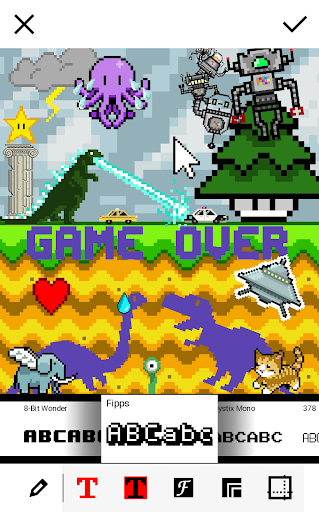
Finally a good old text tool is always useful, whether you're looking to make memes, add a title or a text bubble, the app has a large selection of 8-bit fonts and borders to choose from!
PRO version
Unlocks the following:
★ wallpapers
★ larger range of parameters
★ more ditherings and palettes, including custom palettes
★ extra fonts and borders
★ extra glitches
★ lossless file compression (PNG), higher output resolution (up to 4096 x 4096), 1:1 output resolution
Choose a picture, scroll through a selection of pre-defined 8-bit filters and immediately review the vintage effect. Save or share the result in just one click!
Features
★ make pixel art, pixelate your photos, create memes, design flashy posters, have fun!
★ choose from over 50 color palettes: GameBoy, GameBoy Advance, NES, TO7/70, Amstrad CPC 6128, Apple II, ZX Spectrum, Commodore 16 & 64, VIC 20, CGA, EGA, Atari ST, Amiga, VGA (256 colors)...
★ custom color palettes with the option to interpolate colors, allowing for duotone effects
★ 15 dithering types: error diffusion, noise, pattern, checkerboard...
★ huge finely selectable resolution range from 8 x 8 to 2048 x 2048
★ multiple pixel aspect ratios and attribute clash modes
★ output styles offer alternatives to regular flat pixels: fuse beads, bricks, puzzle, painted...
★ add retro 8-bit text and glitches
★ tastefully decorate with a selection of 8-bit stickers
★ flick right or left and immediately apply the filter to another picture from your collection!
★ high quality output, up to 4096 x 4096 in PNG
★ optional grid overlay for bead artists and cross-stitchers
The app has two goals: be dead simple to use and powerful enough to produce good-looking and effective results.
The reality of old school graphic conversions is that it can be tricky to get good results in all conditions. Low contrast or greyish images tend to be rendered as a murky mess if a straightforward downsampling is applied. 8Bit Photo Lab has a number of parameters that are key to optimizing the final look of your images. Every pixel counts when dealing with low resolution images.
Usage
Start off with one of the predefined looks (star icon) then mix and match colors, ditherings, resolutions and more until you get the effect you want.
Change a parameter and the result is immediately updated. Browse through multiple looks in an instant!
The three main parameters are resolution, palettes and dithering. Ditherings allow to simulate a larger range of colors than what the limited palette offers. Various options are offered here. Pattern dithering was often seen used in older paint software as well as the user interfaces for many operating systems. Checkerboard dithering was commonly employed in games. Error diffusion, gives the most faithful rendering.
Four parameters adjust color values for each pixel. You'll find familiar brightness, saturation and contrast settings as well as the very useful local contrast setting (also known as unsharp mask). Local contrast is very effective at bringing out detail and allowing to reduce resolution while retaining good subject definition. As an interesting side effect, reducing local contrast produces a soft focus effect which may take your art in another direction altogether. Giving saturation a boost can help make the most of some of the flashy color palettes.
Cropping will allow you to select just the part of your pic that you like. A tiny part of an image can still have enough resolution to be turned to an 8-bit picture. Even if your subject is small there is hope!
Old computers had few colors to play. They also crashed often in weird ways. Use the glitch menu (blender icon) to add mayhem to your pics. Screen melt, pixel scattering, pixel sorting, cellular automaton, block swapping, RGB offsetting, interlacing are on the menu.
Finally a good old text tool is always useful, whether you're looking to make memes, add a title or a text bubble, the app has a large selection of 8-bit fonts and borders to choose from!
PRO version
Unlocks the following:
★ wallpapers
★ larger range of parameters
★ more ditherings and palettes, including custom palettes
★ extra fonts and borders
★ extra glitches
★ lossless file compression (PNG), higher output resolution (up to 4096 x 4096), 1:1 output resolution
What's New
Fixed photo orientation on Android 7.0 and above
Fixed grid rendering when output is higher than wide
Fixed grid rendering when output is higher than wide
App Information
Version Name
1.7.3
Version Code
39
File Size
6.9 MB
Minimum OS
Android 4.0+
Target SDK
Android 23
Developer
Ilixa
Contact
Website
Content Rating
Everyone
Package Name
com.ilixa.ebpPermissions Required
This app may request the following permissions:
Recent Reviews

Vincent C
1.0★
I miss this app so much, it's stopped working for new downloads a year or so ago. The other ones made by this company don't do the same things as 8bit and the pro versions cost way more ($50 vs $3), which I wouldn't mind paying if they could deliver like the 8bit app. I'm not sure why, perhaps it was too costly to update it and this company would rather invest in other apps that make more money. But this app was a means for expression and I hate this temporary culture. The product was perfect.

A Google user
5.0★
Admittedly, I'm kind of an image nut already, but to give you some idea of how addictive it is, I've saved so many images from this thing that it's starting to fill up my 32Gb SD card. And there's still a ton of stuff to figure out. As soon as I can remember it during that narrow window of time when I have money in my account, I'm going to upgrade to pro. Gold pro, in fact. And if they come up with versions made out of better, brighter, gaudier, more imageworthy metals, I'll probably buy them. If there ARE any metals like that. Are there? And when my brain is all whacked out from working with images, or if I don't have anything more important to do (or even if I do), I'll just take an image and start tapping the "random" button, just to see what happens, and save the best of the output. And so far, the ONLY flaw I've encountered (and maybe I just haven't found the right way to do it) is that when I'm hitting the random button, if I go too fast and pass up an image I decide I want to save, there's no way to back up one step. Instead of going back to the previous group of settings, the back button takes me out of random mode and the previous settings are lost. This is important because, as much as I hate to admit it, the random algorithm generates output at least as good, and often much better, than anything my brain has created yet. So saving the output is about more than just filling up my SD card. It's about saving settings for future reference. Show me a solution to that and I'll love you forever.
A Google user
5.0★
Simple to use, but not restrictive. The interface allows both quick presets to apply and allows intricate in-depth customization of filters. It's a powerful application and surprisingly robust for what I've come to expect from mobile photo editing apps. Some menus can be a pain to navigate but it's never frustrating. Images can only be saved as jpgs (a poorly suited file type for most images you'll be creating) as well, but it seems to be possible to export as different file types in the pro version. Despite these minor shortcomings, it's still easily worth a download.

shane pollard
1.0★
Like others, I paid for the pro version and now the app seems to have been abandoned. The other apps by the dev have not. Functionally of this app appears to have been incorporated to one of the other apps for a subscription, or one time purchase of $50. But I already paid for this app. The worst part is no communication from the developer. A credit towards the new app would be awesome. But at the same time, who knows when future "purchases" would simply disappear. Unfortunate.

John Bobson
1.0★
Tons of fun! Worth every penny. I've owned the pro version of this app for probably over 5 years now and it's a blast to play around with. I will say that the features available in the free version are very limited; however, the pro version is a one time purchase and if you're a loser nerd like me you'll absolutely get your money's worth Edit: The app now gives an error when I try to install! Please fix 🥺

ethan lacasse
5.0★
Lol i actually was a little annoyed at first because all the features i cared about were behind a paywall... But i caved and paid, and I'm actually really impressed by just how much you can do in this app. I created some really tiny (less than 10kb) converted artworks from tarot cards, and the amount of detail I'm able to preserve is actually incredible. Lots of cool glitch art/datamosh style effects that feel really faithful and realistic, too.
Ad slot: In-Content