
Soccer Tactic Board
com.jenda.footballboard
by Jan Soukup
Screenshots


Ad slot: Top Leaderboard
About this app
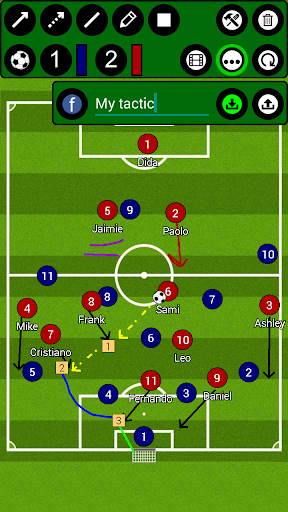
Football Tactic Board, allows you to create your own tactics for every match situation, for FREE and NO REGISTRATIONS nor payments are needed for more advanced tools ;). Intuitive UI, simple, quick using.
Video Manuals here:
https://drive.google.com/drive/folders/1w66zK4uM23tQ9rrOQpkoOJPHZTydqIeG?usp=sharing
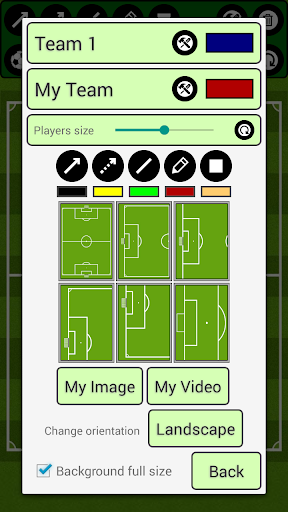
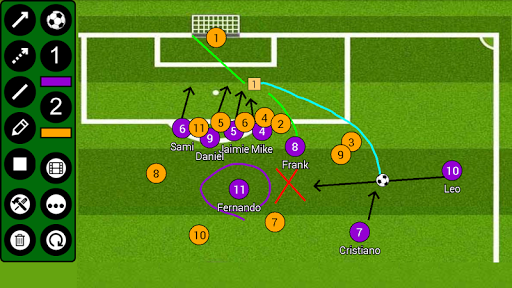
You can change the field, to six different options. Full field view, Half field view, Freekicks left, right, straight and of course penalty!
FTB provides you seven tools! Rectangle with number inside! Sipmle Line, Arrow, Dotted arrow, Pen, Text and Area! Everything you need to create your tactic!
Save your tactics into one frame, or do frame by frame ANIMATION, for more advanced tactics! You can set animation speed to make it simply the BEST.
You can analyse your own photos and your own videos!
Create your teams and players!
***manual on bottom of the page***
FTB allows you several ways to share tactic or animation with others!
- for tactic - you can do photo of your tactic or you can export it into file
- for animation - you can export it into file
This file can be easily imported into app on any other device ;)
***manual on bottom of the page***
Simply remove objects, if you want to rework your tactic, with remove function! Or you can reset everything with just one click!
Create football tactics
/*More field options*/
*Full field
*Half field
*Freekicks
*Corners
*Penalties
/*Tools*/
*Arrow
*Dotted arrow
*Line
*Rectangle
*Pen
*Text
*Area
*Delete
/*Useful features*/
*Change players size
*Save tactics
*Export/Import tactics and animations
*Frame by frame animation
*Portrait/Landscape mode
***HOW TO ADD YOUR TEAM***
Go to edit window (top right tools button), click on team1/team2 edit button on the right of team, add new team and players. Then select this team by clicking on it.
***HOW TO EXPORT TACTIC / ANIMATION***
Go to tactic / animation loading window, on the bottom click on EXPORT, and then click on the tactic / animation which you want to be exported.
Tactics are then exported to your device to folder /FootballBoard/Tactics
Animations to /FootballBoard/Animations
Now you can send them to others and they can import them ;)
***HOW TO IMPORT TACTIC / ANIMATION***
Copy tactic / animation file to your device folder
- tactic to /FootballBoard/Import/Tactics
- animation to /FootballBoard/Import/Animations
(if this folder doesnt exists - Go to tactic / animation loading window, on the bottom click on IMPORT and folders will be created)
Now you have tactic / animation in right folder, so now it is very simple:
Go to tactic / animation loading window, on the bottom click on IMPORT
In import window, there are shown tactics / animations which are copied in import folder
and now you just click on the tactic / animation which you want to be imported.
Video Manuals here:
https://drive.google.com/drive/folders/1w66zK4uM23tQ9rrOQpkoOJPHZTydqIeG?usp=sharing
You can change the field, to six different options. Full field view, Half field view, Freekicks left, right, straight and of course penalty!
FTB provides you seven tools! Rectangle with number inside! Sipmle Line, Arrow, Dotted arrow, Pen, Text and Area! Everything you need to create your tactic!
Save your tactics into one frame, or do frame by frame ANIMATION, for more advanced tactics! You can set animation speed to make it simply the BEST.
You can analyse your own photos and your own videos!
Create your teams and players!
***manual on bottom of the page***
FTB allows you several ways to share tactic or animation with others!
- for tactic - you can do photo of your tactic or you can export it into file
- for animation - you can export it into file
This file can be easily imported into app on any other device ;)
***manual on bottom of the page***
Simply remove objects, if you want to rework your tactic, with remove function! Or you can reset everything with just one click!
Create football tactics
/*More field options*/
*Full field
*Half field
*Freekicks
*Corners
*Penalties
/*Tools*/
*Arrow
*Dotted arrow
*Line
*Rectangle
*Pen
*Text
*Area
*Delete
/*Useful features*/
*Change players size
*Save tactics
*Export/Import tactics and animations
*Frame by frame animation
*Portrait/Landscape mode
***HOW TO ADD YOUR TEAM***
Go to edit window (top right tools button), click on team1/team2 edit button on the right of team, add new team and players. Then select this team by clicking on it.
***HOW TO EXPORT TACTIC / ANIMATION***
Go to tactic / animation loading window, on the bottom click on EXPORT, and then click on the tactic / animation which you want to be exported.
Tactics are then exported to your device to folder /FootballBoard/Tactics
Animations to /FootballBoard/Animations
Now you can send them to others and they can import them ;)
***HOW TO IMPORT TACTIC / ANIMATION***
Copy tactic / animation file to your device folder
- tactic to /FootballBoard/Import/Tactics
- animation to /FootballBoard/Import/Animations
(if this folder doesnt exists - Go to tactic / animation loading window, on the bottom click on IMPORT and folders will be created)
Now you have tactic / animation in right folder, so now it is very simple:
Go to tactic / animation loading window, on the bottom click on IMPORT
In import window, there are shown tactics / animations which are copied in import folder
and now you just click on the tactic / animation which you want to be imported.
What's New
Android 13 repair export permission bug.
App Information
Version Name
5.4.3
Version Code
40
File Size
44.6 MB
Minimum OS
Android 4.4+
Target SDK
Android 33
Developer
Jan Soukup
Contact
Website
Content Rating
Everyone
Package Name
com.jenda.footballboardPermissions Required
This app may request the following permissions:
Recent Reviews

Adam Corkett
4.0★
The app has some great features, like animation and save locally. Would be better with a slightly more intuitive interface, maybe dbl tap items to bring up context menu. More than one ball at a time and a few more basic shapes please. The best one I have used so far. And is free to use. Advertisements aren't too in your face either. Would be great with screen share to a client app e.g. That players can use

A Google user
4.0★
Decent app and fairly intuitive, could maybe do with a few more features. I'd like to be able to place more than one actual football and maybe permanently use my own background image, button labels wouldn't go a miss either. Overall its good, particularly for a free app. One negative is I use it on my phone which makes it a little bit clunky but still works fine. I also agree with another reviewer about the lack of an undo button.

Jason Nuneski
4.0★
Great app and easy to use. Only issue is that i am having trouble with saving the videos, I cannot find the folder that is mentioned in the tutorial and no message comes up to say it has been saved (photos save to gallery without issue). Goes through the process as per the demo video but cannot locate the file. Resorting to screen recording to share clips at the moment. Grateful for help! Thanks :)

Ruach De Vos
4.0★
It has what I was looking for in a soccer tactical app. The reason I did not give it the final 5 star rating is because a 5 star, in my opinion, is exceedingly abundantly above expectation. A little more imagination or creativity could make it more exceptional. Other than that, it is a very good and enjoyable app. Keep up the good work!
A Google user
4.0★
Looks great from my use so far! Would be even better if when you enter your team players, you can drag and drop them in the player list? Currently the order you add them in, is the order they 'pop up' when you select players on the pitch for a tactic .... would be good to either select the players your want, or re-order your squad list easily to help with above selection?

Abs Sam
5.0★
Absolutely amazing app. Been using this for a'couple of years now. Very useful for drawing Tactical phase animations (too see how things play out before a session). I mainly use it to show animations to individuals or the mid/ defence block on how i want the players to behave in or out of possession (as a visual aid supplememt to what was practiced on the field). Good for match days to draw up animations on the fly during the first half to show to the subs. Overall a very good tool to have.
Ad slot: In-Content