

Magnifier Camera (Magnifying G
com.jkfantasy.camera.jkpmagnifiercamera
by JK.Fantasy
Screenshots



Ad slot: Top Leaderboard
About this app
Please watch the teach video to know how to use it.
Magnifier + Flashlight (best lighted magnifying glass app for free)
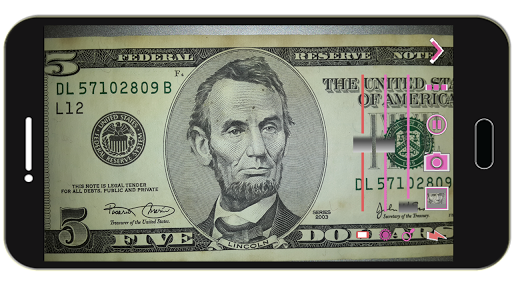
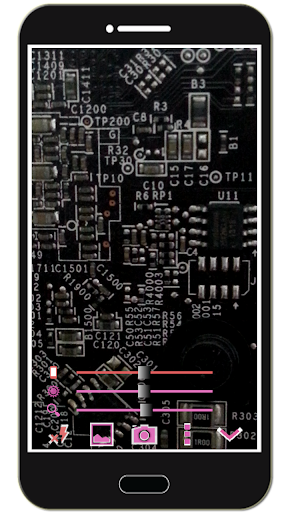
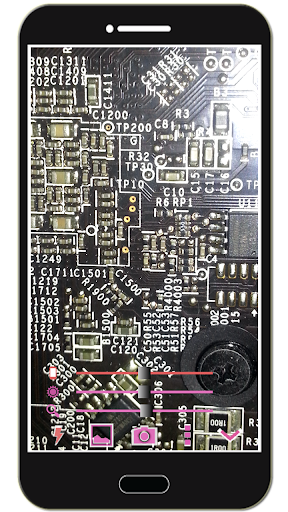
Let your phone become a perfect smart magnifier or smart microscope.
Handy!
Easy to see small text.
Open flashlight when start APP.
You can also use it as a simple version of the skin quality check device. (Skin detector)
[Quick Magnifier Camera Guideline]
When you start camera, the APP will set the magnifier zoom to middle value. You can drag zoom seek bar to let magnifier zoom in/out. (Or use two fingers to let magnifier zoom in/out)
When you start camera, the APP will auto detect the micro focus mode. If it exist, the APP will auto set to micro focus mode. If it doesn't exist, the APP will set to auto focus mode.
You can use the following method to change other settings:
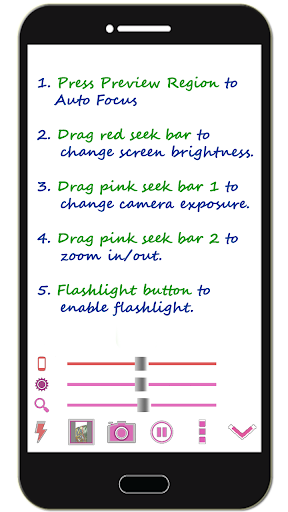
1. Press preview Region to focus.
2. Drag red seek bar to change screen brightness.
3. Drag pink seek bar 1 to change camera exposure.
4. Drag pink seek bar 2 to let magnifier zoom in/out. (Or use two fingers to let magnifier zoom in/out on preview screen)
5. Press the flashlight button to enable flashlight.
6. Press the pause/resume button to pause/resume preview. (freeze image) Then double click the freeze image to let magnifier zoom in/out. (Or two fingers to let magnifier zoom in/out)
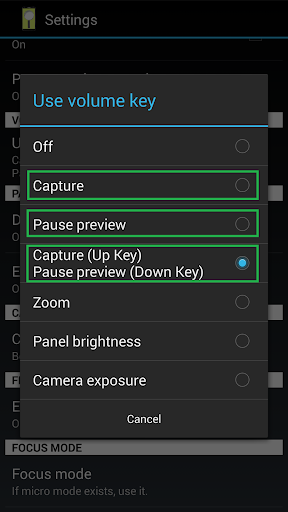
7. [Volume Key] : Use volume-down key to pause/resume preview. (freeze image) Use volume-up key to do camera capture. You can change other option in the camera settings page.
[Others]
1. You also can take a picture if you wish.
2. When focus, the focus area of the image please select the best color change much. If you click on the region are biased in favor of a single color, it is not very good focus. In addition, the lens remains clear, wipe clean the glass will be better focus. And turn on the flashlight also can get a better focus.
3. When camera focus, please don't let the camera's lens be too close to an object. It may be unable to focus. (According to the camera's focal length will vary)
【Recommended External Photo Editor】
( Line Camera )
https://play.google.com/store/apps/details?id=jp.naver.linecamera.android
This APP is now tested more compatible. They support external photo edit more user friendly.
Or you can use system photo editor, it also work. (Test on Samsung Phones.)
【PS】
Please like us on Facebook. Give us the power of love.
https://www.facebook.com/jkfantasy
Magnifier + Flashlight (best lighted magnifying glass app for free)
Let your phone become a perfect smart magnifier or smart microscope.
Handy!
Easy to see small text.
Open flashlight when start APP.
You can also use it as a simple version of the skin quality check device. (Skin detector)
[Quick Magnifier Camera Guideline]
When you start camera, the APP will set the magnifier zoom to middle value. You can drag zoom seek bar to let magnifier zoom in/out. (Or use two fingers to let magnifier zoom in/out)
When you start camera, the APP will auto detect the micro focus mode. If it exist, the APP will auto set to micro focus mode. If it doesn't exist, the APP will set to auto focus mode.
You can use the following method to change other settings:
1. Press preview Region to focus.
2. Drag red seek bar to change screen brightness.
3. Drag pink seek bar 1 to change camera exposure.
4. Drag pink seek bar 2 to let magnifier zoom in/out. (Or use two fingers to let magnifier zoom in/out on preview screen)
5. Press the flashlight button to enable flashlight.
6. Press the pause/resume button to pause/resume preview. (freeze image) Then double click the freeze image to let magnifier zoom in/out. (Or two fingers to let magnifier zoom in/out)
7. [Volume Key] : Use volume-down key to pause/resume preview. (freeze image) Use volume-up key to do camera capture. You can change other option in the camera settings page.
[Others]
1. You also can take a picture if you wish.
2. When focus, the focus area of the image please select the best color change much. If you click on the region are biased in favor of a single color, it is not very good focus. In addition, the lens remains clear, wipe clean the glass will be better focus. And turn on the flashlight also can get a better focus.
3. When camera focus, please don't let the camera's lens be too close to an object. It may be unable to focus. (According to the camera's focal length will vary)
【Recommended External Photo Editor】
( Line Camera )
https://play.google.com/store/apps/details?id=jp.naver.linecamera.android
This APP is now tested more compatible. They support external photo edit more user friendly.
Or you can use system photo editor, it also work. (Test on Samsung Phones.)
【PS】
Please like us on Facebook. Give us the power of love.
https://www.facebook.com/jkfantasy
What's New
V1.6.0:
1. Minor bugs fixed.
2. Change focus mode default setting from "use macro mode" to "do not use macro mode". (To avoid some phones focus failed) Use auto-focus.
1. Minor bugs fixed.
2. Change focus mode default setting from "use macro mode" to "do not use macro mode". (To avoid some phones focus failed) Use auto-focus.
App Information
Version Name
1.3.2
Version Code
32
File Size
2.7 MB
Minimum OS
Android 4.0+
Target SDK
Android 21
Developer
JK.Fantasy
Contact
Website
Content Rating
Everyone
Package Name
com.jkfantasy.camera.jkpmagnifiercameraPermissions Required
This app may request the following permissions:
Recent Reviews

J W
4.0★
This is *almost* the perfect magnifier app. It certainly seems to have the most detail with the least amount of tweaking of the many others I have tried. The pictures it takes are also crisp and clear - even with a shaky hand! There are a few things I wish could be changed however. Like the ability to set a defaults (zoom level, flash, exposure level, etc) at app startup. And the ability to touch and drag anywhere on the screen for zoom or exposure. Other than that... Great app!!

Clifford Lloyd
5.0★
This app is fantastic when it comes to details, I use this magnifier camera to take picture of some of my coins, I am totally amazed but i do have a major issue that is probably with my lack of just knowing. Where do i find the picture that i take with this app. I am using a Samsung galaxy S10, after i topk the pictures i was able to look at i then went on to take 5 more but the just disappear and i need to use them. Can anyone tell me where to look, their not in photos or gallery??????

A Google user
4.0★
For the purpose I needed a macro shot taken, this app was excellent! 👌😁 - For those who complained about it to not focus properly; Just adjust the distance and tilt the camera slightly meanwhile you adjust the slider settings of screen brightness, light and zoom and you'll end up with a great macro shot! So... Please stop the ridiculous whining that makes you sound like a spoiled brat, because it literally took me less than a minute to figure it out and get the shot I needed! If you are in to macro photos and aren't happy with the macro photo apps that exists so far in the app stores, get a decent camera to play with instead! And just to clarify... That's just MY opinion, so no need to get triggered or whatever it's called these days! ~ Cheers!

Sam Stone
5.0★
I've had a terrible time getting good photos of coins. Maybe I can focus with one, but quarters always look dark gray, or new dimes look almost white, etc. My stoopid native phone camera has 4 lenses and a zillion pixels but is worthless for my purpose (which was exactly why I bought it instead of a different fone). This Camara app let's me take advantage of the pixels, focus, and very little manuevering to get the right light and color. Highly recommend.

dav ep
5.0★
Provisional rating. How do I focus w/o moving the object/phone? Or focus at all? tl;dr Can't the camera autofocus on text? That's 97.3% of what I'll be using it for. Regardless, using the distance to the object to increase/decrease the mag, while staying in focus would be cool and well worth paying for. Yeah, ima lazy mofo, but there isn't a man page :-{(=. So all this may be possible.

Mach Fiver
5.0★
This app is as close 2 perfect as possible. It functions better than any stock cam app. Taking macro or normal pictures. I rarely need to do any post filtering or editing other than cropping my shots. And as for the way it pushes ads in a more passive unforced way. I don't hate the app I'm shown. And often check them out. Just wish I could take a pic via a tap anywhere on the screen. Blind aiming for the button while focusing on holding steady is hard. Love this app tons
Ad slot: In-Content