

Mirror Camera (Mirror + Selfi
com.jkfantasy.camera.jkpmirrorcamera
by JK.Fantasy
Screenshots
Ad slot: Top Leaderboard
About this app
Please watch the teach video to know how to use it.
[ Tommorow, I will meet ... me ... yesterday. ]
Mirror + Selfie Camera (best mirror app for free)
Let your phone become a perfect smart mirror.
Handy!
Press mirror region to show/hide menu.
[Quick Mirror Camera Guideline]
When application start, it will hide all the menu. So it is really like a mirror.
You can use the following method to change other settings:
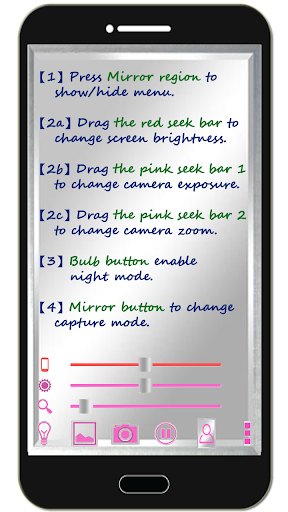
1. Press Mirror region to show/hide menu.
2. Drag the red seek bar to change screen brightness.
3. Drag the pink seek bar 1 to change camera exposure.
4. Drag the pink seek bar 2 to let mirror zoom in/out.
5. Press bulb button enable/disable night mode.
6. Press mirror button to change capture mode. (Capture with "Image on Mirror" or "Your real Image")
7. Press the pause/resume button to pause/resume preview. (freeze image) Then double click the freeze image to let mirror zoom in/out. (Or use two fingers to let mirror zoom in/out)
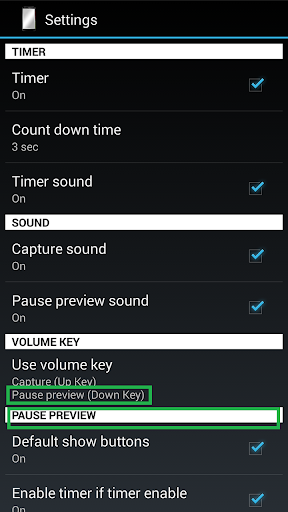
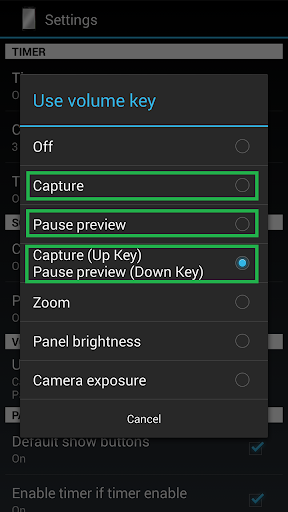
8. [Volume Key] : Use volume-down key to pause/resume preview. (freeze image) Use volume-up key to do camera capture. You can change other option in the camera settings page.
[Others]
1. You also can take a picture or edit mirror photo image if you wish.
2. Night mode : Press the bulb button, use panel light at the edge of panel.
3. This application will not turn off screen when you use Camera. If user not touch the screen for 10 minutes, this application will auto exit to prevent power loss.
【Recommended External Mirror Image Photo Editor】
( Line Camera )
https://play.google.com/store/apps/details?id=jp.naver.linecamera.android
This APP is now tested more compatible. They support external photo edit more user friendly.
Or you can use system photo editor, it also work. (Test on Samsung Phones.)
【PS】
Please like us on Facebook. Give us the power of love.
https://www.facebook.com/jkfantasy
[ Tommorow, I will meet ... me ... yesterday. ]
Mirror + Selfie Camera (best mirror app for free)
Let your phone become a perfect smart mirror.
Handy!
Press mirror region to show/hide menu.
[Quick Mirror Camera Guideline]
When application start, it will hide all the menu. So it is really like a mirror.
You can use the following method to change other settings:
1. Press Mirror region to show/hide menu.
2. Drag the red seek bar to change screen brightness.
3. Drag the pink seek bar 1 to change camera exposure.
4. Drag the pink seek bar 2 to let mirror zoom in/out.
5. Press bulb button enable/disable night mode.
6. Press mirror button to change capture mode. (Capture with "Image on Mirror" or "Your real Image")
7. Press the pause/resume button to pause/resume preview. (freeze image) Then double click the freeze image to let mirror zoom in/out. (Or use two fingers to let mirror zoom in/out)
8. [Volume Key] : Use volume-down key to pause/resume preview. (freeze image) Use volume-up key to do camera capture. You can change other option in the camera settings page.
[Others]
1. You also can take a picture or edit mirror photo image if you wish.
2. Night mode : Press the bulb button, use panel light at the edge of panel.
3. This application will not turn off screen when you use Camera. If user not touch the screen for 10 minutes, this application will auto exit to prevent power loss.
【Recommended External Mirror Image Photo Editor】
( Line Camera )
https://play.google.com/store/apps/details?id=jp.naver.linecamera.android
This APP is now tested more compatible. They support external photo edit more user friendly.
Or you can use system photo editor, it also work. (Test on Samsung Phones.)
【PS】
Please like us on Facebook. Give us the power of love.
https://www.facebook.com/jkfantasy
What's New
V1.6.0:
1. Minor bugs fixed.
1. Minor bugs fixed.
App Information
Version Name
1.6.0c
Version Code
60
File Size
2.9 MB
Minimum OS
Android 4.0+
Target SDK
Android 28
Developer
JK.Fantasy
Contact
Website
Content Rating
Everyone
Package Name
com.jkfantasy.camera.jkpmirrorcameraPermissions Required
This app may request the following permissions:
Recent Reviews

Nathaly Medina
4.0★
Works well and has nice features like brightness and zoom which are very useful :) though it would also be great if they added a video feature. Camera quality is alright but could be better. I don't think it's my phone's camera since comparing the pictures they do vary a little in quality. Nothing too bad though. We should also have the option to tap to focus bc it becomes unfocused a lot.

Sarah Smile
5.0★
This app rocks! I've tried many many mirror apps and I have to say this one beats all of them by far! It works like a real mirror on top of all of it......it also has a flashlight option so to speak and you can see yourself very well even at night time. The other thing I love about it is the zoom it has also it has where u can adjust the brightness etc. All around I love! It's also a camera! Thank you whomever created this app I have it installed on all my devices and use it quite often.

Excel U
3.0★
A lost star for two reasons: the quality of photos is significantly reduced as apposed to the stock selfie camera, and the power consumption of the app is off the charts, but it does what it says! if these problems are resolved, you are looking at a 5 star app!

Ana Cruz Nazario
5.0★
Perfect I love ILet phone become a best mirror. Handy! Press mirror region to show/hide menu. Please watch the teach video to know how to use it. Tommorow, I will meet ... me ... yesterday. Mirror + Selfie Camera (best mirror app for fre Let your phone become a perfect smart mirror. Press mirror region to show/hide menu. Quick Mirror Camera Guideline When application start, it will hide all the menu. So it is really like a mirror. You can use the following method to change

AYANDA OPEYEMI
5.0★
It's been an Amazing App for me Personally without cause for Alarm it has been giving me a clear n sharp pictures so far i position myself well. More Grease to your Elbow.. Plz keep it up and your Sky has no Limit...

Joshua Davison
1.0★
Caused my phone to get Class 0 message scams, do not download it and let it access your files. I know it's this app because the last time I downloaded an app was around a year ago and only until now when I downloaded this app did I start to get these class 0 messages.
Ad slot: In-Content