

GPS Map Camera
com.jkfantasy.gpsmapcamera
by JK.Fantasy
Screenshots

Ad slot: Top Leaderboard
About this app
Please watch the teach video to know how to use it.
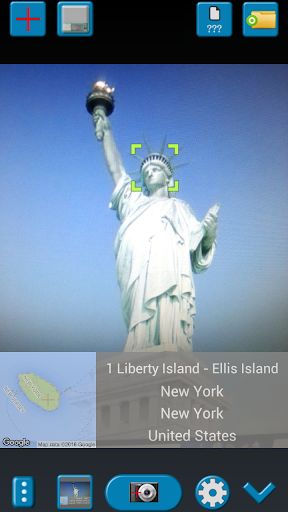
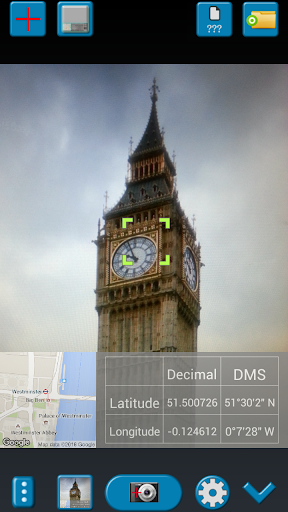
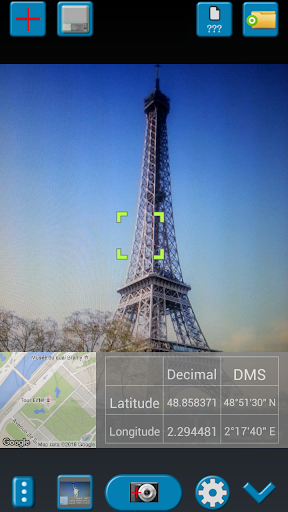
When you take a picture, this application will paste the map, address, weather and date to picture. (GPS latitude/longitude information also could be included)
This application is easy to get/set GPS location and GPS coordination for GPS Tag request.
[Quick GPS Map Camera Guideline]
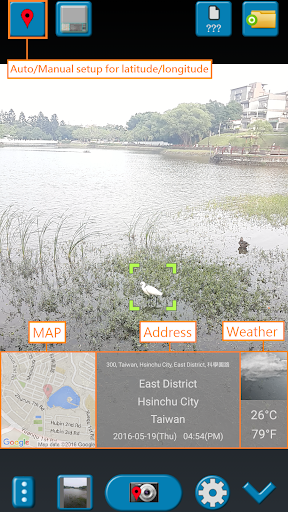
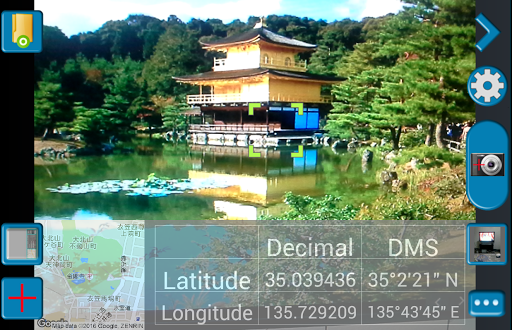
When GPS Map Camera start, map/address/weather will be displayed on the camera preview. You can check the location/coordination before camera capture.
If you want to fine tune the location, manually setup the latitude and longitude also supported. (left-top button)
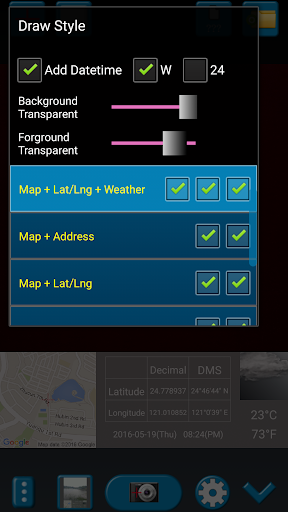
Support some drawing styles for map/address/weather/date. (left-top second button)
Support a variety of file-name formats to help you arrange your photos. (right-top second button)
You can change the picture save folder for help arrange photos. (right-top button)
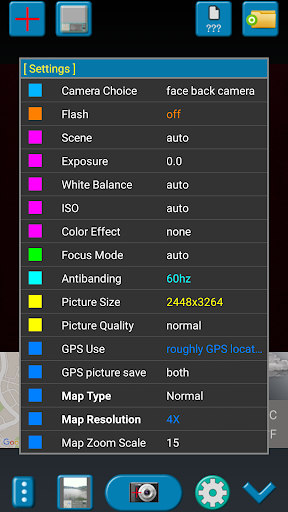
In the camera setting page, the similar functions will be grouped with the same color.
- Camera Choice
- Flash
- Scene/Exposure/White Balance/ISO/Color Effect
- Focus Mode
- Anti-banding
- Picture Size/Picture Quality
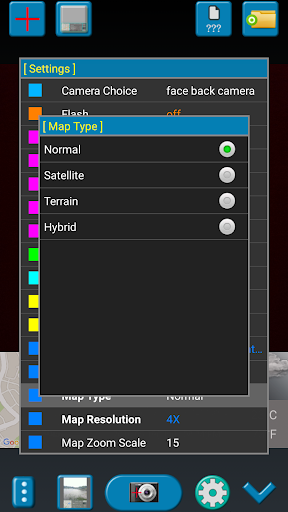
- GPS Use/GPS picture save/Mp Type/Map Resolution/Map Zoom Scale/Map Size
- Photo Viewer
- Sound
- Prompt Dialog
The color of function string is white as default. If change to another function, the color will change to grouped color. It's better to recognize what you set.
[Others]
- Camera focus and zoom operation when preview:
Focus: use one finger to touch the screen.
Zoom: use two fingers to zoom in/out.
[Tips]
- Don't want to get MAP:
Settings -> GPS picture save -> one (original)
- Don't want to save GPS position:
Settings -> GPS Use -> disable GPS
- Don't want to popup prompt dialog:
Settings -> Prompt Dialog -> disable
【Final】
Thank you for use and watch! Hope this app is helpful for you.
When you take a picture, this application will paste the map, address, weather and date to picture. (GPS latitude/longitude information also could be included)
This application is easy to get/set GPS location and GPS coordination for GPS Tag request.
[Quick GPS Map Camera Guideline]
When GPS Map Camera start, map/address/weather will be displayed on the camera preview. You can check the location/coordination before camera capture.
If you want to fine tune the location, manually setup the latitude and longitude also supported. (left-top button)
Support some drawing styles for map/address/weather/date. (left-top second button)
Support a variety of file-name formats to help you arrange your photos. (right-top second button)
You can change the picture save folder for help arrange photos. (right-top button)
In the camera setting page, the similar functions will be grouped with the same color.
- Camera Choice
- Flash
- Scene/Exposure/White Balance/ISO/Color Effect
- Focus Mode
- Anti-banding
- Picture Size/Picture Quality
- GPS Use/GPS picture save/Mp Type/Map Resolution/Map Zoom Scale/Map Size
- Photo Viewer
- Sound
- Prompt Dialog
The color of function string is white as default. If change to another function, the color will change to grouped color. It's better to recognize what you set.
[Others]
- Camera focus and zoom operation when preview:
Focus: use one finger to touch the screen.
Zoom: use two fingers to zoom in/out.
[Tips]
- Don't want to get MAP:
Settings -> GPS picture save -> one (original)
- Don't want to save GPS position:
Settings -> GPS Use -> disable GPS
- Don't want to popup prompt dialog:
Settings -> Prompt Dialog -> disable
【Final】
Thank you for use and watch! Hope this app is helpful for you.
What's New
V1.8.2:
1. Minor bugs fixed.
1. Minor bugs fixed.
App Information
Version Name
1.8.2
Version Code
94
File Size
3.6 MB
Minimum OS
Android 4.0+
Target SDK
Android 28
Developer
JK.Fantasy
Contact
Website
Content Rating
Everyone
Package Name
com.jkfantasy.gpsmapcameraPermissions Required
This app may request the following permissions:
Recent Reviews

Lee Adams
3.0★
It provides a pretty accurate stamping on the pic w/the date & time + your geographical location. It's perfect for food delivery people or instacart shoppers who drop off orders at people's doors. EDIT: had to drop to 3 stars. When deleting pics, it keeps reverting back to the very last pic that was taken which is very annoying when I'm trying to delete pics that were taken a lot earlier. I emailed the developer in hopes that he fixes the glitch. If he does then I will go back to five stars.

A Google user
3.0★
This application is a good start on a good idea. However I have several complaints that make the application less than ideal. First, most modern cell phones have a compass. Despite this the compass information is not included in the labeling options or in the EXIF meta-data. Second, there is no indication of ongoing GPS accuracy. I would be willing to wait while the GPS got a better location... but there is no indication of GPS progress on the screen... While the app is clearly worth $5, the developer has chosen to have a $2 "subscription". While I might consider a $2 year subscription option.. I would rather just pay $5 or even $10 and be done. I hate hate hate recurring charges that I forget about and I dislike business models that rely on them... Beyond that, the "take photo button" is a freaky app logo. Instead of just a red button. For some reason.. the photo also take a few seconds to take.. confused as to why this would be slow. Also, there is no reason why the app needs real-time internet connection. By taking the GPS and compass readings and photos.. it could just "wait for internet to come back" in order to download the map, address and weather data.
A Google user
5.0★
Brilliant ! Well done. I installed and uninstalled 3 other supposed GPS tagging apps before I found this one. This one actually works and is not too advertisement heavy. FEATURE SUGGESTION : An audio queue when the automatic GPS location lat/long info refreshes so that the user can know if the tag data is correct. This will be especially useful when moving and slow GPS updates provide outdated location . Thank you !

Andrew Francis
4.0★
This is a very good app and would be excellent but for one specific flaw (later). My favourite feature of this app is that you can build a customisable file name for each photograph. It is beyond my knowledge how to extract metadata from such files into a spreadsheet but I am able to pull them out of a filename using Excel to create a list of files in a folder and extract the locational, date, time, serial number and project data. I can then pass it to the online Excel to KML converter to make make Google Earth files showing you where every pin is. I love the custom views with maps, coordinates and weather information, the street view option and potential to navigate to a photograph's location. What I am finding very unfortunate however is that even with GPS Use > "Good GPS Location" option selected the app doesn't force you to wait for a good GPS fix. Testing on landmarks with known positions indicates that the app finds a good gps location just AFTER I have taken a picture, keeps hold of it and uses it for the next picture I take! Accuracy is therefore a function of how patient I am and how far I am from the last place I took a photo. If I want to catalog lots of things I'm in a hurry and really want to know how long I need to wait. I gather that a look at the map can be informative but if you're in the wild away from streets there are usually no landmarks to gauge your accuracy. I don't know how phone apps estimate uncertainty in location but I think either this doesn't enforce a good GPS location at all or that its standards are not so stringent as I would like. I gather that there is a trade off in time and accuracy - perhaps using more options (moderate, good, very good, excellent) with some quantification of rough scale of accuracy for each would help? Alternatively perhaps it could show your locational uncertainty and you can take the photo when it falls to within your threshold? 10 metres would be sufficient for me and most phones are now capable of 3m accuracy in open country. As it is I would recommend switching between this app and a GPS app that shows a circular estimate of inaccuracy (e.g. What 3 words or Maps.me) and waiting for location to settle down before taking a photo. It would be even better if this app waited and did it all - this would make this app by far the best of its type that I have seen.

Mariah
4.0★
Useful but takes too long to open and for the address to load. Sometimes the flash doesn't work the first time and I have to take the picture the second time. I really like that it saves a version of the picture both with and without the address because sometimes the address is incorrect and I have to upload the pictures to a food delivery app for the customer to see.
A Google user
5.0★
Excellent tool for adding meta-data to photos. I really like the ease of use and it works well for me on my Galaxy Note 9. Adding options perhaps to indicate the direction of the photo on the map might be really cool. Add an arc showing where the photo is taken in relation to where I am standing.
Ad slot: In-Content