

MultiTimer: Stopwatch & Timer+
com.jupiterapps.stopwatch
by Jupiter Apps
Screenshots




Ad slot: Top Leaderboard
About this app
⏱️ MULTITIMER: STOPWATCH & TIMER+
Multiple timers and stopwatches in one powerful multitimer app — with groups, presets, laps, floating mode, and full customization to fit any task or routine.
✨ WHY MULTITIMER: STOPWATCH & TIMER+?
Stopwatch & Timer+ is more than just a basic stopwatch or single countdown timer. It’s a full multitimer system that lets you:
✅ Run multiple stopwatches and timers simultaneously
✅ Organize them into groups for different situations (home, work, fitness)
✅ Save presets so you never have to set them up twice
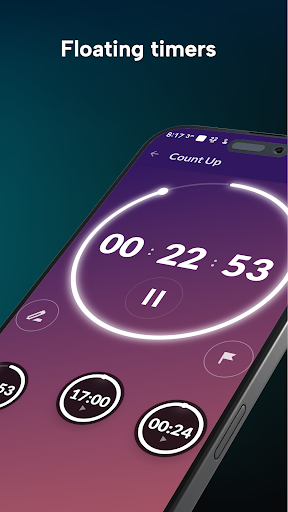
✅ Float timers over other apps so you never lose track of time
Whether you’re cooking, working, studying, training, or relaxing, Stopwatch & Timer+ adapts to your needs — simple enough for everyday use, powerful enough for advanced routines.
🔥 KEY FEATURES
⏳ Core Timing Tools
✅ Run multiple stopwatches and timers at once (up to 99 hours)
✅ Loop countdowns & repeat modes
✅ Chain timers (auto-start the next)
✅ Countdown then up mode
⚙️ Smart Controls
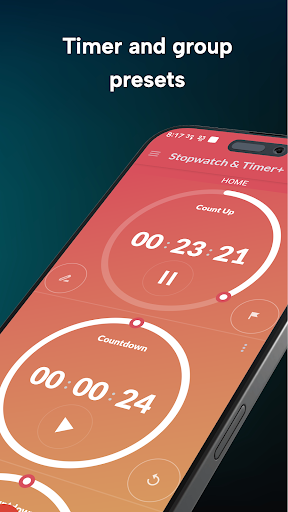
✅ Create groups of timers and control them together — start, stop, or reset all at once
✅ Use groups for different sets of tasks or situations:
✅ At home — cooking, laundry, cleaning
✅ At work — tasks, meetings, lunch breaks
✅ Sports & fitness — workouts, intervals, team drills
✅ Rename, reorder, and delete timers easily
✅ Swipe between groups for effortless organization
✅ Export results by email
📋 Timer & Group Presets
✅ Save presets for individual timers or entire groups
✅ Presets store everything: name, mode (repeat, countdown then up, or start next), alarm sound, and alarm duration
✅ Group presets let you recall entire sets of timers with one tap
✅ Why presets matter: perfect for routines you use often — e.g. a workout circuit, a cooking recipe, or a daily work schedule. No need to set up timers again and again — just load the preset and go.
🏁 Lap & Precision Tools
✅ Track laps with optional 1/100th second accuracy
✅ Rename laps for clarity (e.g. “Warm-up,” “Sprint,” “Cooldown”)
🔔 Alarms & Notifications
✅ Set individual alarm sounds for each timer
✅ Optional vibration alerts
✅ Choose alarm duration to fit your needs
✅ Includes built-in meditation sounds for relaxation or focus
🎨 Customization
✅ Choose your own fonts, colors, and themes
✅ Compact mode to fit more timers on screen
✅ Graphical clock dials and stylish themes
🚀 Power Features
✅ Floating timers stay visible above other apps
🌍 PERFECT FOR
🍳 Cooking & Home — time multiple dishes, laundry cycles, and cleaning sessions so everything stays on track.
💼 Work & Productivity — manage tasks, meetings, and lunch breaks with precision, or use Pomodoro for focused work sessions.
💪 Fitness & Sports — build custom workouts, run HIIT or interval training, and track team drills and recovery periods.
📚 Studying & Focus — stay disciplined with study sessions, reading blocks, and exam practice under timed conditions.
🧘 Meditation & Wellness — use built-in meditation sounds and timers to relax, breathe, or create calm daily routines.
⭐ WHY USERS LOVE IT
Multitimer: Stopwatch & Timer+ is simple, reliable, and endlessly flexible. Whether you’re a professional athlete, a busy chef, or someone building healthy routines, this is your go-to solution.
We’re always improving Stopwatch & Timer+. If you enjoy the app, please leave us a rating — it helps us keep building the features you love!
Online stopwatch: http://stopwatchtimers.com/stopwatch/
Online timer: http://stopwatchtimers.com/timer/
Multiple timers and stopwatches in one powerful multitimer app — with groups, presets, laps, floating mode, and full customization to fit any task or routine.
✨ WHY MULTITIMER: STOPWATCH & TIMER+?
Stopwatch & Timer+ is more than just a basic stopwatch or single countdown timer. It’s a full multitimer system that lets you:
✅ Run multiple stopwatches and timers simultaneously
✅ Organize them into groups for different situations (home, work, fitness)
✅ Save presets so you never have to set them up twice
✅ Float timers over other apps so you never lose track of time
Whether you’re cooking, working, studying, training, or relaxing, Stopwatch & Timer+ adapts to your needs — simple enough for everyday use, powerful enough for advanced routines.
🔥 KEY FEATURES
⏳ Core Timing Tools
✅ Run multiple stopwatches and timers at once (up to 99 hours)
✅ Loop countdowns & repeat modes
✅ Chain timers (auto-start the next)
✅ Countdown then up mode
⚙️ Smart Controls
✅ Create groups of timers and control them together — start, stop, or reset all at once
✅ Use groups for different sets of tasks or situations:
✅ At home — cooking, laundry, cleaning
✅ At work — tasks, meetings, lunch breaks
✅ Sports & fitness — workouts, intervals, team drills
✅ Rename, reorder, and delete timers easily
✅ Swipe between groups for effortless organization
✅ Export results by email
📋 Timer & Group Presets
✅ Save presets for individual timers or entire groups
✅ Presets store everything: name, mode (repeat, countdown then up, or start next), alarm sound, and alarm duration
✅ Group presets let you recall entire sets of timers with one tap
✅ Why presets matter: perfect for routines you use often — e.g. a workout circuit, a cooking recipe, or a daily work schedule. No need to set up timers again and again — just load the preset and go.
🏁 Lap & Precision Tools
✅ Track laps with optional 1/100th second accuracy
✅ Rename laps for clarity (e.g. “Warm-up,” “Sprint,” “Cooldown”)
🔔 Alarms & Notifications
✅ Set individual alarm sounds for each timer
✅ Optional vibration alerts
✅ Choose alarm duration to fit your needs
✅ Includes built-in meditation sounds for relaxation or focus
🎨 Customization
✅ Choose your own fonts, colors, and themes
✅ Compact mode to fit more timers on screen
✅ Graphical clock dials and stylish themes
🚀 Power Features
✅ Floating timers stay visible above other apps
🌍 PERFECT FOR
🍳 Cooking & Home — time multiple dishes, laundry cycles, and cleaning sessions so everything stays on track.
💼 Work & Productivity — manage tasks, meetings, and lunch breaks with precision, or use Pomodoro for focused work sessions.
💪 Fitness & Sports — build custom workouts, run HIIT or interval training, and track team drills and recovery periods.
📚 Studying & Focus — stay disciplined with study sessions, reading blocks, and exam practice under timed conditions.
🧘 Meditation & Wellness — use built-in meditation sounds and timers to relax, breathe, or create calm daily routines.
⭐ WHY USERS LOVE IT
Multitimer: Stopwatch & Timer+ is simple, reliable, and endlessly flexible. Whether you’re a professional athlete, a busy chef, or someone building healthy routines, this is your go-to solution.
We’re always improving Stopwatch & Timer+. If you enjoy the app, please leave us a rating — it helps us keep building the features you love!
Online stopwatch: http://stopwatchtimers.com/stopwatch/
Online timer: http://stopwatchtimers.com/timer/
What's New
1.65 Amoled black options for the primary color themes. New yellow dial / text theme. Option to have alarm only through your headphones if you are wearing them.
App Information
Version Name
1.27
Version Code
1
File Size
4.3 MB
Min SDK
Android 9+
Target SDK
Android 22
Developer
Jupiter Apps
Contact
Website
Content Rating
Everyone
Package Name
com.jupiterapps.stopwatchPermissions Required
This app may request the following permissions:
Recent Reviews

A Google user
5.0★
I'm a swim coach and I use this all the time! I like being able to rename Groups, Timers, and even individual Splits! I use my volume keys to start/lap/start it so I can keep my eyes on the pool. It can only take up to ten groups, but I've never hit the limit of timers. I only wish that I could use my volume control to start a group, I have to touch "Start all" on the screen. People seem to have problems with the count down/timer function. I've never used that.

Michael Brock
5.0★
This app was great..... I created a group of timers and saved as a preset...now running timers do not appear in the app if you navigate away from the initial screen. They do show in the notification area but clicking on them takes me to the app...and does not show the timer.

Christine Snyder
4.0★
Absolutely love this app with one quibble. Options are to stop the alert in increments going up to 20 seconds or to only stop if the alert is manually stopped. I wish I could set the length of time the alert rings in seconds, minutes or hours. If that is added I'd be happy to change to 5 stars.

Susan G
5.0★
I like this app a lot. Is it possible to also see the elapsed time while a timer is counting down? I'd change to 5 stars if I could do this (or maybe I'm missing it?) Yes, your suggestion works, thanks! Can I have one dial (Countdown) and one horizontal (Count Up) in the same group? I'm sure I can since I see it in the first demo shot. [Changing review to 5 stars!)

Crista Malick
1.0★
This app seems to have no consideration for battery usage. I had this app and the Google clock app running a stop watch for about the same amount of time of just under a day and this app used 15 times more battery. If you're willing to waste that much battery on a stop watch, then this is an awesome app.

Uncommon Harmonic
1.0★
So how many levels of costs will there be? You should make money from new users, not those that already paid in good faith. Anyways, you do what you want. I can't stop you. - Insane. Already purchased this app. But for ongoing updates and improvements, they want more money. Unacceptable.
Ad slot: In-Content