

UKG Ready
com.kronos.workforceready
by UKG, Inc.
Screenshots




Ad slot: Top Leaderboard
About this app
The UKG Ready™ mobile app (formerly known as Kronos Workforce Ready) connects you anytime, anywhere to all your HR, payroll, talent, and time needs. With the information you need at your fingertips, you can accomplish a variety of tasks with ease when it’s most convenient for you, helping you succeed in your work and balance your life.
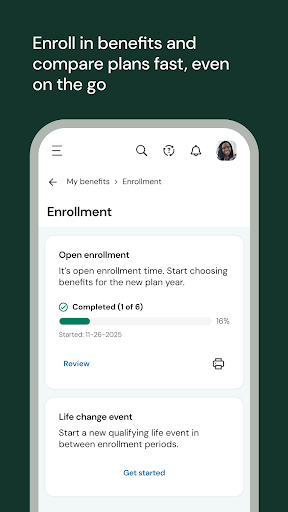
Whether you’re on a job site, on the road, at home, or simply on the move, you can get to what you need right from your mobile device. Clock in or out of a shift, check your pay, request time off, enroll in benefits, or handle any other similar tasks in moments.
If you’re a manager, we’ve got you covered too. Adjust your team’s schedule to fill gaps, work on performance reviews, handle approvals, or even uncover trends like who’s likely to leave or how your team is feeling about their work so you can make a difference for them and your business.
It’s all possible on the go with the Ready mobile app. Connect with us today from your device to get started.
Need help with the app? Check out our resource page: https://community.kronos.com/s/wfr-mobile
Notes:
• To use the UKG Ready mobile app, your organization must enable access and provide you with your 7-digit company shortname.
• Your organization determines which features you can access. Contact your manager or company administrator with any questions about logging in, what features are available to you, or connection issues.
Whether you’re on a job site, on the road, at home, or simply on the move, you can get to what you need right from your mobile device. Clock in or out of a shift, check your pay, request time off, enroll in benefits, or handle any other similar tasks in moments.
If you’re a manager, we’ve got you covered too. Adjust your team’s schedule to fill gaps, work on performance reviews, handle approvals, or even uncover trends like who’s likely to leave or how your team is feeling about their work so you can make a difference for them and your business.
It’s all possible on the go with the Ready mobile app. Connect with us today from your device to get started.
Need help with the app? Check out our resource page: https://community.kronos.com/s/wfr-mobile
Notes:
• To use the UKG Ready mobile app, your organization must enable access and provide you with your 7-digit company shortname.
• Your organization determines which features you can access. Contact your manager or company administrator with any questions about logging in, what features are available to you, or connection issues.
What's New
Introducing the new UKG rebranding!
App Information
Version Name
1.92.11
Version Code
192110
File Size
24.5 MB
Minimum OS
Android 11+
Target SDK
Android 33
Developer
UKG, Inc.
Contact
Website
Content Rating
Everyone
Package Name
com.kronos.workforcereadyPermissions Required
This app may request the following permissions:
Recent Reviews

Brianzilla2004
1.0★
I absolutely despise this pathetic app. Half the time it lets me log in using mobile data, but the other half it stays on the splash screen unless I connect to WiFi. I must've spent a few extra hours in total time just trying to connect to a weak WiFi signal to clock out. I just now wanted to check my schedule and it won't let me log in, so I need to wait hours until I get home. I've never experienced anything like this with any other app. It's a mystifyingly terrible app. Fix it!

franky_bacon
1.0★
2 apps doing the job of one. Says you can log in once and have it remember you for 30-90 days (I dont remember which), but I have to log in every time I open it, sometimes twice. And when I open the app, I'm redirected to my browser to log in, rather than logging on through the app. From my end, more time consuming, power draining, and inconvenient than the previous app my company used.

Greg Beran
1.0★
Constantly have problems with the app not loading past the splash screen. Doesn't seem to work at all since my phone updated to Android 13 either. I don't think they designed a mobile app, they just took a website and are trying to make it run on a phone. The message that comes up when logging out that tells you to close your browser windows should be enough evidence of that. Then if you do log out and try to come back later, it just keeps coming up with the message that it's logging you out..

Koh Herlong
1.0★
Every single time you try to clock in, you have to request a six-digit code, wait for the code, enter the code, and then eventually can clock in. Even if you check the box that says don't ask me for a code again. Same is true for clocking out. I got rid of the app and reinstall it, and even bought a new phone, but still have the same issue.

Cheyne Omatic
1.0★
User interface is not intuitive at all. Often I will log in so that I can find basic information, such as the time I clocked out for lunch, but I'll get lost in the menus of "My" options: My Team, My Pay, My Career, My HR, My Company, My Reports, My Hubs, My Benefits... There are multiple "Dashboards" under different categories: some of which don't display any information at all, like the Dashboard under "Time" and also the one under "My Team."

Joe
2.0★
I am able to access my pay information, and while it takes getting used to a person can see much more information than that. I can request days off through the app. My main complaint about this app is that i am required to change my password every so many days. Changing a non- comprised password is a security risk because having to carry a password with you is a real security risk. I also am irritated that sometimes i must verify my account through text but that is not too big of a deal.
Ad slot: In-Content