

Windroid Launcher (antiguo)
com.lanuarasoft.windroid
by Lanuara Diego Adrián
Screenshots




Ad slot: Top Leaderboard
About this app
ATENCIÓN!!! Está versión será discontinuada.
Por favor acceda a las nuevas versiones desde los siguientes links:
* https://play.google.com/store/apps/details?id=com.lanuarasoft.windroid.free
* https://play.google.com/store/apps/details?id=com.lanuarasoft.windroid.full
---
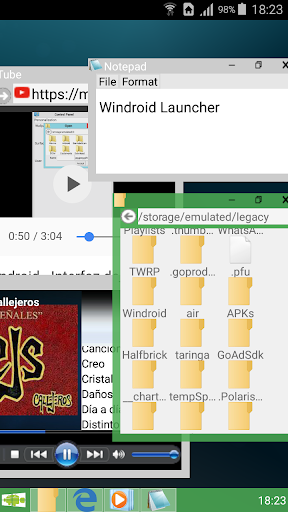
Windroid es un launcher personalizable que incluye sus propias aplicaciones capaces de mostrarse en ventanas incluso fuera de la misma aplicación.
Ademas contiene una barra de tarea y selector de aplicaciones. Es cómoda, intuitiva, rápida y eficiente. Gracias al soporte multitareas, puede ejecutar muchas aplicaciones nativas al mismo tiempo.
De todas formas, si usted gusta, puede utilizarse con su launcher favorito como una simple aplicación.
Windroid contiene las siguientes características:
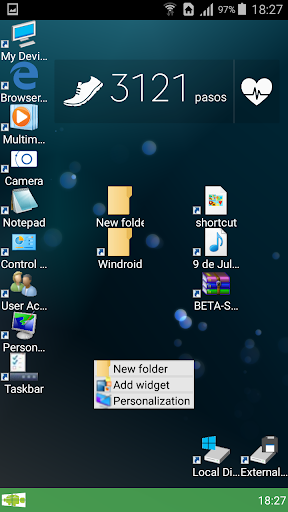
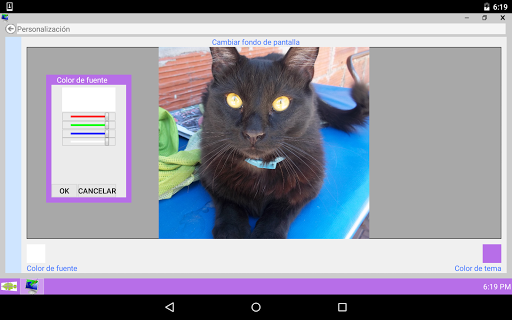
-Escritorio personalizable: Coloque iconos a gusto, agregue Widgets y cambie el fondo de pantalla con sus imágenes preferidas. Ademas podrá elegir la organización de sus iconos: Alinear en cuadricula o no alinear.
-Explorador de archivos. Visualice los archivos de su dispositivo y ejecútelos haciendo doble click.
-Visualizador de imágenes: Visualice imágenes jpg, png, gif y bmp. Haga zoom para ver los detalles de sus imágenes.
-Reproductor de audio: Reproduzca todos los audios de su dispositivo en los formatos mp3, wma, ogg, wav, mid, midi, ACC y amr. (Depende de los codecs instalados en el dispositivo)
-Navegador web: Navegue y explore páginas web, incluso con contenido Flash (Si se encuentra instalado en el dispositivo)
-Editor de texto: Edite y visualice archivos de texto simple en formato txt.
-Cámara de fotos: Tome fotografías directamente desde el escritorio.
-ScreenLock: Evita toques accidentales. Permite el ingreso de una contraseña.
TIPS:
*Puede cambiar el tamaño de las ventanas arrastrando el lado inferior, el lado derecho o el extremo inferior derecho de la ventana. Ademas puede maximizar realizando doble click sobre la barra de títulos de la ventana.
Para mayor precisión, los bordes para cambiar el tamaño deben arrastrarse del lado de afuera de la ventana.
*Para agregar un icono al escritorio, abrir la barra de Windroid y arrastrar un icono al escritorio.
*Puede borrar iconos del escritorio haciendo long click sobre el icono a borrar.
*Para ejecutar aplicaciones del escritorio o del explorador de archivos realice doble click sobre un icono.
*Puede cambiar el nombre de usuario, imagen de usuario, fondo de pantalla y colores ingresando al Panel de Control->Personalización.
*Puede cerrar o mostrar aplicaciones abiertas desde la barra de tareas, haciendo long click sobre el icono de la aplicación.
*Puede agregar Widgets realizando un Long Click sobre el escritorio y seleccionando "Agregar Widget"
Por favor acceda a las nuevas versiones desde los siguientes links:
* https://play.google.com/store/apps/details?id=com.lanuarasoft.windroid.free
* https://play.google.com/store/apps/details?id=com.lanuarasoft.windroid.full
---
Windroid es un launcher personalizable que incluye sus propias aplicaciones capaces de mostrarse en ventanas incluso fuera de la misma aplicación.
Ademas contiene una barra de tarea y selector de aplicaciones. Es cómoda, intuitiva, rápida y eficiente. Gracias al soporte multitareas, puede ejecutar muchas aplicaciones nativas al mismo tiempo.
De todas formas, si usted gusta, puede utilizarse con su launcher favorito como una simple aplicación.
Windroid contiene las siguientes características:
-Escritorio personalizable: Coloque iconos a gusto, agregue Widgets y cambie el fondo de pantalla con sus imágenes preferidas. Ademas podrá elegir la organización de sus iconos: Alinear en cuadricula o no alinear.
-Explorador de archivos. Visualice los archivos de su dispositivo y ejecútelos haciendo doble click.
-Visualizador de imágenes: Visualice imágenes jpg, png, gif y bmp. Haga zoom para ver los detalles de sus imágenes.
-Reproductor de audio: Reproduzca todos los audios de su dispositivo en los formatos mp3, wma, ogg, wav, mid, midi, ACC y amr. (Depende de los codecs instalados en el dispositivo)
-Navegador web: Navegue y explore páginas web, incluso con contenido Flash (Si se encuentra instalado en el dispositivo)
-Editor de texto: Edite y visualice archivos de texto simple en formato txt.
-Cámara de fotos: Tome fotografías directamente desde el escritorio.
-ScreenLock: Evita toques accidentales. Permite el ingreso de una contraseña.
TIPS:
*Puede cambiar el tamaño de las ventanas arrastrando el lado inferior, el lado derecho o el extremo inferior derecho de la ventana. Ademas puede maximizar realizando doble click sobre la barra de títulos de la ventana.
Para mayor precisión, los bordes para cambiar el tamaño deben arrastrarse del lado de afuera de la ventana.
*Para agregar un icono al escritorio, abrir la barra de Windroid y arrastrar un icono al escritorio.
*Puede borrar iconos del escritorio haciendo long click sobre el icono a borrar.
*Para ejecutar aplicaciones del escritorio o del explorador de archivos realice doble click sobre un icono.
*Puede cambiar el nombre de usuario, imagen de usuario, fondo de pantalla y colores ingresando al Panel de Control->Personalización.
*Puede cerrar o mostrar aplicaciones abiertas desde la barra de tareas, haciendo long click sobre el icono de la aplicación.
*Puede agregar Widgets realizando un Long Click sobre el escritorio y seleccionando "Agregar Widget"
What's New
V3.2.0
-Grave bug en ScreenLocker, solo Android 2.X.X
-Correción de mas bugs Android 4.X.X
V3.1.9
-SCREENLOCKER
-Nuevas correcciones de bugs en Android 4.X.X (Gracias por los reportes de errores)
-Grave bug en ScreenLocker, solo Android 2.X.X
-Correción de mas bugs Android 4.X.X
V3.1.9
-SCREENLOCKER
-Nuevas correcciones de bugs en Android 4.X.X (Gracias por los reportes de errores)
App Information
Version Name
3.1.9
Version Code
30
File Size
4.2 MB
Minimum OS
Android 2.3+
Target SDK
Android 22
Developer
Lanuara Diego Adrián
Contact
Website
Content Rating
Everyone
Package Name
com.lanuarasoft.windroidPermissions Required
This app may request the following permissions:
Recent Reviews

Matthew Martin
4.0★
It does entertain the thought of making my slimbook andriod tablet more pc like and I like how you can actually have youtube and ebay open at the same time, but the downfalls are for one some "move me" window that popped up and won't go away and that the integrated browser is a very thin app, I would had done a couple things differently however I do very much like the app and I think I prefer it over andriod launcher.

A Google user
2.0★
I used to use this app alot hoping for it be updated and improved upon but after years it still hasn't happened. The app design is still awful and feels clunky. There is no excuse after many years, if you cared for the app you'd work on improvements and crash fixes
A Google user
5.0★
I love this launcher but i see it has not been given new updates in a while so could i ask you to give it som cool updates like maybe making it to where the built in player also plays cideos and also when i use the file manager it does not let me in the sd card could you fix that to pleas if you could thanks
A Google user
4.0★
Quite a good app like how you can change the start button. It would be nice if there was a few more personalisation options such as specific themes like windows 95, xp, vista, 7.
A Google user
5.0★
only saying that I wish was different was to have the full Windows Media Player experience to a degree at least view music and or videos like Windows media does and possibly make a playlist but all around five stars for me

Dylan Price (DP)
5.0★
Very good launcher. This app is a windows launcher to make your phone look more like windows. This app is absolutly perfect for me because it allows me to do some form of multitasking on my phone. This app is very easy to use.
Ad slot: In-Content