

Opus Player - WhatsApp Audio
com.littlepako.opusplayer3
by pasquapp
Screenshots


Ad slot: Top Leaderboard
About this app
WARNING: the app doesn't save the voice notes. If you delete the files from WhatsApp or from a file manager, they can't be recovered by the app.
Opus Player was born as a simple audio player for the opus format, but now it is something more.
As most audio players, you can start it in your file manager, but differently from the others, you can choose the audio output, selecting the main speaker or the earpiece (the speaker for the voice call). It is useful if you don't have a headphone with you.
Opus Player is compatible with most file explorers on Google Play.
Moreover it provides a lot of features for managing your audio messages such as deleting, sharing and organizing, that make it the best audio manager for WhatsApp's voice notes.
Features:
-SHARE THE AUDIO ON FACEBOOK: Opus Player is the only app that lets you share an audio as a Facebook post, a WhatsApp status or an Instagram story.
-CHOOSE THE AUDIO OUTPUT: you can switch your audio output between the standard multimedia and the voice call's speaker. Use it if you have problems with the proximity sensor when using WhatsApp.
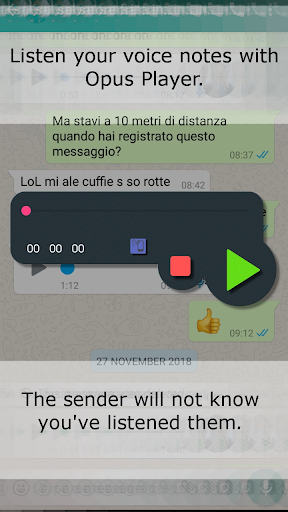
-USE IT WITH WHATSAPP: if you listen a voice message through Opus Player, the sender will not know you’ve listened it. Just long press on the WhatsApp VNs, press on the share button and select Opus Player.
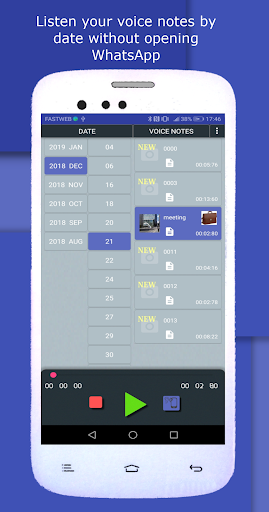
-WHATSAPP VOICE NOTES HISTORY: Opus Player takes a history of all your voice messages, received and sent, and it shows them to you in order of date, giving you the possibility to easily find an old voice note and share it with other apps.
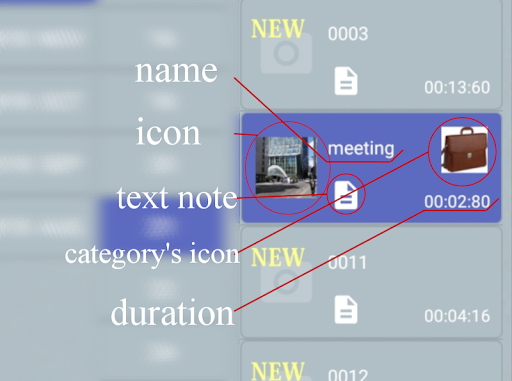
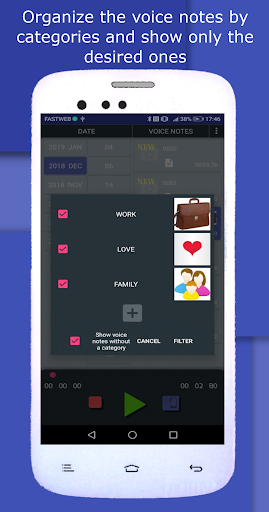
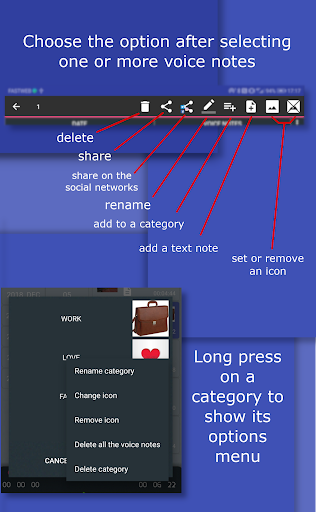
-ORGANIZE IN CATEGORIES: you can create a category, giving it a name and an image and associate to it all the audio messages you want. After created the categories, you can filter the voice notes choosing to show only those belonging to one or more categories. Moreover you can delete all the voice notes in a category with only one click.
-RENAME THE VOICE NOTES: you can change the name to each audio message without worrying about the compatibility with WhatsApp: the name is stored and shown only in Opus Player, without modifying the file, in order to avoid problems while running on WhatsApp.
-SET A TEXT NOTE: you can relate each vNote to a text note, maybe for summarizing the content of the audio or for taking note of who is the sender.
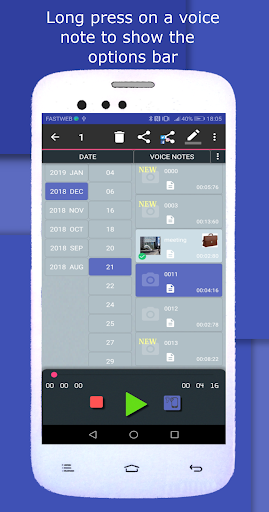
-MULTIPLE SELECTION: you can select multiple voice messages received in a day and you can perform different actions on them:
-delete
-share
-add to a category
-set an icon
-set a text note
-SELECT THE FOLDER: you can manually select the folder in which Opus Player must search the .opus files. You can select the Telegram folder (Telegram\Telegram Audio\) as well. Just remember to select the "select the ogg files" option, because it uses the .ogg extension instead of .opus, and "use file's date", because it doesn't save the date in the name as WhatsApp does.
Why download Opus Player:
- it saves you time when you need to find old voice messages;
- listening the new received voice notes directly from the app, WhatsApp will not be notified and the blue ticks will not be shown;
- you can share the voice messages on the main social networks: create Facebook and Twitter posts, share on WhatsApp status and on Instagram stories.
Follow the updates on the Facebook page:
https://www.facebook.com/OpusPlayer/
If you have any problem or even any tips, please contact us to [email protected] or directly write on the Facebook page.
Opus Player was born as a simple audio player for the opus format, but now it is something more.
As most audio players, you can start it in your file manager, but differently from the others, you can choose the audio output, selecting the main speaker or the earpiece (the speaker for the voice call). It is useful if you don't have a headphone with you.
Opus Player is compatible with most file explorers on Google Play.
Moreover it provides a lot of features for managing your audio messages such as deleting, sharing and organizing, that make it the best audio manager for WhatsApp's voice notes.
Features:
-SHARE THE AUDIO ON FACEBOOK: Opus Player is the only app that lets you share an audio as a Facebook post, a WhatsApp status or an Instagram story.
-CHOOSE THE AUDIO OUTPUT: you can switch your audio output between the standard multimedia and the voice call's speaker. Use it if you have problems with the proximity sensor when using WhatsApp.
-USE IT WITH WHATSAPP: if you listen a voice message through Opus Player, the sender will not know you’ve listened it. Just long press on the WhatsApp VNs, press on the share button and select Opus Player.
-WHATSAPP VOICE NOTES HISTORY: Opus Player takes a history of all your voice messages, received and sent, and it shows them to you in order of date, giving you the possibility to easily find an old voice note and share it with other apps.
-ORGANIZE IN CATEGORIES: you can create a category, giving it a name and an image and associate to it all the audio messages you want. After created the categories, you can filter the voice notes choosing to show only those belonging to one or more categories. Moreover you can delete all the voice notes in a category with only one click.
-RENAME THE VOICE NOTES: you can change the name to each audio message without worrying about the compatibility with WhatsApp: the name is stored and shown only in Opus Player, without modifying the file, in order to avoid problems while running on WhatsApp.
-SET A TEXT NOTE: you can relate each vNote to a text note, maybe for summarizing the content of the audio or for taking note of who is the sender.
-MULTIPLE SELECTION: you can select multiple voice messages received in a day and you can perform different actions on them:
-delete
-share
-add to a category
-set an icon
-set a text note
-SELECT THE FOLDER: you can manually select the folder in which Opus Player must search the .opus files. You can select the Telegram folder (Telegram\Telegram Audio\) as well. Just remember to select the "select the ogg files" option, because it uses the .ogg extension instead of .opus, and "use file's date", because it doesn't save the date in the name as WhatsApp does.
Why download Opus Player:
- it saves you time when you need to find old voice messages;
- listening the new received voice notes directly from the app, WhatsApp will not be notified and the blue ticks will not be shown;
- you can share the voice messages on the main social networks: create Facebook and Twitter posts, share on WhatsApp status and on Instagram stories.
Follow the updates on the Facebook page:
https://www.facebook.com/OpusPlayer/
If you have any problem or even any tips, please contact us to [email protected] or directly write on the Facebook page.
What's New
Removed check for selected folder when granting access to the storage due to a bug on some devices where the right path was not mapped.
Please note that the app now does not warn you if you select a wrong folder. In that case, you may not be able to see all the voice notes.
Please note that the app now does not warn you if you select a wrong folder. In that case, you may not be able to see all the voice notes.
App Information
Version Name
2.6.35
Version Code
120
File Size
35.0 MB
Minimum OS
Android 5.0+
Target SDK
Android 33
Developer
pasquapp
Contact
Website
Content Rating
Everyone
Package Name
com.littlepako.opusplayer3Permissions Required
This app may request the following permissions:
Recent Reviews

samuel mogeke
4.0★
Beautiful App. However, of late after converting WhatsApp audio and I click on it the file disappears and doesn't post to social media. I have reinstalled several times with no change. I miss it's efficiency.

Ferdi Hidayat
5.0★
After the update, everytime i launch the app it shows the list of the voice notes when it's loading.. and then after the loading is completed, the voice notes list is just disappeared :( Edit : Thank you for your response 🙏 I really don't remember deactivating the "show voice notes without a category" option, but yes i activated it and now it show the voice notes after it finished loading 👍

Raju
5.0★
Amazing app !! My music teacher uses the voice notes feature of whatsapp to record audio to clarify doubts, and this app helps in storing them chronologically. What would be more useful is if we have an opportunity to play the same note repeatedly, as in a loop. This will help in practice more significantly. Thank you for the app. The paid version is amazing !!!

Nikita Govender
4.0★
I LOVE this app. But I have a voice note on my WhatsApp that it won't retrieve. Oddly it retrieved one other from the same day but not the one I want. What can I do? Edit: thank you for your reply, the message was not deleted. Since the number was not a saved contact, my WhatsApp did not auto download the voice note, preventing it from being stored in my file manager and Opus Player.

Bruno Castillo
3.0★
Has been working fine for me for a long time. But now all of a sudden, when I click on the file it says that it can't find an app to open the file type and it offers to search on the Play store. On the Play store it brings me to your app which is already installed. If you open the app it'll find all the opus files and it does play them but I prefer the other way where I click on the specific file to listen to. It's there s way to re-associate the files with your app?

Mtezman
2.0★
App was working just fine but two weeks ago, when opened it, it didn't display folders. Nothing. Tried pressing everywhere with no success. Today I tried again still nothing. Decided to update it just now but still, no folders displayed. What's happening? Edit: Had to uninstall and reinstall it. That fixes the issue.
Ad slot: In-Content