

Lock Screen iOS 26
com.luutinhit.lockscreennotificationsios
by LuuTinh Developer
Screenshots




Ad slot: Top Leaderboard
About this app
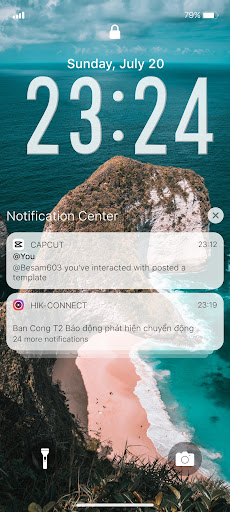
Open from the Lock screen & Notifications iOS 26
You can quickly view your recent notifications from the Lock screen by turn on your phone.
You can also do these things from the Lock Screen & Notificaions iOS 26:
- Tap a single notification or a group of notifications to view all of them for that app.
- Swipe left over notifications to manage, view, or clear the notifications.
- Manage alerts for specific apps.
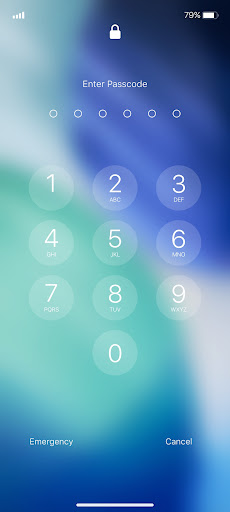
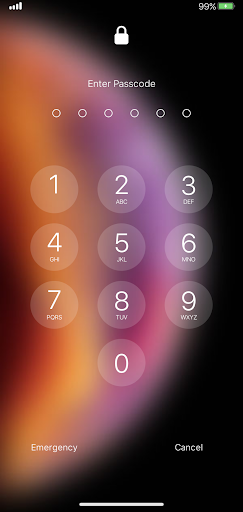
Learn how to set, use, and change a passcode on your device.
Set a passcode on your phone to help protect your data.
Set up a passcode
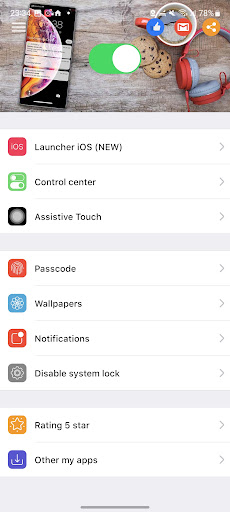
- On your phone, open Lock Screen & Notification ap.
- Tap Passcode option.
- Enable Passcode and Enter a six-digit passcode.
- Enter your passcode again to confirm it and activate it.
To make Lock Screen & Notifications iOS 15 working most perfect. You must grant some special permissions like to:
- CAMERA: To open camera in your phone.
- READ_PHONE_STATE: To turn off lockscreen while calling.
- NOTIFICATION ACCESS: To get notifications in your phone.
- READ/WRITE_EXTERNAL_STORAGE: To download more wallpaper.
- DRAW OVER SCREEN: To show Lock Screen & Notification in over all apps.
How to use Lock Screen & Notificaions iOS 26: https://youtu.be/HS-L0jAF0Vw
You can quickly view your recent notifications from the Lock screen by turn on your phone.
You can also do these things from the Lock Screen & Notificaions iOS 26:
- Tap a single notification or a group of notifications to view all of them for that app.
- Swipe left over notifications to manage, view, or clear the notifications.
- Manage alerts for specific apps.
Learn how to set, use, and change a passcode on your device.
Set a passcode on your phone to help protect your data.
Set up a passcode
- On your phone, open Lock Screen & Notification ap.
- Tap Passcode option.
- Enable Passcode and Enter a six-digit passcode.
- Enter your passcode again to confirm it and activate it.
To make Lock Screen & Notifications iOS 15 working most perfect. You must grant some special permissions like to:
- CAMERA: To open camera in your phone.
- READ_PHONE_STATE: To turn off lockscreen while calling.
- NOTIFICATION ACCESS: To get notifications in your phone.
- READ/WRITE_EXTERNAL_STORAGE: To download more wallpaper.
- DRAW OVER SCREEN: To show Lock Screen & Notification in over all apps.
How to use Lock Screen & Notificaions iOS 26: https://youtu.be/HS-L0jAF0Vw
What's New
THIS RELEASE:
- Update new Launcher iOS 26.
- Update new Lockscreen iOS 26.
- Fix all issue reported by user.
THANK YOU SO MUCH FOR USING MY APPS :)
- Update new Launcher iOS 26.
- Update new Lockscreen iOS 26.
- Fix all issue reported by user.
THANK YOU SO MUCH FOR USING MY APPS :)
App Information
Version Name
1.6.5
Version Code
165
File Size
6.4 MB
Minimum OS
Android 5.0+
Target SDK
Android 34
Developer
LuuTinh Developer
Contact
Website
Content Rating
Everyone
Package Name
com.luutinhit.lockscreennotificationsiosPermissions Required
This app may request the following permissions:
Recent Reviews

A Google user
4.0★
Works reasonably well as long as you are ok with disabling your phone's existing lock and using the app's lock. The app will only show after the phone has been unlocked, meaning that the actual "iphone" lock screen will pop up only if the phone is unlocked, and the app has been toggled on within the app. There is a suprising amount of customization. It should be noted that you may also opt to have no lock, meaning only a swipe will be required to open the device. Not bad, would recommend.
A Google user
4.0★
Not bad. Definitely not a perfected science yet, but it's the best version of an iOS launcher I've ever seen. Works fast (on a Samsung works even faster than an iPhone), very interested implementation of tools and themes that look almost identical to an iPhone. The only reason I'm not keeping it, is because even if it were a perfected iOS launcher it wouldn't be better than OneUI. No complaints, keep working on it, great job so far.
A Google user
3.0★
The only thing missing, is that you put a similar screen on top of the phone replacing the notification centers of all cell phones with Android or something else (this screen can be removed by sliding your finger down from the top of I'm not inventing the screen, because it actually exists in IOS or iphone, you can search it by notification center) you should also support Alcatel. 7, my system was stopping the app. So, this would be perfect to 5 stars

Pha NengHa
3.0★
decent app. Firstly, you can add your own wallpaper. Secondly, it looks very similar to the real deal. The only problem is that it is very buggy as it always show the lock screen randomly at times. I do hope you look at this immediately. 3 stars.

Luffy
3.0★
The best iOS lock screen so far!! out of many iOS lock screen I've tried, this is the best one, but I think it could get even more better this app should have more features like widgets, and it also randomly shows up sometimes, this app is sooo good, its just buggy, hope you can fix this as early as possible 👍

Pladinum LABS
5.0★
YOU SHOULD TRY THIS APP ALONG WITH LAUNCHER iOS 26 it has deep integration along with actual lock and unlock animations and it doesn't get killed by battery optimization at all and has been my best companion since [slight problem]I would really like it if this thing had face id or atleast 2d face recognition Otherwise it's the BEST
Ad slot: In-Content