

Video Compress
com.melgames.videocompress
by Mel studio apps
Screenshots


Ad slot: Top Leaderboard
About this app
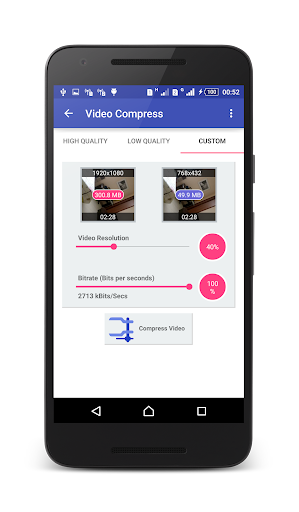
This tool compresses video files and saves them on your phone.
Use it to reduce data usage. Compressing a video makes it much easier to share on social networks such as facebook , google + , whatsapp , etc.
Resources:
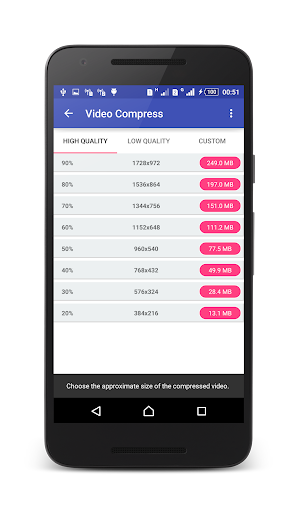
- Creates compressed videos with high, normal, low video quality
- Friendly interface, easy to use, and very fast
- Supports almost all video formats
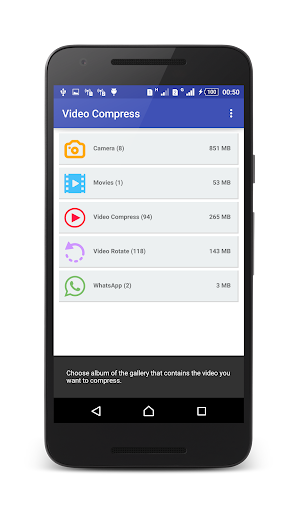
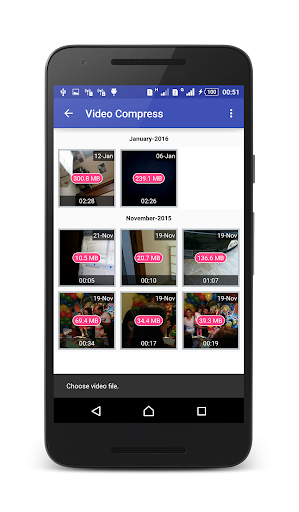
- Well organized ; displays the albums in your gallery that contain videos
- Generates a copy of the video while maintaining the original
- All the videos generated are available in an album in the video gallery
- Allows audio removal to further increase the compression of the video
- The longer the video, the greater the compression ratio
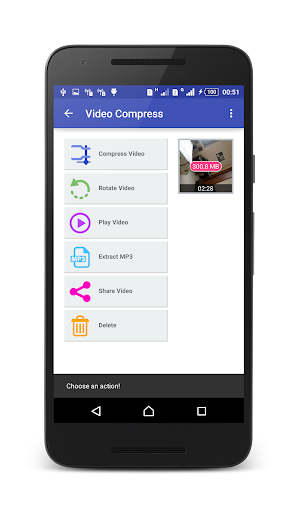
- Converts video files to MP3 audio files
- Rotates video
- Shares videos
- Extracts subtitles from videos
- Shares video clips. (Sends e-mail, uploads to YouTube, etc.)
- Supports both ARM and X86 CPUs (Such as intel zenfone)
- ARMv7 NEON CPU optimizations
- Video compressor without loss of quality, TRY IT!
Ideal for those who do not have high speed internet (such as 3G) or have a low data limit.
**News**
Now you can share video files directly to this app to compress them before share it to others apps like social apps,
Use it to reduce data usage. Compressing a video makes it much easier to share on social networks such as facebook , google + , whatsapp , etc.
Resources:
- Creates compressed videos with high, normal, low video quality
- Friendly interface, easy to use, and very fast
- Supports almost all video formats
- Well organized ; displays the albums in your gallery that contain videos
- Generates a copy of the video while maintaining the original
- All the videos generated are available in an album in the video gallery
- Allows audio removal to further increase the compression of the video
- The longer the video, the greater the compression ratio
- Converts video files to MP3 audio files
- Rotates video
- Shares videos
- Extracts subtitles from videos
- Shares video clips. (Sends e-mail, uploads to YouTube, etc.)
- Supports both ARM and X86 CPUs (Such as intel zenfone)
- ARMv7 NEON CPU optimizations
- Video compressor without loss of quality, TRY IT!
Ideal for those who do not have high speed internet (such as 3G) or have a low data limit.
**News**
Now you can share video files directly to this app to compress them before share it to others apps like social apps,
App Information
Version Name
7.0.3
Version Code
20230703
File Size
19.6 MB
Min SDK
Android 23+
Target SDK
Android 34
Developer
Mel studio apps
Contact
Content Rating
Everyone
Package Name
com.melgames.videocompressPermissions Required
This app may request the following permissions:
Recent Reviews

John
4.0★
It has one important disadvantage. I cannot search for the video I want to reduce by looking for the correct folder. It offers me folders and if it is not there, bad luck. Equally to avoid that problem, I cannot find the video somehow else and then say "send to Video compress" So, if the app doesn't find it, I am screwed and will not be able to use the app. I.e. I cannot compress a video which came through bluetooth. It happens quite often in similar ways.

D Lam
1.0★
Used to be good, but not anymore since they updated it, UI has less options on the screen when choosing the compression size etc. Most importantly, it doesn't even work... I tried both fast forward and compress function, it said 'done, tap to see it', I clicked on it, and it's the original video, cannot find the edited version anywhere on my phone, I'm deleting this app, waste of my time.

Known as Blunt & Honest (SNAS)
5.0★
It is not one of the... IN FACT, an only THE BEST APP... PERIOD. WITHOUT A DOUBT WITH NO "IFS" & "BUTS" HIGHLY RECOMMEND: Based on, EXPERIENCE of using it for "> A DECADE OR TWO (> or

John
1.0★
Used to be an excellent App. I paid to remove the adds since when everything has gone downhill. It refused to complete it's task . Files disappear, the app crashes. . I'm just about to uninstall . I have no idea what they have done but no menu options are now available , just a list of my past compressed video's. Conclusion, what was good , now a totally useless app.

Ec Hanson
2.0★
It is not recommended. Maybe something wrong. I installed the app, tried to 🗜 compress a video. Once you have selected your output it jump out of the app. After 3mins the percentage on my notification ain't moving. Nothing on the app to show it is compressing a video 📹. I had to cancel the action. At the moment I have to Uninstall. No gonna lie it easy to use but it ain't working on video 📹 🗜 compress.

A Google user
5.0★
It works! I shoot my videos in 4K, for quality reasons. I store them like this for myself. But for sharing with others, while on the go, a FHD or even 720p is good enough (and trim) for a lot less size. So, instead of eating my mobile data 4G limit/month with 2 short 4k videos, I am much better sharing 20 if them. I highly recommend this
Ad slot: In-Content