

ChaoMe Theme Editor
com.mixapplications.miuithemeeditor
by MixApplications
Screenshots
Ad slot: Top Leaderboard
About this app
* Stop your ads Blocker to be able to run it*
* No Root *
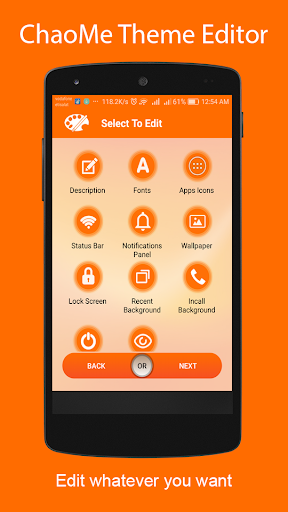
ChaoMe Theme Editor is the most powerful theme editor for ChaoMe phones with its simple and awesome UI and its wide set of options to help you customizing your phone easily. It's fully free and available to everyone. You can pick, edit and save your theme quite fast. Never hesitate to download it.
Features
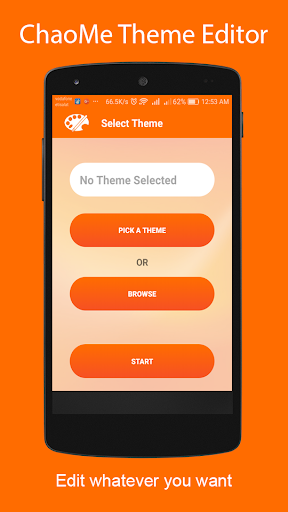
- Multi option for selecting themes :
--- Picking from theme manager
--- Browsing storage
- Edit description
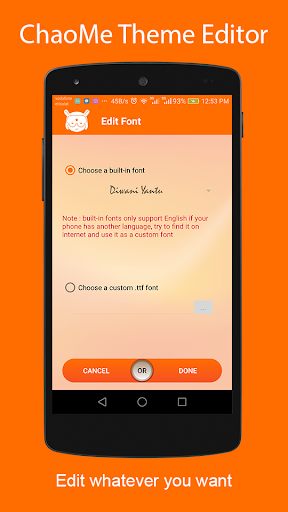
- Edit system font to whatever you want and choose between :
--- Built-in fonts (built-in fonts support only English language if not working with you try to get font support your language ".ttf" and select it by "choose a custom .ttf font" option).
--- Browsing storage.
- Edit apps icons by :
--- Selecting an icon mask.
--- Selecting dynamic icons.
--- Importing all icons from an installed icon pack.
--- Selecting icons manually for each app.
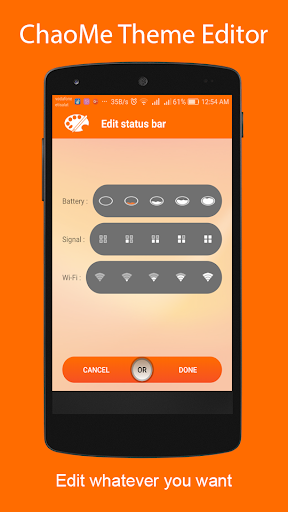
- Edit status bar icons (battery, signal and WiFi).
- Edit home screen wallpaper.
- Edit lock screen wallpaper & style.
- Editing notification panel background & icons.
- Editing incoming calls background.
And more discover it by yourself.
We hope you'll enjoy the app. If you like it, then please rate it 5 Stars.
If you have any bug or suggestion, please contact us.
Thanks
* No Root *
ChaoMe Theme Editor is the most powerful theme editor for ChaoMe phones with its simple and awesome UI and its wide set of options to help you customizing your phone easily. It's fully free and available to everyone. You can pick, edit and save your theme quite fast. Never hesitate to download it.
Features
- Multi option for selecting themes :
--- Picking from theme manager
--- Browsing storage
- Edit description
- Edit system font to whatever you want and choose between :
--- Built-in fonts (built-in fonts support only English language if not working with you try to get font support your language ".ttf" and select it by "choose a custom .ttf font" option).
--- Browsing storage.
- Edit apps icons by :
--- Selecting an icon mask.
--- Selecting dynamic icons.
--- Importing all icons from an installed icon pack.
--- Selecting icons manually for each app.
- Edit status bar icons (battery, signal and WiFi).
- Edit home screen wallpaper.
- Edit lock screen wallpaper & style.
- Editing notification panel background & icons.
- Editing incoming calls background.
And more discover it by yourself.
We hope you'll enjoy the app. If you like it, then please rate it 5 Stars.
If you have any bug or suggestion, please contact us.
Thanks
What's New
Update dependencies.
App Information
Version Name
1.8.15
Version Code
71
File Size
154.5 MB
Minimum OS
Android 7.0+
Target SDK
Android 34
Developer
MixApplications
Contact
Website
Content Rating
Everyone
Package Name
com.mixapplications.miuithemeeditorPermissions Required
This app may request the following permissions:
Recent Reviews

Fahmi
1.0★
i can't prove if this app is fake, but super dumb either to think it's fake. I've never found myself any working themes applied when i edited them with this app. but this app is WORKS fine. it can run on offline/online, yes, theme still exported, but none of those method are working when i apply my themes after using it. edit: Actually, it works if i just importing an mtz file without editing any with this app features. but won't last an hour, suddenly turning back to Default theme.

M.Fariud Zaman
3.0★
Good but some options not working perfectly, When I m changed the icons manually it's not changing all. and all is the on status bars icons, battery indicator, network signal icons not working perfectly. when I restart my device for work perfectly but not, same conditions face again, now I m request Developer to more improvements on this, and fix all problems.

_
1.0★
Completely worthless. Firstly it has an ad play every single time you push a button in the app and secondly it doesn't even do what it's supposed to. I tried to edit a theme, just a small change, updating a few custom icons, it got stuck on "exporting theme" for 3 hours and never finished. 100% useless app

Ebrahim
4.0★
Good App BUT! IF YOU OWN A XIAOMI PHONE AND YOU WANT TO INSTALL THIRD-PARTY THEMES OR USE THIS APP PROPERLY UNLOCK BOOTLOADER AND GET A CUSTOM ROM LIKE XIAOMI.EU!!!!!!!! The app itself does a good job of installing/ripping .MTZ files, you have a lot of icons and stuff to choose from. I don't think the app itself has been update to match the recent changes that Miui 12 has... for example you can set a certain icon for taskbar but if you switch to darkmode it will disappear.

A Google user
2.0★
The app is really good but some functionalities are not working such as setting up notification bar colors. Also, the created theme is crashing after some time and the system goes back to default theme. It even crashed my other apps, needs to be improved or fixed.
A Google user
1.0★
Maybe useful in MIUI 10 but it is totally useless for MIUI 11. Yes, this app can edit and allow you to apply third party themes but in MIUI 11 after an hour or two the applied theme change back to default automatically which is absolutely terrible. What is the use of a theme editor when you can't keep that applied theme for a long time. That's why I'm rating low. If developers can fix this only then I'll change my rating.
Ad slot: In-Content