

Canara e-Passbook
com.mobile.canaraepassbook
by CANARA BANK
Screenshots



Ad slot: Top Leaderboard
About this app
• Concise form of physical passbook.
• Easy and convenient to use.
• Registration via. OTP authentication to registered mobile no.
• Details of all accounts (SB, RD, FD, and Loans) and transactions available in a bundled form.
• Real-time updates of account details and transactions.
• Customer details and Branch Details included with an option to share via. SMS/ WhatsApp.
• Statement generation option is available.
• Loan accounts details and statement generation option.
• Enhanced in-built security through MPIN/ Fingerprint/ Face ID lock.
• Option for maintaining personal ledger(s) and entering personalized remarks for transaction(s).
• Branch Holiday details are available.
• Creation of personal Expenses heads, tagging passbook entries to those heads with graph capabilities.
• Consolidate Asset/Liability View
• Off-line functionality.
STEPS FOR VALIDATING MOBILE NUMBER:
1) Click on 'Send SMS'.
2) The screen will be redirected to SMS application containing the encrypted text for registration. Click on 'Send'. SMS will be sent to the Bank’s server and details linked to registered Mobile number in the device will be fetched (In case of dual SIM cards, User must send SMS from their Registered Mobile Number).
3) After sending the SMS, User shall be redirected back to ePassbook application. If not so, the user may manually switch to the e-Passbook application using the 'BACK' button.
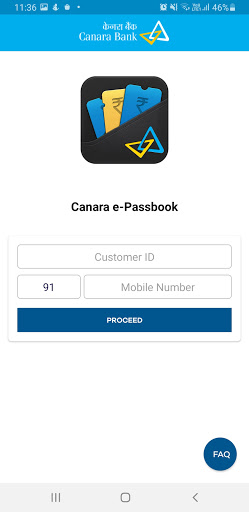
4) In the next page, the mobile number fetched from Bank‘s server will be displayed. User shall enter his/her customer ID and click on Proceed.
5) If the Mobile Number matches with the Customer ID of the User the application will ask for OTP or the error message 'Customer Id is not registered with Mobile number’ will be displayed. We request the user to kindly try with the registered mobile number and customer ID.
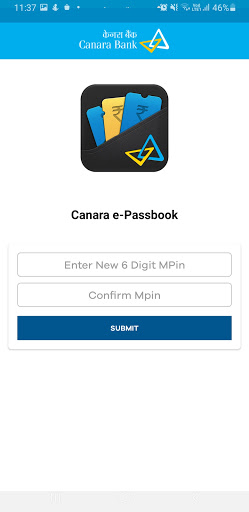
6) After OTP validation, User shall be asked to create new MPin and enter it twice.
7) After MPIN creation, User will be redirected to the login page of the application.
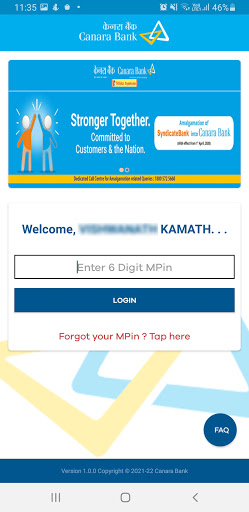
8) The User may enter MPIN to login to the application.
• Easy and convenient to use.
• Registration via. OTP authentication to registered mobile no.
• Details of all accounts (SB, RD, FD, and Loans) and transactions available in a bundled form.
• Real-time updates of account details and transactions.
• Customer details and Branch Details included with an option to share via. SMS/ WhatsApp.
• Statement generation option is available.
• Loan accounts details and statement generation option.
• Enhanced in-built security through MPIN/ Fingerprint/ Face ID lock.
• Option for maintaining personal ledger(s) and entering personalized remarks for transaction(s).
• Branch Holiday details are available.
• Creation of personal Expenses heads, tagging passbook entries to those heads with graph capabilities.
• Consolidate Asset/Liability View
• Off-line functionality.
STEPS FOR VALIDATING MOBILE NUMBER:
1) Click on 'Send SMS'.
2) The screen will be redirected to SMS application containing the encrypted text for registration. Click on 'Send'. SMS will be sent to the Bank’s server and details linked to registered Mobile number in the device will be fetched (In case of dual SIM cards, User must send SMS from their Registered Mobile Number).
3) After sending the SMS, User shall be redirected back to ePassbook application. If not so, the user may manually switch to the e-Passbook application using the 'BACK' button.
4) In the next page, the mobile number fetched from Bank‘s server will be displayed. User shall enter his/her customer ID and click on Proceed.
5) If the Mobile Number matches with the Customer ID of the User the application will ask for OTP or the error message 'Customer Id is not registered with Mobile number’ will be displayed. We request the user to kindly try with the registered mobile number and customer ID.
6) After OTP validation, User shall be asked to create new MPin and enter it twice.
7) After MPIN creation, User will be redirected to the login page of the application.
8) The User may enter MPIN to login to the application.
What's New
Enhancement
App Information
Version Name
1.0.14
Version Code
20
File Size
12.3 MB
Minimum OS
Android 8.0+
Target SDK
Android 33
Developer
CANARA BANK
Contact
Content Rating
Everyone
Package Name
com.mobile.canaraepassbookPermissions Required
This app may request the following permissions:
Recent Reviews

Deepak kumar
5.0★
Yes. Excellent initiative. APP got downloaded easily and able to register too. Able to view all details. However, the option of sending the statement for a particular period is not functional. The email comes to the registered email ID but no statement comes. Could be teething trouble and surely will be set right soon. Thanks for everyone who made it happen.

Joseph G Fernandez
5.0★
Quite good. As long as i can get correct up to date data (statement of account), which i can download, print and keep for my records/reference, i am HAPPY. Thank you for the app. Please note: the app is automatically uploading OTP, automatically without waiting for confirmation proceeding with performing actions - if this is being done on purpose, consciously, deliberately, then i take it you know what you are doing. If not, then maybe it is better that the user "confirms" at every step.

Prabakaran Rao
4.0★
Yes. Excellent initiative. APP got downloaded easily and able to register too. Able to view all details. However, the option of sending the statement for a particular period is not functional. The email comes to the registered email ID but no statement comes. Could be teething trouble and surely will be set right soon. Thanks for everyone who made it happen.

Veera Reddy Aerra
2.0★
Iam unable to send sms for mobile number verification from my registered mobile number. Not sent message is being displayed. Iam using this app for the last several years. With the present updation only iam encountering this problem. Kindly fix it at the earliest.. The ap is not opening.After uninstalling and reinstallation the registration is not getting completed with the message ' registration time exceeds alloted duration Kindly fix the issue Iam not able to use the app for the last 10 days

Deepak Jaiswal
1.0★
e-Passbook Version 1.0.21 is Worst app, I have had the same problem since months. I have written the instructions in the app that after sending the message, it will come back to the app itself. I don't have to do anything manually. But even after 10-30 minutes it does not come back to the app and if I back up myself then again and again the Canara e-passbook app asks me to send the message, I click on send message, the message box also redirects, the message also goes but no reply comes.

Riyath Ahamed
2.0★
App asking to send message from registered mobile to open after upgrade. As an NRE customer, I couldn't send SMS from my number since I didn't active outgoing service, I have only incoming SMS for password. I recommend you to make another option to activate the account since it is only passbook but not the application for transaction of money. I wrote it clearly to customer care, but they couldn't understand my issue. still no remedy.
Ad slot: In-Content