

Gallery KK
com.moblynx.galleryics
by Moblynx
Screenshots




Ad slot: Top Leaderboard
About this app
★ NEW VERSION 2.0 ★
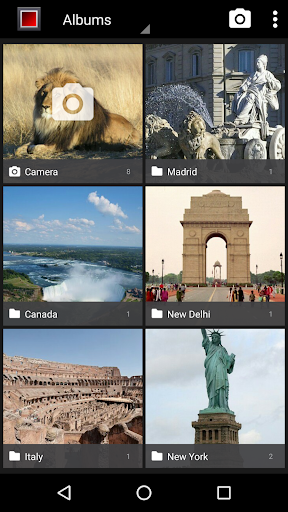
Gallery KK is an improved version of the Gallery & Photo editor app included on KitKat (Android 4.4)
Our goal is to allow any Android phone or tablet can enjoy this great gallery!
This app is also perfect for Nexus or Android One devices that have lost the classic gallery app with the last upgrade to Lollipop (Android 5.0). We are working on improving the compatibility to support more devices.
--- FEATURES ---
● GALLERY:
- Ultra fast photo & video viewer
- Configurable thumbnail size/colors
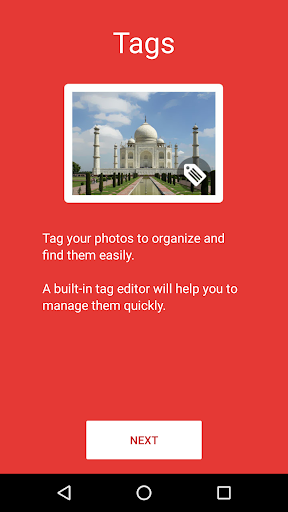
- Photo tag viewer & editor
- Grid view/Filmstrip view
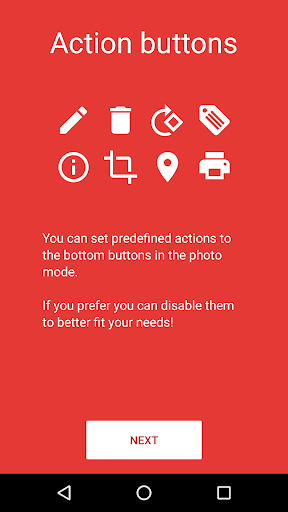
- Custom action buttons (edit, delete, tags,...) in photo view
- Scroll: Horizontal/Vertical
- Animated GIF support
- Hide unwanted folders (customizable)
- Configurable screen orientation
- Show/hide status bar
- Slideshow animations: Fade, zoom, slide & flip
- Photo sphere support (Settings→General→Photo sphere support)
- Trim & mute videos
- More cool features soon ...
● PHOTO EDITOR:
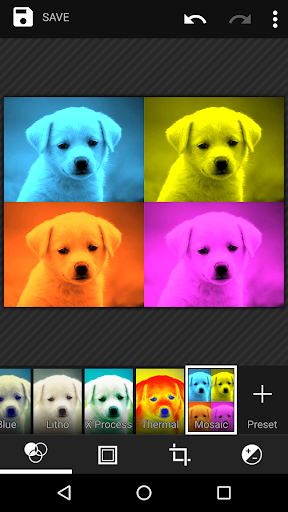
- High quality photo editing
- New exclusive filters (thermal & mosaic)
- Crop, Straighten, Rotate, Mirror, Draw & more cool effects
If you prefer the old gallery (Android 4.0), you can download "Gallery ICS (classic version)" for free:
https://www.google.com/url?q=https://play.google.com/store/apps/details?id=com.moblynx.galleryicsold
--- FAQ ---
● What are tags? What is its used for?
Tags are keywords that you can attach to your photos to categorize and organize them. A built-in tag editor will help you to manage them quickly.
Use the Tags view to see all photos classified by tags. You can even import tags from the photos that you have in the gallery.
Tags are stored in the metadata of the photos and are not lost if you uninstall the app.
● What are the Action Buttons? How can I customize them?
Action buttons are two buttons that appear on the bottom of the full picture view.
You can customize these buttons from "Settings→Pictures→Action Button(left/right)" to assign your favorites quick actions (edit, delete, crop, rotate, ...). If you prefer you can disable them to better fit your needs!
● How can I move or copy files between albums?
Unfortunately we have not yet integrated this functionality into the current version.
Anyway, you can use apps from other devs that are compatible with Gallery KK, like “Gallery Folder Plugin” from "Tatuas Apps" dev: https://www.google.com/url?q=https://play.google.com/store/apps/details?id=com.tatuas.android.gfp
● Why do you show ad banners within the app?
Ads help us to make money and keep working on improving and adding new features to the app. If you prefer you can remove the ads with an in-app purchase (“Remove ads”).
We use device identifiers to personalise content and ads, to provide social media features and to analyse our traffic. We also share such identifiers and other information from your device with our advertiser (Google Admob) and analytics platform (Google Analytics). If you use this app is understood that that you accept these policies.
The in-app purchase (“Remove ads”) also disables the share of info with our analytics partner.
● Why is requested the approximate location (network-based) permission?
On the Locations view the photos (if geotagged) are sorted based on your proximity to them.
--- THANKS ---
● Thanks to everyone who uses our applications. Your support helps us to keep working hard on this project. Please contact us at [email protected] if you have any issue. We are delighted to receive any feedback.
● Thanks to Google for releasing the Android open source project. Without their great contribution to the developer community our work would not be possible.
--- NOTES ---
● Android is a trademark of Google Inc.
● This app is not affiliated or endorsed by Google Inc.
Gallery KK is an improved version of the Gallery & Photo editor app included on KitKat (Android 4.4)
Our goal is to allow any Android phone or tablet can enjoy this great gallery!
This app is also perfect for Nexus or Android One devices that have lost the classic gallery app with the last upgrade to Lollipop (Android 5.0). We are working on improving the compatibility to support more devices.
--- FEATURES ---
● GALLERY:
- Ultra fast photo & video viewer
- Configurable thumbnail size/colors
- Photo tag viewer & editor
- Grid view/Filmstrip view
- Custom action buttons (edit, delete, tags,...) in photo view
- Scroll: Horizontal/Vertical
- Animated GIF support
- Hide unwanted folders (customizable)
- Configurable screen orientation
- Show/hide status bar
- Slideshow animations: Fade, zoom, slide & flip
- Photo sphere support (Settings→General→Photo sphere support)
- Trim & mute videos
- More cool features soon ...
● PHOTO EDITOR:
- High quality photo editing
- New exclusive filters (thermal & mosaic)
- Crop, Straighten, Rotate, Mirror, Draw & more cool effects
If you prefer the old gallery (Android 4.0), you can download "Gallery ICS (classic version)" for free:
https://www.google.com/url?q=https://play.google.com/store/apps/details?id=com.moblynx.galleryicsold
--- FAQ ---
● What are tags? What is its used for?
Tags are keywords that you can attach to your photos to categorize and organize them. A built-in tag editor will help you to manage them quickly.
Use the Tags view to see all photos classified by tags. You can even import tags from the photos that you have in the gallery.
Tags are stored in the metadata of the photos and are not lost if you uninstall the app.
● What are the Action Buttons? How can I customize them?
Action buttons are two buttons that appear on the bottom of the full picture view.
You can customize these buttons from "Settings→Pictures→Action Button(left/right)" to assign your favorites quick actions (edit, delete, crop, rotate, ...). If you prefer you can disable them to better fit your needs!
● How can I move or copy files between albums?
Unfortunately we have not yet integrated this functionality into the current version.
Anyway, you can use apps from other devs that are compatible with Gallery KK, like “Gallery Folder Plugin” from "Tatuas Apps" dev: https://www.google.com/url?q=https://play.google.com/store/apps/details?id=com.tatuas.android.gfp
● Why do you show ad banners within the app?
Ads help us to make money and keep working on improving and adding new features to the app. If you prefer you can remove the ads with an in-app purchase (“Remove ads”).
We use device identifiers to personalise content and ads, to provide social media features and to analyse our traffic. We also share such identifiers and other information from your device with our advertiser (Google Admob) and analytics platform (Google Analytics). If you use this app is understood that that you accept these policies.
The in-app purchase (“Remove ads”) also disables the share of info with our analytics partner.
● Why is requested the approximate location (network-based) permission?
On the Locations view the photos (if geotagged) are sorted based on your proximity to them.
--- THANKS ---
● Thanks to everyone who uses our applications. Your support helps us to keep working hard on this project. Please contact us at [email protected] if you have any issue. We are delighted to receive any feedback.
● Thanks to Google for releasing the Android open source project. Without their great contribution to the developer community our work would not be possible.
--- NOTES ---
● Android is a trademark of Google Inc.
● This app is not affiliated or endorsed by Google Inc.
What's New
2.0.3
Less memory usage
Small bugs fixed
2.0.2
Fixed photo editor crash
2.0
Photo tag viewer & editor
Custom action buttons (edit, delete, tags,...) in photo view
Buttons updated to material style
Autoplay videos/gifs
Customizable hidden albums
New media views (Tags & Size)
Default album for edited media
Extra customizable settings
Removed GPS permission (not used)
1.4
Gallery scroll: Horizontal/Vertical
Add classic Gallery shortcut (Settings→General)
Animated GIF support
Less memory usage
Small bugs fixed
2.0.2
Fixed photo editor crash
2.0
Photo tag viewer & editor
Custom action buttons (edit, delete, tags,...) in photo view
Buttons updated to material style
Autoplay videos/gifs
Customizable hidden albums
New media views (Tags & Size)
Default album for edited media
Extra customizable settings
Removed GPS permission (not used)
1.4
Gallery scroll: Horizontal/Vertical
Add classic Gallery shortcut (Settings→General)
Animated GIF support
App Information
Version Name
1.1
Version Code
1100
File Size
9.1 MB
Minimum OS
Android 4.0+
Target SDK
Android 19
Developer
Moblynx
Contact
Website
Content Rating
Everyone
Package Name
com.moblynx.galleryicsPermissions Required
This app may request the following permissions:
Recent Reviews

A Google user
2.0★
I have purchased the ad free version, & has been working great. But I had to reduce my rating, because lately, many pix are not showing, & entire albums have disappeared. I can still see them, in file manager, but not in kk. They're not hidden, so idk why they're not showing. Also, all of my hidden albums are gone, too. This makes it pretty useless. I will raise my rating back up, when these bugs are fixed.
A Google user
5.0★
I love Gallery KK, it's been my go-to local gallery app since like 6 or 7 years ago. The additional features they have are all so nice, the ads aren't intrusive, and it doesn't even cost much to remove the ads. On top of that, the team actually pays attention to bugs and errors and tries to fix them as soon as they can!! 5 stars.

Sam G
5.0★
Bought the ad free version on this years ago. Years of 5 star usage from it. But recently with newer Android versions it's been having trouble sorting galleries. Still my favorite gallery app. Fast. Small. The image editor has a proper RGB curves filter AND a B&W filter that lets you adjust which channels get mixed in. I wish it was still under development.

Erich Richard (Sprig)
5.0★
Please update this app for newer versions of android! I just got a new phone and am devastated this widget is no longer supported by my phone. I loved this app so much and nothing on the play store comes close to replacing it!

Amit Verma
5.0★
Simple and reliable gallery app. No unnecessary activities, just musr have features. I install it in my every new phone despite having plethora of other gallery app on play store. It cost less if you want to remove ads, although it doesn't bother or stop you accessing it.

Sandeep Sharma
5.0★
Exceptional using since last 15 years. No nonsense app with specific right folder categorisation. Great foe gallery it's primary pupose. With no hanki panky like creating something and not serving the right folder main thing like Gallery. Google keeps moving it's folders trying to control the users , as per it's bufiness plan to mint more money from users and app people. Google not mentally stable and visionary like apple 🍎
Ad slot: In-Content