
Moto Widget
com.motorola.timeweatherwidget
by Motorola Mobility LLC.
Screenshots
Ad slot: Top Leaderboard
About this app
🧩 5 widget styles. Endless personalization.
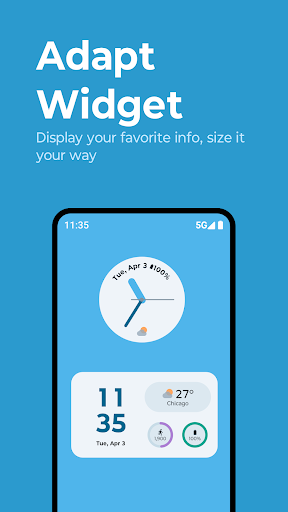
• Adapt–Our most customizable widget. Choose between layouts and pick what info to show: clock, dual time, weather, battery, AQI, steps, and alarm.
• Clean–A modern, minimal widget with fresh updates. Choose weather animations and customize visual elements.
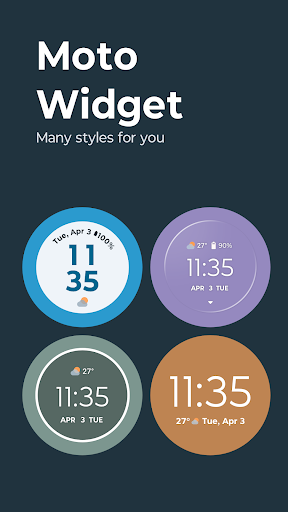
• Beyond–A circular, animated widget with multiple swipeable views like time, weather, steps, and battery.
• Classic–A nostalgic, minimalist widget with time, date, weather, and a battery ring—for fans of the original Moto look.
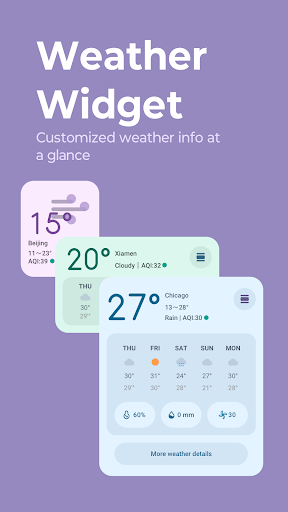
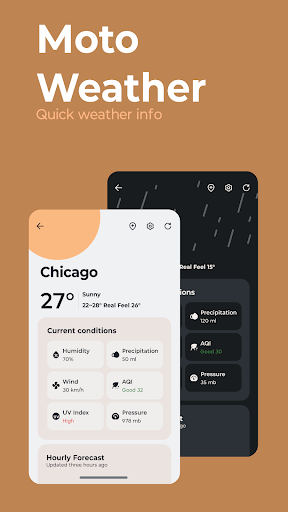
• Weather–A full-featured, weather-only widget showing current conditions and forecasts. Choose between hourly or 5-day views with a simple tap.
🌤 Weather, done right
Get detailed forecasts, UV index, allergy outlooks, and radar—right at your fingertips.
🔔 Smart weather notifications
• Daily weather forecast
• Tomorrow’s forecast
• Weekly outlook
• Severe weather alerts
📲 Add a widget to your home screen
Long-press on a blank space.
Tap Widgets.
Scroll to Moto Widget.
Drag and drop your favorite layout.
Make your home screen work harder–and look better—with Moto Widget.
• Adapt–Our most customizable widget. Choose between layouts and pick what info to show: clock, dual time, weather, battery, AQI, steps, and alarm.
• Clean–A modern, minimal widget with fresh updates. Choose weather animations and customize visual elements.
• Beyond–A circular, animated widget with multiple swipeable views like time, weather, steps, and battery.
• Classic–A nostalgic, minimalist widget with time, date, weather, and a battery ring—for fans of the original Moto look.
• Weather–A full-featured, weather-only widget showing current conditions and forecasts. Choose between hourly or 5-day views with a simple tap.
🌤 Weather, done right
Get detailed forecasts, UV index, allergy outlooks, and radar—right at your fingertips.
🔔 Smart weather notifications
• Daily weather forecast
• Tomorrow’s forecast
• Weekly outlook
• Severe weather alerts
📲 Add a widget to your home screen
Long-press on a blank space.
Tap Widgets.
Scroll to Moto Widget.
Drag and drop your favorite layout.
Make your home screen work harder–and look better—with Moto Widget.
What's New
• New weather notifications
• Clean widget customizations
• Redesigned Weather page
• Resolved widget and text sizing issues on Android 11
• Bug fixes
• Clean widget customizations
• Redesigned Weather page
• Resolved widget and text sizing issues on Android 11
• Bug fixes
App Information
Version Name
4.10.21
Version Code
410021
File Size
47.3 MB
Min SDK
Android 33+
Target SDK
Android 33
Developer
Motorola Mobility LLC.
Contact
Website
Content Rating
Everyone
Package Name
com.motorola.timeweatherwidgetPermissions Required
This app may request the following permissions:
Recent Reviews

O RGLLC
1.0★
Was working fantastic before and suddenly it asks for permission to allow targeted advertising or not. I've selected my choice and nothing happened, the screen just froze with the notification and then I decided to choose the other option and nothing happened. There's no other button to choose from and I can't see the week ahead like I did before. in less than 24 hrs this happened without any updates available.

Thomas Burken
2.0★
The new layout of the hourly forecast is a downgrade, it makes it harder to see the forecasted change in weather over time. Additionally, they've entirely removed the wind data from the hourly forecast. If you want to see any wind data besides the real-time data you have to click through to the AccuWeather website. They've removed data and made what data is left more annoying to use, & the only possible reason I can think of is because some graphic designer thought it would look a bit prettier.

Steve Chamberlin
2.0★
I totally agree about removing the battery ring, what were they thinking? That said, out of necessity I went looking for a substitute, and found one that I like even better than the ring. The "Battery Widget" from Jonas Uekotter is a lightweight simple 1 x 1 circle that clearly displays the exact battery % and battery temperature. It's free and has no ads. It shows me the battery % more clearly than the ring, and you can touch it and it takes you directly to the battery settings page where you can see more details if you want. I like it so much better than the battery ring, that Moto can leave it off for all I care. I just put it right below the little battery icon whose numbers are so small I can't read them, and this I can read easily. Perfect!

Lynn Diven
2.0★
Very disappointed with the update. It is way too big. Covers my entire wallpaper. Even when it's moved, it keeps sliding back to the center. Think the battery ring is working properly. The oval shape was much sleeker looking. The font should be color adjustable. The white doesn't show up and no way to change the color. I accidently removed the old one and now I'm very disappointed I can't get it back. Terrible looking update.

Jeffrey Young
1.0★
I had the widget's "clean style" visible on my peek screen, with weather and temp, and I loved it. Woke up this morning and the display had changed to the classic, without weather and temp, and I hate it. I've been searching for over an hour how to change it back with no luck. It's extremely frustrating to have your personal settings randomly overwritten.

Jill Davis
2.0★
I., like others, want the battery indicator back!! I don't know why that was removed but it was a huge mistake. Without it, I'm not charging my battery now until it's down to 20 percent, which takes forever now, even with a turbo charger. It's a great convenience that should not have been eliminated. The other functions are great but a lot of us want to see the battery indicator come back. Please include it in the next update. I'll be looking for another widget in the meantime.
Ad slot: In-Content