

NRG Player music player
com.mrgreensoft.nrg.player
by NRG Software
Screenshots





Ad slot: Top Leaderboard
About this app
NRG Player - beautiful music player for Android with an equalizer that plays songs from folders and has customizable user interface.
Main features:
• Popular music format playback
Listen to songs in more than 20 popular formats.
• Lossless formats (.FLAC, .ALAC, .APE)
Listen to tracks in formats without quality loss, which your default music player couldn’t play before. Our application has it’s own audio engine.
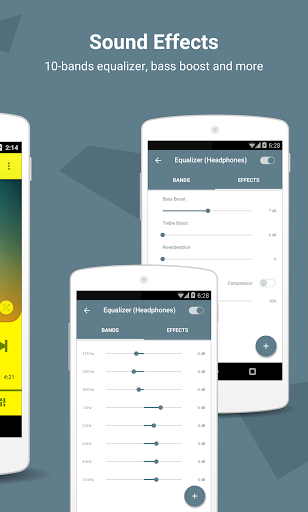
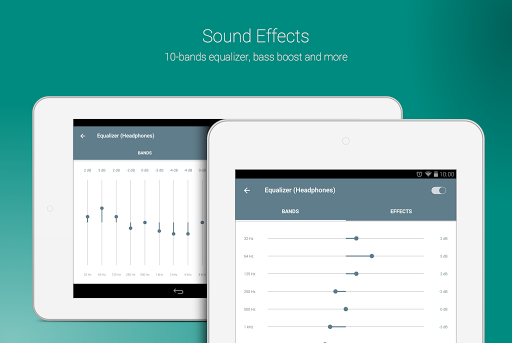
• 10 band graphic equalizer with presets
Choose standard presets or create your own. To open it tap EQL button on the right bottom corner. Then tap on On/Off button to switch it on/off.
• Sound effects
Get the best quality from your headphones using them with flexible effects. Open equalizer and swipe to the second tab with effects.
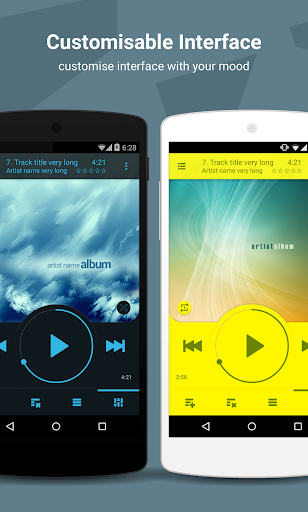
• Custom interface colors and background
Change look and feel depending on your own style. Express yourself! To customize your interface tap options menu (small gear in the top right corner or menu button on your device). Then tap on Settings -> Look and feel -> “Colors and Background” or “Skins” to change whole look of the player.
• Convenient circle rewind for audiobooks and podcasts
Tweak rewind speed for easy navigation in long tracks. Open Settings -> Controls -> Rewind speed. For example, x1/8 speed allows you to rewind in 8 full circles instead of one. It makes your navigation eight times easier.
• Volume buttons playback control
Switch tracks with volume buttons. You don’t need to pull out your phone from your pocket. It’s a great way to use NRG Player for sport. To switch on this feature open Settings -> Controls -> Volume buttons.
• Switch folders, albums or artists in one motion
Open media library by tapping on ADD button in the left bottom corner. Find your favorite directory, album or artist and tap on small play triangle button on the left side of the list item. Return to the main screen. Now you can swipe to the right or to the left on the playback queue to switch. Use NRG Player as your music player for car.
• Play all your collection in three taps
1. Tap on ADD button to open media library.
2. Tap on “Songs” tab
3. Tap on play icon in the left side of any item in the list
Playback queue will be created automatically for you. You can switch on "random" on the main screen (above forward button).
• Unique playlist system
You can select tracks in 5 categories: folders, songs, albums, artists and genres. Add them all to playlist in one touch. There are no borders between directories and media library anymore. Just press ADD button on the left bottom corner. Then tap on checkboxes on the right side of any list item. When you select everything you want just press “Add” or “Play” button.
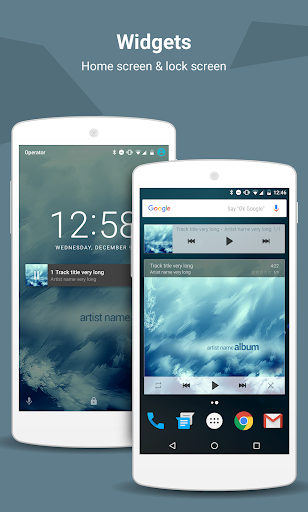
• Home screen and lock screen widgets
You can choose one of three home screen widgets: 4x1, 4x2, 4x3, and one lock screen widget!
• Headset support
Leave your device in the pocket! You can tweak your headset on the Settings screen: Settings -> Controls -> Headset.
• Id3 tags editor
You don't need to edit every track if you want to change album or artists title. Just open tag editor in album or artist category. To do that open music library, select required tab and make a long press on a list item to open context menu. Then just select “Edit tags” option. All changes will be applied automatically.
• Sleep timer
Don’t worry about sleeping with player on. It’s turn off automatically by sleep timer. To open sleep timer tap on Settings -> Controls -> Sleep timer.
Use [email protected] for bug reports.
Main features:
• Popular music format playback
Listen to songs in more than 20 popular formats.
• Lossless formats (.FLAC, .ALAC, .APE)
Listen to tracks in formats without quality loss, which your default music player couldn’t play before. Our application has it’s own audio engine.
• 10 band graphic equalizer with presets
Choose standard presets or create your own. To open it tap EQL button on the right bottom corner. Then tap on On/Off button to switch it on/off.
• Sound effects
Get the best quality from your headphones using them with flexible effects. Open equalizer and swipe to the second tab with effects.
• Custom interface colors and background
Change look and feel depending on your own style. Express yourself! To customize your interface tap options menu (small gear in the top right corner or menu button on your device). Then tap on Settings -> Look and feel -> “Colors and Background” or “Skins” to change whole look of the player.
• Convenient circle rewind for audiobooks and podcasts
Tweak rewind speed for easy navigation in long tracks. Open Settings -> Controls -> Rewind speed. For example, x1/8 speed allows you to rewind in 8 full circles instead of one. It makes your navigation eight times easier.
• Volume buttons playback control
Switch tracks with volume buttons. You don’t need to pull out your phone from your pocket. It’s a great way to use NRG Player for sport. To switch on this feature open Settings -> Controls -> Volume buttons.
• Switch folders, albums or artists in one motion
Open media library by tapping on ADD button in the left bottom corner. Find your favorite directory, album or artist and tap on small play triangle button on the left side of the list item. Return to the main screen. Now you can swipe to the right or to the left on the playback queue to switch. Use NRG Player as your music player for car.
• Play all your collection in three taps
1. Tap on ADD button to open media library.
2. Tap on “Songs” tab
3. Tap on play icon in the left side of any item in the list
Playback queue will be created automatically for you. You can switch on "random" on the main screen (above forward button).
• Unique playlist system
You can select tracks in 5 categories: folders, songs, albums, artists and genres. Add them all to playlist in one touch. There are no borders between directories and media library anymore. Just press ADD button on the left bottom corner. Then tap on checkboxes on the right side of any list item. When you select everything you want just press “Add” or “Play” button.
• Home screen and lock screen widgets
You can choose one of three home screen widgets: 4x1, 4x2, 4x3, and one lock screen widget!
• Headset support
Leave your device in the pocket! You can tweak your headset on the Settings screen: Settings -> Controls -> Headset.
• Id3 tags editor
You don't need to edit every track if you want to change album or artists title. Just open tag editor in album or artist category. To do that open music library, select required tab and make a long press on a list item to open context menu. Then just select “Edit tags” option. All changes will be applied automatically.
• Sleep timer
Don’t worry about sleeping with player on. It’s turn off automatically by sleep timer. To open sleep timer tap on Settings -> Controls -> Sleep timer.
Use [email protected] for bug reports.
App Information
Version Name
2.3.9
Version Code
2298
File Size
10.3 MB
Minimum OS
Android 6.0+
Target SDK
Android 22
Developer
NRG Software
Contact
Website
Content Rating
Everyone
Package Name
com.mrgreensoft.nrg.playerPermissions Required
This app may request the following permissions:
Recent Reviews

Rob Reinert
5.0★
Can't believe that I searched for so long to find a decent music player app that isn't 100% streaming-only! I just needed a good, reliable app to play local mp3 files that are already stored on my device. Google Play Music has now been replaced by YouTurd Music, which does nothing that I want and basically forces users to pay for the premium version if they want any kind of useful functionality. Thankfully, NRG Player does exactly what it says on the label, and does it well! 5 Stars

Thomas Kirk (Ikon64)
5.0★
This player looks great with the Carbo skin (particularly yellow or blue). Sounds great & is simple to use. Also like that it supports system Playlists. You can change the audio focus via the headphone settings. This comes into play if you are simultaneously using it with a GPS while driving. In one headphone mode it will mute the music when a GPS directing is given...& in the other headphone mode it will simultaneously play both the music & the spoken GPS directions without muting the music.

A Google user
5.0★
Very nice. Great sound and volume control. Simple to use interface. Effective equalizer. The compressor does a darned good job of balancing volume and equalizer effects, and the reverb option adds a pleasant enhancement effect that integrates with music to provide an even more enjoyable listening experience. Didnt notice a way to save equalizer and effects tweaks though. That's needed. This is a great choice for discriminating audiophiles like me, who simply must have good equalizer control.

TJ Fick
1.0★
I had this app for over 10 years now, and liked the customization of the interface and playlist capabilities. I also purchased the ad blocker. I originally gave this app a 5 star, but now reduced it to one. The app stopped allowing my bluetooth controls to work on not only my car receiver, but all my bluetooth devices. It connects, but play/stop/skip do not work. I tested my other playlist device and had no problem. I emailed developer/s and got no response. Disappointing.

Chris Ogbonna
4.0★
Sound quality of this app is the best I've ever used, my songs are usually on 195kbps but it sound lossless like a 320kbps. The only thing holding the remaining one star is the interface, I want to be able to see my high quality album art clearly. Another issue is that it duplicate some of my song, which I'm sure is one, if I delete one, the other will disappear too.
A Google user
5.0★
Best music player ever, cool design, great sound & awesome features. Registered with a monthly subscription from the first 2 minutes of usage. You can delete files from within the app, music loads fast, browsing and sorting is intuitive. The only negative thing I found: it looses star ratings after you move the rated files around, so it must have its own database for storing the ratings instead of appending them to the file. All in all great app.
Ad slot: In-Content