
Video to MP3 Converter
com.naing.mp3converter
by NAINGDroid
Screenshots




Ad slot: Top Leaderboard
About this app
Easily convert your video into MP3 or AAC format!!
** This application is NOT Youtube MP3 converter. You can convert ONLY videos that are in your device.
Step by step instructions
1) Choose Video that you want to convert
2) Choose audio format (MP3 or AAC) and Bit Rate
3) Add meta-data for MP3 format (optional)
4) Press "Convert" button
Features
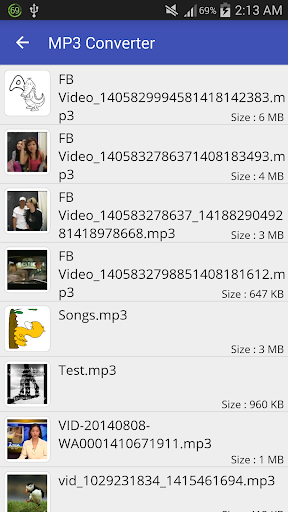
- Trim converted MP3 files or MP3 files in your device
- Merge multiple audio files into one
- Edit MP3 Meta-Data (Cover image, Title, Artist, Genre,..)
- Search lyrics with song title and artist
- Run in Background
- Output small browser
- Options (Play, Delete, Rename, Share, Edit Meta-Data, Trim, Merge)
** In-App Purchase is for Ad-Free Version
** Supports All ARM (CPU) devices
Video to MP3 Converter use LGPL ffmpeg and libmp3lame libraries as codec.
** This application is NOT Youtube MP3 converter. You can convert ONLY videos that are in your device.
Step by step instructions
1) Choose Video that you want to convert
2) Choose audio format (MP3 or AAC) and Bit Rate
3) Add meta-data for MP3 format (optional)
4) Press "Convert" button
Features
- Trim converted MP3 files or MP3 files in your device
- Merge multiple audio files into one
- Edit MP3 Meta-Data (Cover image, Title, Artist, Genre,..)
- Search lyrics with song title and artist
- Run in Background
- Output small browser
- Options (Play, Delete, Rename, Share, Edit Meta-Data, Trim, Merge)
** In-App Purchase is for Ad-Free Version
** Supports All ARM (CPU) devices
Video to MP3 Converter use LGPL ffmpeg and libmp3lame libraries as codec.
What's New
Supported Android 13
App Information
Version Name
1.5.7B
Version Code
18
File Size
12.7 MB
Minimum OS
Android 4.4+
Target SDK
Android 22
Developer
NAINGDroid
Contact
Website
Content Rating
Everyone
Package Name
com.naing.mp3converterPermissions Required
This app may request the following permissions:
Recent Reviews

Shane Julve Gomez
4.0★
Overall, the app is great.... The converting of songs to mp3 was quick and fast, I can say. However, the only thing that bothers me right now is because the app won't let my local songs (in my storage) be opened. You know.. like meta data. I wish u could fix this bug... I really want to change my other songs in my video (actually I record those songs and put it in a video so that I could change it in converting to an mp3 one), This trick I'm using tho to make a low cost version of songs I like.

A Google user
5.0★
Definitely like this app. I bought the pro version a while back to remove ads and support developer. I've now just reinstalled it and tried it again after a gap of about six months, and I must admit, I expected the ads to reappear, something which has been the case with apps I've purchased in the past. But not here. It recognises that I've already paid, so no ads reappear. Very pleased with this. 5 stars. Oh, and the app works great!

Tigere Hungwe
5.0★
I've discovered an exceptional video-to-MP3 converter app that has significantly streamlined my workflow, enabling seamless conversion of video files to audio format with ease and efficiency. A fantastic app that lets me effortlessly convert videos to MP3s – it's been a game-changer for me!
Real Saurabh
4.0★
Definitely like this app. I bought the pro version a while back to remove ads and support developer. I've now just reinstalled it and tried it again after a gap of about six months, and I must admit, I expected the ads to reappear, something which has been the case with apps I've purchased in the past. But not here. It recognises that I've already paid, so no ads reappear. Very pleased with this. 5 stars. Oh, and the app works great!

Frankie Angelo
4.0★
Probably the best mp3 converter app in my opinion, doesn't take too much time and great quality is always guaranteed, but what only bothers me is that, the sample rate is fixed at 44.1khz. Nevertheless this tool really does it's job well and 320kbps is kinda adequate, but I hope u could put more sample rate options in your future updates and could you please make the title changeable and also add an option where we could put an "E" that indicates song with explicit content
A Google user
4.0★
I love the app, takes downloaded videos and makes them into mp3. Works great, my only small critic is that if you do multiple then they all end up with the same cover image instead of their own but i can deal with it for how great it does. Never had a issue with any device not recognizing the mp3 which i have had with other converters.
Ad slot: In-Content