

Lines Pro - Icon Pack
com.natewren.lines
by Nate Wren Design
Screenshots





Ad slot: Top Leaderboard
About this app
Lines icons (pro version) are outlined shapes of the most popular apps. Included with the hand-crafted line icons are matching wallpapers, and widgets for clocks, battery and weather. Widgets offer color, size, and font customization and over 200 hand-picked wallpapers of skies, clouds, landscapes and abstract designs are included. The center of the icon outline is transparent, letting you show off your wallpaper beneath the icons. The line icons are xxxhdpi which means they're HD or high enough resolution to get cool looking lined icons on any device out there.
QUICK TIPS
You can manually edit icons in most launchers by long-pressing the icon you'd like to edit.
Widgets: If your widget stops updating, check your system or battery settings to make sure the app is exempt from battery optimization. More info at https://dontkillmyapp.com/
PRO VERSION
This is the pro version of the app. Get the free version here: https://play.google.com/store/apps/details?id=com.natewren.linesfree
HOW-TO GUIDE
http://natewren.com/apply
FEATURES
• 4,200+ hand crafted flat, clean & simple white flat HD icons with many variations of default lined icons such as phone, contacts, camera, etc.
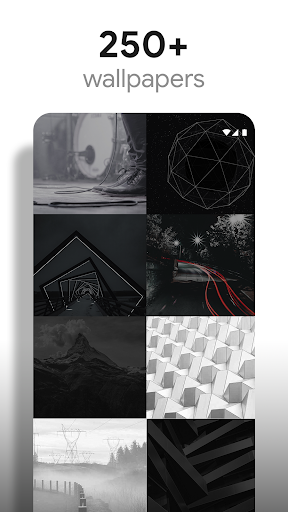
• 200+ wallpapers included. Downloadable from the cloud. Browse and save the ones you want. All wallpapers shown are included!
• XXXHDPI high definition modern, outlined transparent icons included for super large HD screens. All Icons are 192x192.
• Customized cloud/sky/landscape wallpapers. Wallpapers have been edited to show off the white icons nicely
• Most of the flat line icons are transparent letting each show the provided scenic/landscape backgrounds or to your own backgrounds.
• Wallpaper picker included
• Request more line cons via "Request" tab
• Clean, white outline icons work best with dark wallpapers.
• Muzei support for rotating wallpapers
• New icons added regularly
WIDGETS
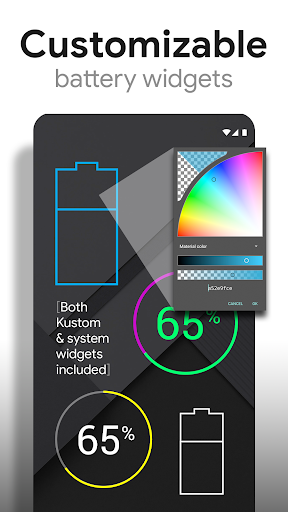
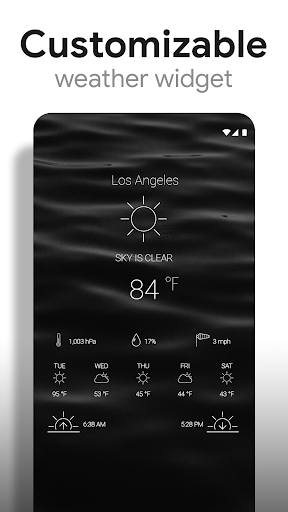
System widgets as well as editable KWGT widgets are included.
• Battery widgets
• Digital clock widgets
• Analog clock widget
• Weather widgets
DISCLAIMER
You may need a 3rd party launcher to apply the icon pack. Please download a launcher (Nova, Evie, Microsoft, etc.) before installing.
COMPATIBLE LAUNCHERS
• Nova Launcher (Recommended)
• Microsoft Launcher (Apply via launcher settings)
• Evie Launcher (Apply via launcher settings)
• Poco Launcher
• ADW Launcher
• Yandex Launcher (Apply via launcher settings)
• Action Launcher
• Apex Launcher
• Atom Launcher
• Aviate Launcher
• Go Launcher
• Holo Launcher
• Inspire Launcher
• KK Launcher
• Lucid Launcher
• Next Launcher
• Nine Launcher
• Solo Launcher
• Smart Launcher
• Themer
• TSF
Nova is recommended for the best experience and supports icon name search when manually applying icons. For more info on searching while manually applying icons please visit https://natewren.com/manually-edit-icons/.
HOW TO APPLY ICONS VIA ICON PACK
1. Open the app after installing
2. Navigate to "Apply" tab
3. Select your Launcher
HOW TO APPLY ICONS VIA LAUNCHER
1. Open Launcher settings by tapping + holding on an empty area of home screen
2. Select personalization options
3. Select icon pack
FOLLOW ME
Twitter: https://twitter.com/natewren
QUESTIONS/COMMENTS
[email protected]
http://www.natewren.com
QUICK TIPS
You can manually edit icons in most launchers by long-pressing the icon you'd like to edit.
Widgets: If your widget stops updating, check your system or battery settings to make sure the app is exempt from battery optimization. More info at https://dontkillmyapp.com/
PRO VERSION
This is the pro version of the app. Get the free version here: https://play.google.com/store/apps/details?id=com.natewren.linesfree
HOW-TO GUIDE
http://natewren.com/apply
FEATURES
• 4,200+ hand crafted flat, clean & simple white flat HD icons with many variations of default lined icons such as phone, contacts, camera, etc.
• 200+ wallpapers included. Downloadable from the cloud. Browse and save the ones you want. All wallpapers shown are included!
• XXXHDPI high definition modern, outlined transparent icons included for super large HD screens. All Icons are 192x192.
• Customized cloud/sky/landscape wallpapers. Wallpapers have been edited to show off the white icons nicely
• Most of the flat line icons are transparent letting each show the provided scenic/landscape backgrounds or to your own backgrounds.
• Wallpaper picker included
• Request more line cons via "Request" tab
• Clean, white outline icons work best with dark wallpapers.
• Muzei support for rotating wallpapers
• New icons added regularly
WIDGETS
System widgets as well as editable KWGT widgets are included.
• Battery widgets
• Digital clock widgets
• Analog clock widget
• Weather widgets
DISCLAIMER
You may need a 3rd party launcher to apply the icon pack. Please download a launcher (Nova, Evie, Microsoft, etc.) before installing.
COMPATIBLE LAUNCHERS
• Nova Launcher (Recommended)
• Microsoft Launcher (Apply via launcher settings)
• Evie Launcher (Apply via launcher settings)
• Poco Launcher
• ADW Launcher
• Yandex Launcher (Apply via launcher settings)
• Action Launcher
• Apex Launcher
• Atom Launcher
• Aviate Launcher
• Go Launcher
• Holo Launcher
• Inspire Launcher
• KK Launcher
• Lucid Launcher
• Next Launcher
• Nine Launcher
• Solo Launcher
• Smart Launcher
• Themer
• TSF
Nova is recommended for the best experience and supports icon name search when manually applying icons. For more info on searching while manually applying icons please visit https://natewren.com/manually-edit-icons/.
HOW TO APPLY ICONS VIA ICON PACK
1. Open the app after installing
2. Navigate to "Apply" tab
3. Select your Launcher
HOW TO APPLY ICONS VIA LAUNCHER
1. Open Launcher settings by tapping + holding on an empty area of home screen
2. Select personalization options
3. Select icon pack
FOLLOW ME
Twitter: https://twitter.com/natewren
QUESTIONS/COMMENTS
[email protected]
http://www.natewren.com
What's New
Added 80 Icons to Pro Version
Added 20 Icons to Free Version
Now Targeting SDK version 35
Updated Appfilter - fixes to un-themed icons
Current Pro Version Icon Count: 5,470
Current Pro Version Icon Count: 2,637
If you've purchased an Icon Pack, thanks for your support!
For Updates: @natewren on bluesky | @natewrendesign on insta
Added 20 Icons to Free Version
Now Targeting SDK version 35
Updated Appfilter - fixes to un-themed icons
Current Pro Version Icon Count: 5,470
Current Pro Version Icon Count: 2,637
If you've purchased an Icon Pack, thanks for your support!
For Updates: @natewren on bluesky | @natewrendesign on insta
App Information
Version Name
1.0.9
Version Code
109
File Size
31.9 MB
Minimum OS
Android 4.4+
Target SDK
Android 23
Developer
Nate Wren Design
Contact
Website
Content Rating
Everyone
Package Name
com.natewren.linesPermissions Required
This app may request the following permissions:
Recent Reviews
Shana
5.0★
I reviewed the free version back in 2022 (mentioned I bought Pro not even a few days later because I loved it, after trying god-knows-how many other ones). I've used just Pro since that review! 😊 I'm constantly amazed by how frequently the developer adds dozens of new ones—sometimes in one day!! And same as I said: even if an app doesn't have a specific icon already, you have sooo many others that fit perfectly, or alts if you don't like the default! I can't go without this pack now 💜

A Google user
5.0★
I love Lines and Lines Dark... One thing I really like is editing any of my app icons to anything in the collections. One thing that would make it perfect is to be able to change the style of the font for the digital clock to something other than Roboto. In 2018, I found this app. Now it's 2025, and this has been my Go-To... Thank you, Mr Wren
A Google user
3.0★
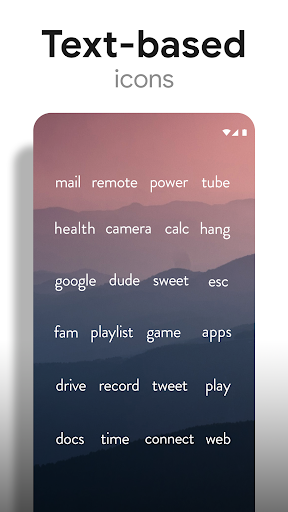
Very upset, they updated and removed icons I've been using and now the whole point of this icon pack is worthless. Edit: I suppose technically the icons were not removed but rather the font changed for the word based icons. The font is now rounder, bolder, and uses all lowercase, as opposed to a previous version which had more formal thinner typeface. Edit: Also I am now assuming that you are just a graphic designer based on the nature of the product along with the name associated with ownership of the download and not a big company and I apologize for being harsh but I'm accustomed to throwing my frustrations at large companies expecting it to not do much, but I realize that that is probably not the case with you and the review have a direct impact on your life and are a review of your personal work. Having said that I'm gonna bump this up to a 4 because I appreciate your work but am still upset about the change of typeface.

Allison Romane
5.0★
I've been using these icons for a couple years now and I love the aesthetic. It goes with just about any dark wallpaper, which is what I prefer (I'm a dark-mode girl) NO ADS and a huge amount of icons that automatically assign to the apps they're meant for. There are some apps that it doesn't have, but most of those are region-specific. I just do a couple minutes of editing on the logo and use the remove.bg website HIGHLY HIGHLY RECOMMEND

Gregory Havens
5.0★
This is the best icon I've tried out of many others. A big part of what separates this from the others, is when an obscure app isn't supported it intuitively creates an icon for it ( admittedly not as good looking as supported ones, but does the trick) so it doesn't stick out. You don't have a random colored icon in there. Do you offer any color lines? I'd gladly buy a red. I only saw gold in the store. Great app.

Crackers McQuackers
5.0★
Hands down the absolute best icon Library available. There are pre-made icons for literally thousands of different apps. Clean simple white lines really clean up my phone's UI and provide a nice neutral contrast to my custom wallpapers. And the customizability of the pro pack is just unmatched. I'd give it 10 Stars if I could, paying for the pro version was an absolute no-brainer.
Ad slot: In-Content