

DreamMapper
com.philips.sleepmapper.root
by Philips Respironics
Screenshots


Ad slot: Top Leaderboard
About this app
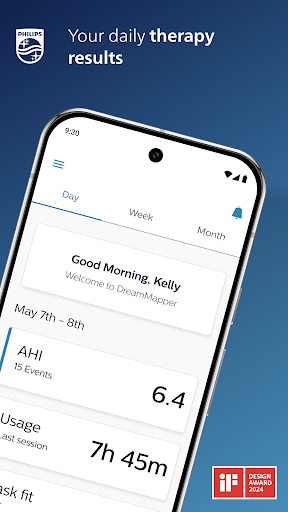
Achieving a great night’s sleep with CPAP therapy happens when you take an active role in your own therapy. That means being in tune with how your therapy and equipment are performing – and how they should be performing – from night to night. DreamMapper is a mobile and web application that keeps you actively informed about your previous night’s therapy – with information like mask fit and therapy hours – so you know you are getting what’s needed for the great night’s sleep you deserve.
DreamMapper provides all of the following:
• Bluetooth® data transfer from your Philips PAP;
• Daily feedback about your treatment and your therapy results;
• Personalize your treatment management by setting alerts and personal goals;
• Find the answers to your questions through a rich content including informational videos and guides;
• Receive notifications about your therapy and your DreamMapper compatible equipment;
Learn more about DreamMapper and the Philips devices it supports at www.dreammapper.com.
Philips CPAP devices treat Obstructive Sleep Apnea (OSA) so that you can sleep better at night and be more active during the day.
Part of the Dream Family
DreamMapper is part of the Dream Family from Philips Respironics. The Dream Family offers innovative, comprehensive sleep therapy technology like:
• DreamWear: It looks different because it is different. The ingenious open-face design provides exceptional comfort with an optimal fit, easy freedom of movement and the ability to choose your most comfortable sleep position. DreamWear is User-friendly in every possible way.
• DreamStation: Embrace your care with confidence with our most innovative obstructive sleep apnea (OSA) technology. With easy-to-navigate menus, remote diagnostics, a sleek, compact profile and incredibly quiet operation, DreamStation helps make it simple to start, customize and continue your OSA therapy.
• DreamStation Go: Whether you’re traveling for business or venturing out on the vacation of a lifetime, DreamStation Go provides an easy, reliable and portable PAP experience for users who refuse to compromise.
Philips DreamMapper has access to the following permissions:
Location
Approximate location (network-based): This is to set up Bluetooth communication. A location is required to acquire the pair.
Photos/Media/Files
Read the contents of your USB storage: This is needed to access the scanned and stored image that the camera takes of the Device Serial Number (DSN).
Storage
Read the contents of your USB storage: This is a way to access the DSN image that might be stored on the SD card (some Androids devices store images to the SD card). This is the default behavior when you ask for the Photo/Media/Files access.
Camera
Take pictures and videos: Used to scan the DSN.
Other reasons
Receive data from Internet: DreamMapper needs to communicate with its Data Center.
View network connections: Wi-Fi setup as well as the need for DreamMapper to communicate with its Data Center.
Pair with Bluetooth devices: First-time connection to another Bluetooth device.
Access Bluetooth settings: First-time connection to another Bluetooth device.
Full network access: DreamMapper needs to communicate with its Data Center.
Prevent device from sleeping: Prevents the phone from “going to sleep” while playing videos.
DreamMapper provides all of the following:
• Bluetooth® data transfer from your Philips PAP;
• Daily feedback about your treatment and your therapy results;
• Personalize your treatment management by setting alerts and personal goals;
• Find the answers to your questions through a rich content including informational videos and guides;
• Receive notifications about your therapy and your DreamMapper compatible equipment;
Learn more about DreamMapper and the Philips devices it supports at www.dreammapper.com.
Philips CPAP devices treat Obstructive Sleep Apnea (OSA) so that you can sleep better at night and be more active during the day.
Part of the Dream Family
DreamMapper is part of the Dream Family from Philips Respironics. The Dream Family offers innovative, comprehensive sleep therapy technology like:
• DreamWear: It looks different because it is different. The ingenious open-face design provides exceptional comfort with an optimal fit, easy freedom of movement and the ability to choose your most comfortable sleep position. DreamWear is User-friendly in every possible way.
• DreamStation: Embrace your care with confidence with our most innovative obstructive sleep apnea (OSA) technology. With easy-to-navigate menus, remote diagnostics, a sleek, compact profile and incredibly quiet operation, DreamStation helps make it simple to start, customize and continue your OSA therapy.
• DreamStation Go: Whether you’re traveling for business or venturing out on the vacation of a lifetime, DreamStation Go provides an easy, reliable and portable PAP experience for users who refuse to compromise.
Philips DreamMapper has access to the following permissions:
Location
Approximate location (network-based): This is to set up Bluetooth communication. A location is required to acquire the pair.
Photos/Media/Files
Read the contents of your USB storage: This is needed to access the scanned and stored image that the camera takes of the Device Serial Number (DSN).
Storage
Read the contents of your USB storage: This is a way to access the DSN image that might be stored on the SD card (some Androids devices store images to the SD card). This is the default behavior when you ask for the Photo/Media/Files access.
Camera
Take pictures and videos: Used to scan the DSN.
Other reasons
Receive data from Internet: DreamMapper needs to communicate with its Data Center.
View network connections: Wi-Fi setup as well as the need for DreamMapper to communicate with its Data Center.
Pair with Bluetooth devices: First-time connection to another Bluetooth device.
Access Bluetooth settings: First-time connection to another Bluetooth device.
Full network access: DreamMapper needs to communicate with its Data Center.
Prevent device from sleeping: Prevents the phone from “going to sleep” while playing videos.
What's New
Major enhancements and minor fixes
App Information
Version Name
2.35.0
Version Code
145
File Size
13.7 MB
Minimum OS
Android 8.0+
Target SDK
Android 34
Developer
Philips Respironics
Contact
Website
Content Rating
Everyone
Package Name
com.philips.sleepmapper.rootPermissions Required
This app may request the following permissions:
Recent Reviews

Brian Brock
1.0★
Edit: apparently excluding the past night's sleep is a "feature." 👎 Edit: after the last update, I miss the bar graph comparing the past few days. It was replaced with a weekly and monthly average. I liked having the daily comparison right there on the screen handy, so I could see on the short term how I was doing compared to prior nights. It also doesn't seem to sync data as consistently as it used to. Deducting a couple stars for adding features I don't want and removing ones I used.

Billy Pollard
1.0★
If I could give this a Negative 5 stars, I would. The update is just horrible, whoever came up with this version ought to be fired!!! Bar graph missing, won't sync, can't get rid of the "Did you know" banner, constantly needing to pair Bluetooth, the UI is horrible. This is absolutely garbage; bring back the prior version.

Sharon Roberts
3.0★
Updated: Since the recent update/ overhaul the app's interface is MUCH improved. That said, there are still issues. For one, I have to really fight with it to get it to sync. For another, I don't need to set reminders to tell me to clean the thing or see my doctor, but I can't get it to stop telling me about the importance of doing those things and telling me to set reminders. Lastly, it knows which machine I have and it keeps showing me videos that aren't applicable to my machine.

Robert Greenbank
1.0★
This app used to be great, until they updated it. The sync rarely works until I re-pair the device. The 10-day bar graph is no longer there, which was a great at-a-glance staus. This can't be the same programming staff that created the original version -- I've been in IT for 45 years, and if I was their manager, they would be gone quick! Get with it, Phillips!

Mikey G
1.0★
Agree with all 1 Star reviews, ever since the last update this app truly sucks! It doesn't upload data from the machine every time. It has multiple blank days, I have done all the trouble shooting and still missing over a week of data (and counting) that the machine shows. After reading all the issues with contacting the apps tech team, I see no reason to do so. At this point I feel I may as well uninstall it!

Randy Steinberg
3.0★
Great for what it is. I wish it provided more data, specifically around timestamps. Start and end times for each night, start and end times for each apnea, and a graph of pressures would be three examples. The unit probably already tracks those anyway. 2025 update: can't get the app to pull data from the machine. Luckily, I'm almost due for a replacement machine.
Ad slot: In-Content