

Sketch by Rasm - draw & paint
com.raed.sketchbook
by Sketch by Rasm
Screenshots
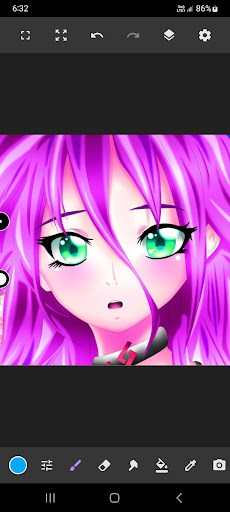
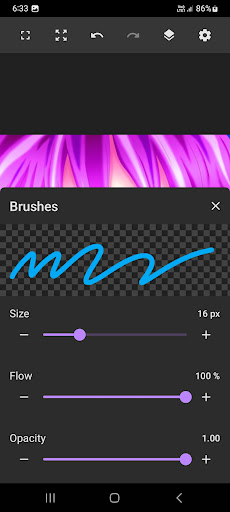


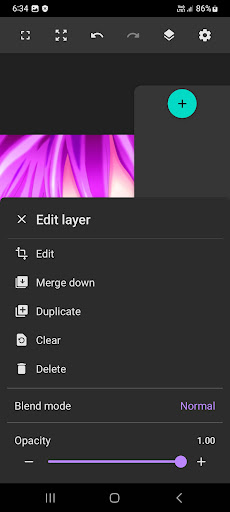


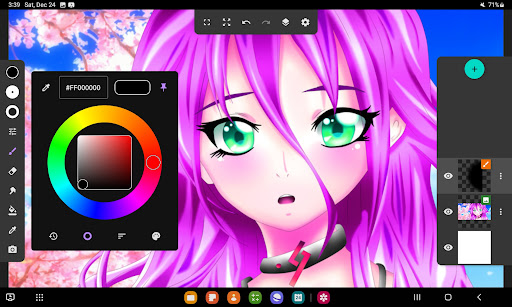



Ad slot: Top Leaderboard
About this app
Our art studio is not just a simple drawing app. It's a comprehensive platform designed to provide artists of all skill levels with a powerful toolset for creating digital art.. With our digital drawing
app, you get access to a wide range of tools that allow you to create stunning digital art that looks and feels like traditional media.
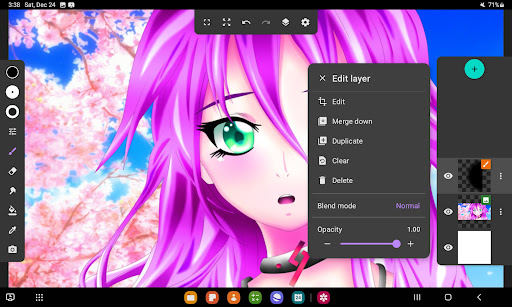
Our app's sketch pad is designed to be the perfect place to start sketching on your own. The interface of the art studio app is intuitive and easy to use, with a range of tools that allow you to get started right away. You can choose from different brush types, sizes, and styles to create the perfect stroke for your artwork, and create layers with our layers feature.
If you're searching for drawing apps for iPad for free, you've come to the right place!
One of the key features of our app is its powerful brush tools. You can create strokes of different sizes and styles, allowing you to create everything from detailed sketching to abstract artwork. Our brush tools are designed to give you complete control over your drawings, so you can create exactly what you have in mind. You can bring your characters to life with vibrant colors and intricate details for anime coloring, manga and more.
Our layers feature is another powerful drawing editor tool especially for digital art. Layers tool allows you to organize your artwork and experiment with different ideas. You can create as many layers as you need, and easily move them around or adjust their opacity to create the perfect effect. And with our editing options, you can refine your work until it's perfect, without losing any of the details you've already added.
If you are looking for drawing apps for ipad for free, you are in the right place!
Our drawing app is designed to be flexible and customizable. With Sketch Pad Art Studio you have everything you need to unleash your creativity and create digital art that's truly stunning! Whether you're an experienced artist or just starting out, our free drawing apps provide you with a comprehensive platform for creating beautiful digital art. So what are you waiting for? Download our art studio today and start exploring the exciting world of digital art!
app, you get access to a wide range of tools that allow you to create stunning digital art that looks and feels like traditional media.
Our app's sketch pad is designed to be the perfect place to start sketching on your own. The interface of the art studio app is intuitive and easy to use, with a range of tools that allow you to get started right away. You can choose from different brush types, sizes, and styles to create the perfect stroke for your artwork, and create layers with our layers feature.
If you're searching for drawing apps for iPad for free, you've come to the right place!
One of the key features of our app is its powerful brush tools. You can create strokes of different sizes and styles, allowing you to create everything from detailed sketching to abstract artwork. Our brush tools are designed to give you complete control over your drawings, so you can create exactly what you have in mind. You can bring your characters to life with vibrant colors and intricate details for anime coloring, manga and more.
Our layers feature is another powerful drawing editor tool especially for digital art. Layers tool allows you to organize your artwork and experiment with different ideas. You can create as many layers as you need, and easily move them around or adjust their opacity to create the perfect effect. And with our editing options, you can refine your work until it's perfect, without losing any of the details you've already added.
If you are looking for drawing apps for ipad for free, you are in the right place!
Our drawing app is designed to be flexible and customizable. With Sketch Pad Art Studio you have everything you need to unleash your creativity and create digital art that's truly stunning! Whether you're an experienced artist or just starting out, our free drawing apps provide you with a comprehensive platform for creating beautiful digital art. So what are you waiting for? Download our art studio today and start exploring the exciting world of digital art!
What's New
Bug fix
App Information
Version Name
5.0.0
Version Code
121
File Size
100.0 MB
Minimum OS
Android 6.0+
Target SDK
Android 34
Developer
Sketch by Rasm
Contact
Website
Content Rating
Everyone
Package Name
com.raed.sketchbookPermissions Required
This app may request the following permissions:
Recent Reviews

Aaron Shirley
4.0★
It has layers and undo which makes it very good, but 3 important things are missing which would make it great: -1 text editor. It used to have it, where did it go?? -2 crop tool. I have to bring everything I do into android photo gallery to crop properly before I share it. -3 words of any kind. It has a steep learning curve because everything you do is by trial and error. Nothing is labled! There are still 3 instruments in there that I have no idea what they're supposed to do.

Ryleh Rapplean
3.0★
Good variety of pens & colors, but it doesn't have any sort of pressure sensitivity. It might not matter if you're completely new to digital (you could get used to it), but if you're coming from a computer & looking for an app to make your phone a quick sketch book where you can finish on your drawings later on bulkier software, this probably isn't your app. Also, the upper limit for image size is only around 4000x4000 pixels, which again, could work, but isn't ideal & it was laggy w/ that #.

huh really
5.0★
Simple and sweet. Surpasses my default Quickmemo, which basically nothing before has been able to. It's an app really made for those moments when you suddenly come up with a drawing inspiration, idea, or just feel motivated to sketch. Since the layer system is simple, you can even use the import image option over and under a simple drawing that has a plain background to edit sketches from other apps or software. The ads aren't overly obtrusive in an app for once.

A Google user
4.0★
A simple drawing tool that has layering. I use it on my phone so it is nearly impossible to draw. Yet the layering functionality and basic shapes allow easy creation of icons and simple ui elements. I cannot comment on the actual drawing part. It works well. One function that would be sublime in it would be a merge delete where you could cut a shape from another.

Ekō
4.0★
It's honestly a good app, i like the brushes and the differant textures they give off. Unfortunately i could not find the color option so i could not change the color. It would also be nice if you could tilt the screen and move it around, instead of zoom in and zooming out and side to side. It would really help to turn it upside down or something. Other than that it is a really good app it ran smoothly and i didn't have to buy anything.

Shazarii
3.0★
It was a decent drawing app, i like how you are able to use several layers and the unlimited color choice... although for me there are some downsides to it... there are some things about this app that makes it seem a little lackluster... like for instance there arent a lot of tools you could choose from... and i also dont really like the fact that when you scroll down to change the size of the pen tool and the minimum size of the pen tool is still a little big for me... i like using fine lines.
Ad slot: In-Content