

Audio Remote
com.samsung.samsungband
by Samsung Electronics Co., Ltd.
Screenshots

Ad slot: Top Leaderboard
About this app
Samsung Audio Remote is an exclusive, integrated audio device control app that can control the Samsung GIGA system and Soundbar through Bluetooth.
Compatible Models
Soundbar : Y15 / Y16 / Y17 / Y18 / Y19 models (HW-J / HW-K / HW-M / HW-N / HW-R) 2 / 3 / 4 / 5 / 6 series, HW-J6000(R) and HW-Q6*R Series.
(Download "Wireless Audio - Multiroom" App for soundbar Wi-Fi supporting models)
GIGA : Model code MX-J***, MX-JS**** series
(excluding micro and non-bluetooth mini models : MX-J640, MM-J430D, MM-J330, MM-J320)
Control Soundbar with one hand! -
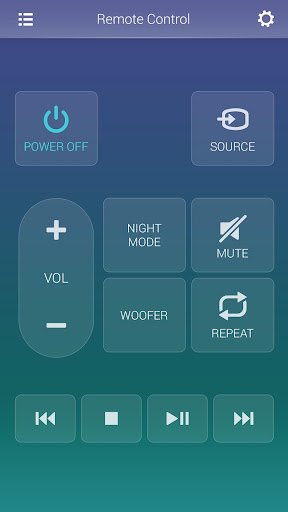
You can connect your mobile with Soundbar to easily use the Soundbar remote control function while watching TV. You can also easily play music from your smartphone through Soundbar.
Maximize your GIGA Party -
Simple music playback and playlist control!
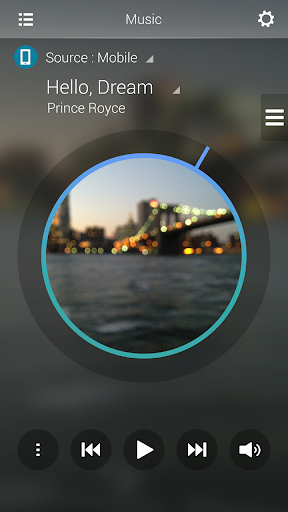
You can play any music you want from your smartphone, USB, or CDs. You can also make a queue to hear only the songs you want. You can conveniently use equalizer settings and wireless remote control features.
Create your party yourself!
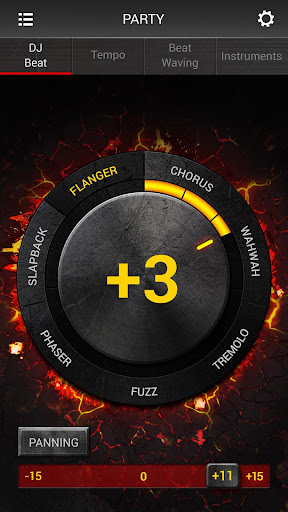
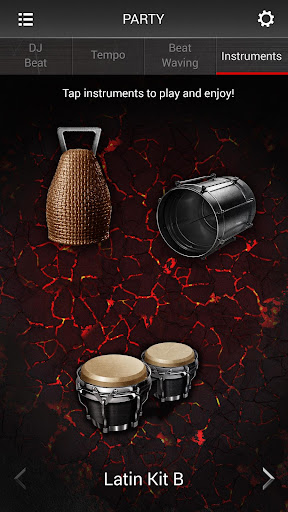
Enjoy the feeling of becoming a DJ through 7 DJ effects, panning effects, and music speed control. You can freely control the speaker lighting color and create a party atmosphere. You can even enjoy about 20 instruments with your own performance through DJ sound.
Sports broadcasts are that much more exciting!
Enjoy Samsung TV's sports broadcasts through TV SoundConnect and boost the announcer's voice or stadium background noise depending on your preference. Make sports broadcasts even more fun with cheering, jeering, vuvuzela, or siren noises.
Notice
Depending on the audio model, some features may not be supported.
May not operate smoothly, not be supported, or screen display problems may occur depending on your phone or the policy of telecom operators.
Check the Bluetooth volume when using other Bluetooth devices after using the app and then use.
Please update to the latest version to use.
Compatible Models
Soundbar : Y15 / Y16 / Y17 / Y18 / Y19 models (HW-J / HW-K / HW-M / HW-N / HW-R) 2 / 3 / 4 / 5 / 6 series, HW-J6000(R) and HW-Q6*R Series.
(Download "Wireless Audio - Multiroom" App for soundbar Wi-Fi supporting models)
GIGA : Model code MX-J***, MX-JS**** series
(excluding micro and non-bluetooth mini models : MX-J640, MM-J430D, MM-J330, MM-J320)
Control Soundbar with one hand! -
You can connect your mobile with Soundbar to easily use the Soundbar remote control function while watching TV. You can also easily play music from your smartphone through Soundbar.
Maximize your GIGA Party -
Simple music playback and playlist control!
You can play any music you want from your smartphone, USB, or CDs. You can also make a queue to hear only the songs you want. You can conveniently use equalizer settings and wireless remote control features.
Create your party yourself!
Enjoy the feeling of becoming a DJ through 7 DJ effects, panning effects, and music speed control. You can freely control the speaker lighting color and create a party atmosphere. You can even enjoy about 20 instruments with your own performance through DJ sound.
Sports broadcasts are that much more exciting!
Enjoy Samsung TV's sports broadcasts through TV SoundConnect and boost the announcer's voice or stadium background noise depending on your preference. Make sports broadcasts even more fun with cheering, jeering, vuvuzela, or siren noises.
Notice
Depending on the audio model, some features may not be supported.
May not operate smoothly, not be supported, or screen display problems may occur depending on your phone or the policy of telecom operators.
Check the Bluetooth volume when using other Bluetooth devices after using the app and then use.
Please update to the latest version to use.
What's New
2019 New Soundbar Models Support
App Information
Version Name
1.3.7
Version Code
7
File Size
20.0 MB
Minimum OS
Android 4.0+
Target SDK
Android 19
Developer
Samsung Electronics Co., Ltd.
Contact
Content Rating
Everyone
Package Name
com.samsung.samsungbandPermissions Required
This app may request the following permissions:
Recent Reviews

Antionette Kuhnert
1.0★
This app worked great and now I can together past the main screen of how to use the app. What did you guys do to it. Someone said there's a red bar at the bottom to skip. Yeah... can't tap it. It's barely visible. Sound bar didn't come with a remote. Wasn't in the box but wasn't a big deal... I had the app. Hope this might get fixed some day ??

Ryan Richeson
1.0★
Used to be able to actually use it as a remote, now you can't even get past the screen where it explains how to use it. It says tap in the top left corner to use the remote, and yet it does nothing. The only thing you can do is control volume or exit the app completely. Used to be able to change the sound settings, adjust the sub, everything the remote did and now its just garbage. Great job guys 🙄

Stephanie Snyder
3.0★
There's a bug at the tutorial where the red bar that allows you to skip is hidden below my actual phone screen. I was just able to get past it when I googled how to use the app (lol). Click the right hand lower screen, should get past it that way. The only other issue is it defaults to the "no playing" instead of the remote setting after closing the app. Other than that, I can do what I need, now that I'm past the tutorial.

Marco Garcia
4.0★
So for anyone having trouble using it. There's an x on the bottom of the instruction page thats usually blocked by the navigation bar. You have to change the app to full screen or get the bar to go away to close it. Once you do you can change your settings back. But you have to close that message on the bottom of the screen before you can continue to use the app. Hope that helps yall out.

A Google user
2.0★
Not completely useless, but the display is definitely not correct on a Note 10, you cannot see the bottom part of the display to dismiss the Intro/Help text. You can press repeatedly on the lower right corner to dismiss though. After dismissing, in Settigns you can disable Help Text and it won't pop up again. it's odd that the equalizer you have to access from Now Playing and cannot from Remote Control, but it does work, so that's worth something.

Kat
2.0★
Not a great app, but it's the only one that sometimes works with our soundbar. We lost the remote so this is the only way we can control it without getting up to press the physical buttons every time. It crashes as soon as you open it a lot of the time and it becomes unusable and it will randomly change the input of the soundbar while you're watching something. I desperately wish they would fix this app and improve it
Ad slot: In-Content