

Voice Recorder Pro
com.splendapps.voicerec
by Splend Apps
Screenshots
Ad slot: Top Leaderboard
About this app
Voice recorder - Audio recorder
Voice Recorder is free, full-featured, beautifully designed and easy to use audio recording app for android.
Our sound recorder provides high quality recordings without limits of time (only limited by memory size).
You can use it as a regular dictaphone for record voice notes and memos, business meetings, interviews, lectures, speeches, concerts, sleep talking :) or anything else.
This audio recorder works well on smartphones and tablets, with and without external storage.
More features and details
• 4 Different audio formats: MP3, high quality PCM (wav), good quality AAC (m4a/mp4) and AMR (3gp) to save space
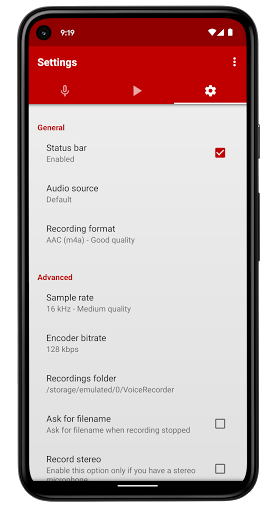
• Adjustable sample rate from phone quality (8 kHz) up to CD quality (44 kHz)
• Changeable bitrate from 32 up to 320 kbps
• Support for stereo and mono recording
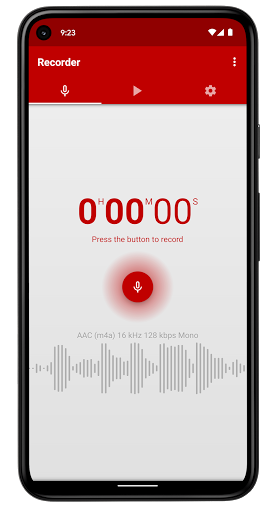
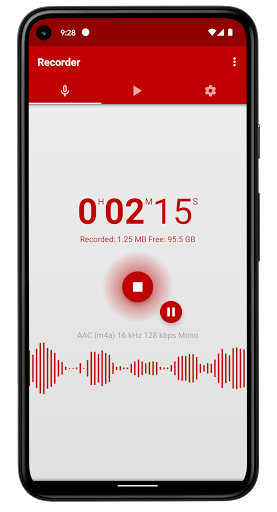
• Live audio spectrum analyzer
• Recording in background even when screen is off
• Customizable recordings folder
• Selectable audio source (microphones or phone call)
NOTE: This app is not dedicated call recorder and may not work properly on some devices.
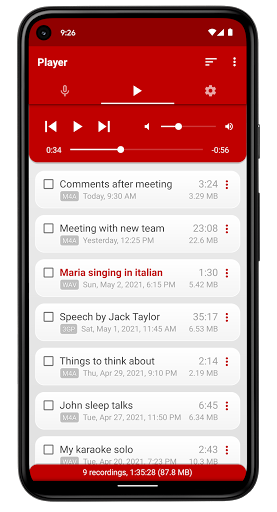
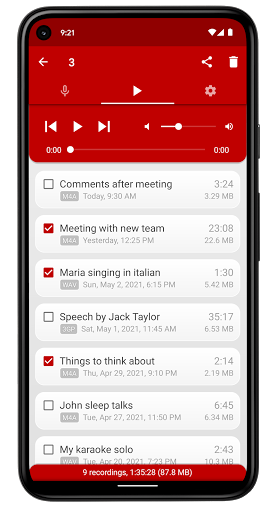
• Built-in user-friendly media player with volume control exactly like in a regular mp3 player
• Send and share via e-mail and other apps
• Rename and delete your recordings
• Set recording as ringtone, alarm or notification sound
• Open with option allows you to play and edit sounds in other apps
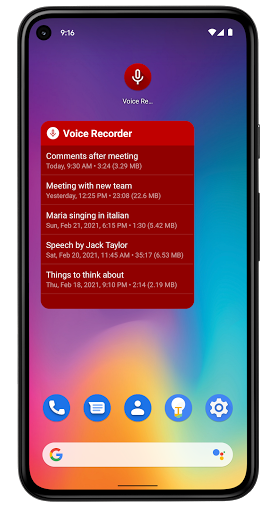
• Resizable widget displays your recordings and provides quick access to the app
• Control recorder and player from the status bar
• Blinking LED notification during recording and playing when screen is off (for devices with notifiation LED)
• Automatic stop when out of memory
• Stop recording or playing when active call
• Auto start recording
• Share and delete multiple files at the same time (long-click selection support)
• Sorting recordings by date, name, size and duration
• Saving sounds to android media library
About Us
• Visit SplendApps.com: http://splendapps.com/
• Our Privacy Policy: http://splendapps.com/privacy-policy
• Contact Us: http://splendapps.com/contact-us
Follow Us
• Facebook: https://www.facebook.com/SplendApps/
• Instagram: https://www.instagram.com/splendapps/
• Twitter: https://twitter.com/SplendApps
Voice Recorder is free, full-featured, beautifully designed and easy to use audio recording app for android.
Our sound recorder provides high quality recordings without limits of time (only limited by memory size).
You can use it as a regular dictaphone for record voice notes and memos, business meetings, interviews, lectures, speeches, concerts, sleep talking :) or anything else.
This audio recorder works well on smartphones and tablets, with and without external storage.
More features and details
• 4 Different audio formats: MP3, high quality PCM (wav), good quality AAC (m4a/mp4) and AMR (3gp) to save space
• Adjustable sample rate from phone quality (8 kHz) up to CD quality (44 kHz)
• Changeable bitrate from 32 up to 320 kbps
• Support for stereo and mono recording
• Live audio spectrum analyzer
• Recording in background even when screen is off
• Customizable recordings folder
• Selectable audio source (microphones or phone call)
NOTE: This app is not dedicated call recorder and may not work properly on some devices.
• Built-in user-friendly media player with volume control exactly like in a regular mp3 player
• Send and share via e-mail and other apps
• Rename and delete your recordings
• Set recording as ringtone, alarm or notification sound
• Open with option allows you to play and edit sounds in other apps
• Resizable widget displays your recordings and provides quick access to the app
• Control recorder and player from the status bar
• Blinking LED notification during recording and playing when screen is off (for devices with notifiation LED)
• Automatic stop when out of memory
• Stop recording or playing when active call
• Auto start recording
• Share and delete multiple files at the same time (long-click selection support)
• Sorting recordings by date, name, size and duration
• Saving sounds to android media library
About Us
• Visit SplendApps.com: http://splendapps.com/
• Our Privacy Policy: http://splendapps.com/privacy-policy
• Contact Us: http://splendapps.com/contact-us
Follow Us
• Facebook: https://www.facebook.com/SplendApps/
• Instagram: https://www.instagram.com/splendapps/
• Twitter: https://twitter.com/SplendApps
What's New
Usability improvements and minor bug fixes.
App Information
Version Name
2.0.4
Version Code
32
File Size
3.3 MB
Minimum OS
Android 6.0+
Target SDK
Android 23
Developer
Splend Apps
Contact
Website
Content Rating
Everyone
Package Name
com.splendapps.voicerecPermissions Required
This app may request the following permissions:
Recent Reviews

Ret Robertson
5.0★
Fantastic app. I've been using it for a very long time now (have been remiss regarding leaving a review), but can honestly say I've had no negative issues with it whatsoever. Easy to use. Clear sound. Can put a title to the recordings. No intrusive ads. What more can you want? I would most definitely recommend this recording app!

Christopher Hurley
1.0★
Ruined a funeral. Play another full screen video ad at full volume, and make sure i can't back out of it while you're at it. Not if, but when i find you. I'm gonna put your $3 where you will never, ever, ever lose it. Bet. Also, your app would be awesome if not for the false premise and insulting inability to select external microphones. Notably, Bluetooth ones. So, on to the next trash app to try again.

A Google user
5.0★
Great choice for a voice recorder. I tried a few and I like this one the best. Real time audio information on record (volume, activity) which is nice, good range of formats to record in - with many options to adjust file size and quality. Picks up sound adequately but that is more of a phone thing I think - I dont really need a gain booster (which this lacks) Ads.. whatever. Lacks an editor but just get a dedicated app for that. A solid choice choice for recording a lecture and sharing. Ty

Tami Walstrom
5.0★
LOVE IT. The recordings are very clear and balanced, even when people are at varying distances from the mic ... and I do not even have it set at its highest quality. It let's me record conversations in the room even when Bluetoothed to my earbuds. In case the developers read this, I'd love the option to not show the giffy of the"recording" on the bottom of the record screen - for some reason it makes some people nervous. Also, I ADORE the red color scheme but I also like gray, so being able to

Pamela Bickett
3.0★
Does not record phone calls and stops recording if you make or take a call while recording. I did not use for phone calls so that was okay. Recording was great, clear and no issues until I tried sharing. The file sizes were too big to just text or in most cases email. I ended up sharing some to my Google drive but it was inconsistent & took forever to upload, many times just quitting after uploading 75% for 2 minutes...very frustrating. Also as others have said, can't find files outside app.
A Google user
4.0★
I like using it. However I find it really annoying I can't use different recordings at once for my ringtone, notifications and alarm. Meaning if I choose a recording for my notifications, ring tone or alarm, I'm only given the option to use the same recording for the others or the other default sounds that came with the phone. I can't use a different recording for each thing. Unless there's something I missed.
Ad slot: In-Content