

Teen Time - Parental Control
com.teentime.parent
by Parental Control App by Teen Time
Screenshots




Ad slot: Top Leaderboard
About this app
Teen Time - Parental Control, Screen Time & GPS app is the perfect tool to manage your kid's mobile device usage.
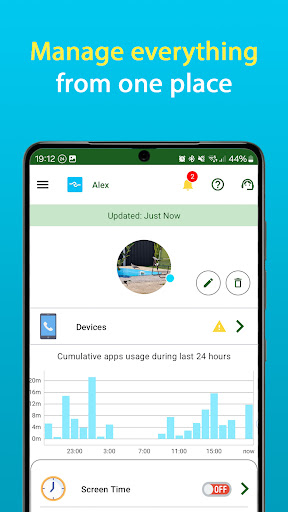
Teen Time gives you a wide range of tools to restrict usage of any games or other applications, receive device usage statistics, battery and sound status, setup screen time limits & schedules, track movement, get notifications about arrivals into preset places and many more…
At Teen Time, we divide our features into 3 main categories:
✔ Screen time control: completely block games and entertainment apps (block Clash of Clans or PUBG, limit YouTube, block Snapchat or Instagram), partial apps block, app usage reports;
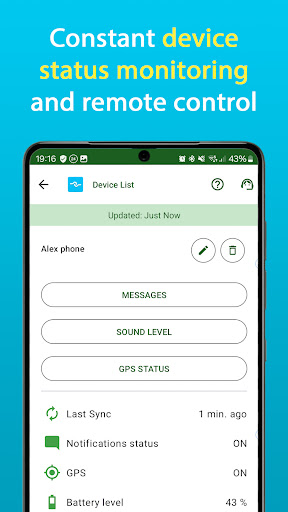
✔ Parental controls: get reports on visited web-sites, search queries & watched YouTube videos, daily device usage habits monitoring, device status monitoring;
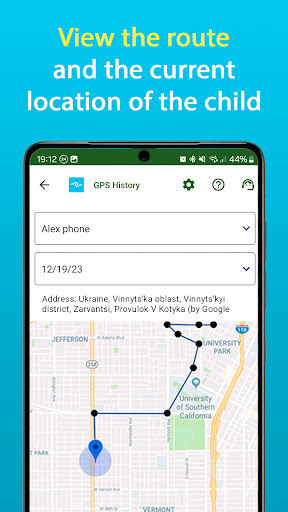
✔ Personal safety: GPS tracking, notifications on arrivals and departures from school, home or other places, SOS widget, remote sound control, mandatory messages.
TEEN TIME KEY FEATURES:
✔ Connect all family member’s devices;
✔ Support for smartphones and tablets;
✔ Full restriction of selected apps;
✔ Daily screen time limits with weekend exceptions;
✔ Screen time schedules;
✔ Easy temporary modifications to main settings;
✔ Control over just downloaded applications;
✔ Device usage restrictions at defined periods of time (school time, night time etc);
✔ Device geolocation tracking;
✔ Notifications about arrival and departures from preset places;
✔ SOS kids widget notifications;
✔ Device usage statistics;
✔ Device status: sound & battery levels, GPS etc;
✔ Visited web-sites, search queries and watched YouTube videos reports;
✔ Remote sound level setup;
✔ Parent messages that are automatically drawn over other running apps;
✔ GPS accuracy and refresh timeout setup.
KID BENEFITS:
✔ Arrangement of daily schedule;
✔ Clear and transparent rules and restrictions;
✔ Immediate notifications to parents using SOS widget;
✔ Solution to overuse of mobile devices;
✔ Easy temporary changes to main settings;
✔ Assistance in achieving better results in school.
TEEN TIME SETUP:
1. Download Teen Time - Parental Control, Screen Time & GPS app for FREE on your device;
2. Follow on screen instructions to download Teen Time for Kids on children's devices, pair them with your device and grant required permissions.
The whole setup process takes just few minutes. After this, you can apply your screen time usage rules and other parental control features to ensure healthy device usage by your kids.
APP USAGE
Teen Time contains no advertisements. 14-days FREE trial is available to all new accounts.
After the trial period you will still be able to:
✔ Add unlimited children, parents and their devices
✔ Monitor screen time & device usage
✔ Use SOS widget functions
✔ Monitor battery level
✔ Check sound level on kid's devices
Get PREMIUM version to enable all advanced parental control features. Premium features will be especially useful for parents, who don’t want to manually control their children's screen time daily. Just set the rules once and let Teen Time apply them!
SUPPORT
Once you download Teen Time on your device, you'll find in app help. There are also tutorials on our official web-site.
Finally, there are Customer Care representatives that will answer your questions or assist in setting up parental control or screen time limits the way you want. Just e-mail us at [email protected].
GIVE IT A TRY RIGHT NOW!
Give us ★★★★★ if you like Teen Time. Your ratings are very important to us!
Teen Time gives you a wide range of tools to restrict usage of any games or other applications, receive device usage statistics, battery and sound status, setup screen time limits & schedules, track movement, get notifications about arrivals into preset places and many more…
At Teen Time, we divide our features into 3 main categories:
✔ Screen time control: completely block games and entertainment apps (block Clash of Clans or PUBG, limit YouTube, block Snapchat or Instagram), partial apps block, app usage reports;
✔ Parental controls: get reports on visited web-sites, search queries & watched YouTube videos, daily device usage habits monitoring, device status monitoring;
✔ Personal safety: GPS tracking, notifications on arrivals and departures from school, home or other places, SOS widget, remote sound control, mandatory messages.
TEEN TIME KEY FEATURES:
✔ Connect all family member’s devices;
✔ Support for smartphones and tablets;
✔ Full restriction of selected apps;
✔ Daily screen time limits with weekend exceptions;
✔ Screen time schedules;
✔ Easy temporary modifications to main settings;
✔ Control over just downloaded applications;
✔ Device usage restrictions at defined periods of time (school time, night time etc);
✔ Device geolocation tracking;
✔ Notifications about arrival and departures from preset places;
✔ SOS kids widget notifications;
✔ Device usage statistics;
✔ Device status: sound & battery levels, GPS etc;
✔ Visited web-sites, search queries and watched YouTube videos reports;
✔ Remote sound level setup;
✔ Parent messages that are automatically drawn over other running apps;
✔ GPS accuracy and refresh timeout setup.
KID BENEFITS:
✔ Arrangement of daily schedule;
✔ Clear and transparent rules and restrictions;
✔ Immediate notifications to parents using SOS widget;
✔ Solution to overuse of mobile devices;
✔ Easy temporary changes to main settings;
✔ Assistance in achieving better results in school.
TEEN TIME SETUP:
1. Download Teen Time - Parental Control, Screen Time & GPS app for FREE on your device;
2. Follow on screen instructions to download Teen Time for Kids on children's devices, pair them with your device and grant required permissions.
The whole setup process takes just few minutes. After this, you can apply your screen time usage rules and other parental control features to ensure healthy device usage by your kids.
APP USAGE
Teen Time contains no advertisements. 14-days FREE trial is available to all new accounts.
After the trial period you will still be able to:
✔ Add unlimited children, parents and their devices
✔ Monitor screen time & device usage
✔ Use SOS widget functions
✔ Monitor battery level
✔ Check sound level on kid's devices
Get PREMIUM version to enable all advanced parental control features. Premium features will be especially useful for parents, who don’t want to manually control their children's screen time daily. Just set the rules once and let Teen Time apply them!
SUPPORT
Once you download Teen Time on your device, you'll find in app help. There are also tutorials on our official web-site.
Finally, there are Customer Care representatives that will answer your questions or assist in setting up parental control or screen time limits the way you want. Just e-mail us at [email protected].
GIVE IT A TRY RIGHT NOW!
Give us ★★★★★ if you like Teen Time. Your ratings are very important to us!
What's New
Thank you for using Teen Time. This update contains various bug-fixes and improvements.
App Information
Version Name
1.0.06
Version Code
156
File Size
14.2 MB
Minimum OS
Android 8.0+
Target SDK
Android 34
Developer
Parental Control App by Teen Time
Contact
Website
Content Rating
Everyone
Package Name
com.teentime.parentPermissions Required
This app may request the following permissions:
Recent Reviews
Vasco Roma
2.0★
Doesn't work consistently. I got the app and the premium subscription mostly for the schedule feature. However, this feature doesn't work reliably and simply stops working on random days. No, this isn't my kid circumventing the app or some other user error. Everything is setup as it should be but it's just not blocking usage of the phone when it's supposed to. Going to keep looking for alternatives.

A Google user
3.0★
The app doesn't work. Doesn't track app usage, set for 2 hours, and shows 2 hours remaining. The phone never locks or anything even when the two hours are reached. Contacted support and no one has reached out. Don't install this app. Edit: I updated my review. It is no longer 1 star. Upsetting to three stars due to excellent customer service.

Phillip Paulino
2.0★
It's not bad, the biggest flaw I noticed is that the app you install on the kid's phone is just sitting there in plain sight in the phone's app tray. It's very easy to uninstall the app from the app tray because it doesn't ask for permission to uninstall, rendering the parent's side useless. You need to add a feature that changes the icon to something the kid would not want to delete, like a decoy system management icon or file manager icon.
A Google user
2.0★
I really didn't gave any notifications for my child's activity. when putting the limits in, the only options are 13 and up, 17 and up, etc. wouldn't 13 and up be the same for 17 and up? The app never really explained that. When i installed it i had a 18 day trial period, 2 days later it said that was almost up. When I take the time to install these apps I expect more out of them, not only do you have to set up your device, you have to set up your child's. All that work for nothing.

Sian Gough
1.0★
First of all the geofencing notifications are useless, they only notify in the app. Secondly I blocked some games and within days they have unlocked on my childs phone even though the app still says they are blocked! And lastly the volume changing setting doesn't work at all! Complete waste of time! I'm going back to using the Google one!

R Drenth
1.0★
Had a hard time getting my sons phone to update properly. It wouldn't sync and therefore wasn't keeping track of time used. I emailed customer support and they gave me the standard answer that was in their help section. So, no help at all. I finally figured it all out only to realize there is no free version of this app. After the trial you have to pay. What a freaking waste of time. They didn't say it was a trial when I downloaded the stupid thing, and half the time I had it, it didn't work.
Ad slot: In-Content