

Send SMS/MMS Messages from PC
com.texty.sms
by MightyText: SMS Texting w/ PC - SMS Messaging
Screenshots



Ad slot: Top Leaderboard
About this app
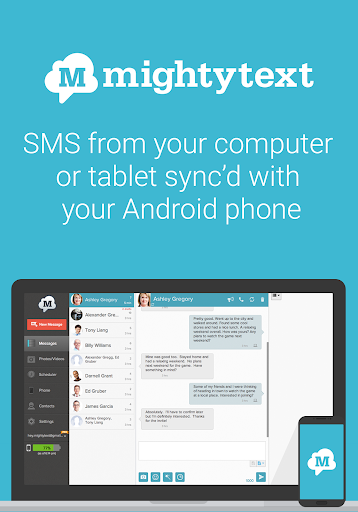
Looking for a fast, easy way to see and respond to your phone’s text messages from your PC or tablet? Look no further than MightyText! With MightyText, you can text from your computer or tablet and sync your SMS conversations, MMS messages, and even your call logs with your Android phone and number. Say goodbye to typing on a tiny phone screen and hello to seamless messaging on all your devices.
MightyText is perfect for those who:
- Prefer typing on a full keyboard rather than a phone screen
- Want to save time by sending text messages from their computer computer or tablet
- Need to send messages to multiple people at once
- Want to keep a backup of their messages on their computer
- Want to stay connected with their friends and family even when they're away from their phone
Features:
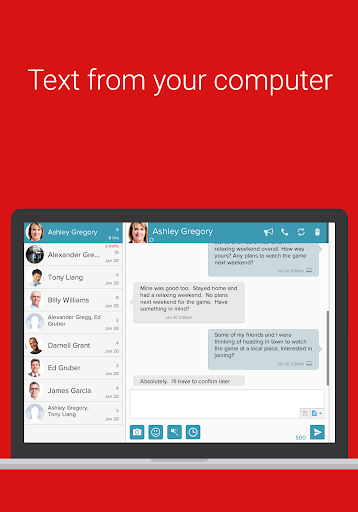
- Send and receive SMS and MMS messages from your computer or tablet
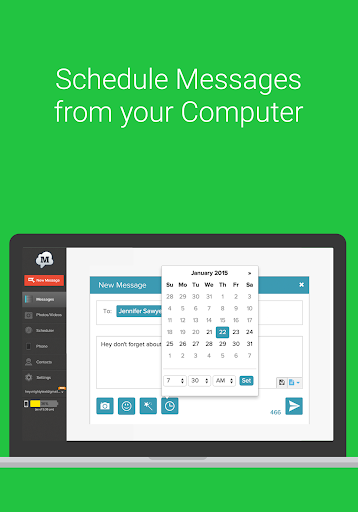
- Schedule messages to be sent at a later time
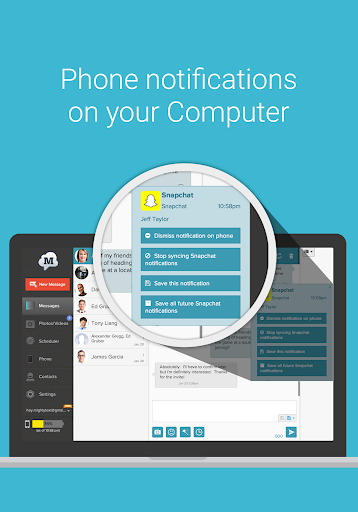
- Get notifications on your computer when you receive a new message
- Send messages to as many 25 people at once
- Search and archive your messages
- Backup photos and videos on your phone automatically
- Receive PC notifications for third party apps such as WhatsApp, Instagram, Gmail, etc
- Use MightyText from any web browser, including Chrome, Firefox, and Edge
MightyText is easy to set up and use. Simply install the app on your Android phone and then launch MightyText in your PC web browser, or download our Windows or Android tablet app. Once you're connected, you can start texting from your computer or tablet with ease.
Upgrade to MightyText Pro to access features such as:
- Automatic message backup and restore
- Message templates
- Read and respond to texts from your email.
- Customize your experience with different themes
- Get priority customer support and early access to new features
- and more!
Download MightyText now and start texting from your computer or tablet with ease! Whether you're at work, at home, or on the go, MightyText makes it easy to stay connected with the people who matter most.
MightyText is perfect for those who:
- Prefer typing on a full keyboard rather than a phone screen
- Want to save time by sending text messages from their computer computer or tablet
- Need to send messages to multiple people at once
- Want to keep a backup of their messages on their computer
- Want to stay connected with their friends and family even when they're away from their phone
Features:
- Send and receive SMS and MMS messages from your computer or tablet
- Schedule messages to be sent at a later time
- Get notifications on your computer when you receive a new message
- Send messages to as many 25 people at once
- Search and archive your messages
- Backup photos and videos on your phone automatically
- Receive PC notifications for third party apps such as WhatsApp, Instagram, Gmail, etc
- Use MightyText from any web browser, including Chrome, Firefox, and Edge
MightyText is easy to set up and use. Simply install the app on your Android phone and then launch MightyText in your PC web browser, or download our Windows or Android tablet app. Once you're connected, you can start texting from your computer or tablet with ease.
Upgrade to MightyText Pro to access features such as:
- Automatic message backup and restore
- Message templates
- Read and respond to texts from your email.
- Customize your experience with different themes
- Get priority customer support and early access to new features
- and more!
Download MightyText now and start texting from your computer or tablet with ease! Whether you're at work, at home, or on the go, MightyText makes it easy to stay connected with the people who matter most.
App Information
Version Name
16.81
Version Code
580
File Size
4.3 MB
Minimum OS
Android 4.4+
Target SDK
Android 33
Developer
MightyText: SMS Texting w/ PC - SMS Messaging
Contact
Website
Content Rating
Everyone
Package Name
com.texty.smsPermissions Required
This app may request the following permissions:
Recent Reviews

Charles Walton
1.0★
difficult to install, unapproved by Google auto protect. Syncing is erratic and reading texts on the computer or on the phone does not mark them as read in the other app. Very unsatisfactory experience especially since they won't refund the $89 pd for the premium app after I wanted to cancel. I struggled for several weeks to figure ways around this bulky app, but could not come up with a good method. Just increasing frustration. Definitely do not buy premium until you are certain.

Jermaine Miller
1.0★
Product doesn’t work and never syncs properly. I’ve been subscribed since 2021 and keep forgetting to cancel until I get charged again each year. Tried reaching out to support for the sync issue but that was a fail. Now I’m stuck with another 8 months of a service I haven’t tried to use in 2+ years. Total waste of time, money, and a lot of frustration. I wish there was an easier way to cancel.

A Google user
2.0★
By far, one of the most consistent apps that I've ever had!!! Works without fail! On a few occasions I've left my phone at home but I was still able to text from a different location. It also allows me to use emoji's that are not always available on my phone. update- mighty text barely works for me anymore. my laptop does not receive notifications when I've received a text and they often don't show up in my computer at all. sad!
A Google user
3.0★
I like this and have recommended it to others. The MightyText team reached out to me offering a discount Pro edition. Ever since I accepted I have been getting breakpoint location error messages with mysterious numbers. I had to go back to the basic version, but I couldn't get anybody to listen. Each time I emailed the errors to one person, another person emails telling me they haven't heard from me. It's a decent app, but don't get in the position of needing customer service. You'll grow old

G Murphy
3.0★
I've been using Mighty Text for years and it works but it is not reliable. Big issues syncing to see the same sent and received texts on both computer (Windows 11 PC) and phone (pixel 8Pro). If you text from the computer you may not get the reply on the computer... And you may not see the computer sent text on the phone but you see the reply on the phone. This isn't always the case but it happens way too often. I have found that Google messages is 1000% reliable.

Timothy Page
1.0★
Edit, I finally uninstalled. Not enough free and in consistently syncs photos. more of a pain than it's worth. Trying Pushbullet now. It sure makes life a lot easier. Typing is easier than texting. The only thing is it seems the number of free outgoing texts keeps dropping. Now it's only 15. It had been 26. Then it erroneously changed to 75. At 15, that's just one every two days. Lots of messages are very slow to send.
Ad slot: In-Content