

Signal Strength Test & Refresh
com.tritech.network.refresher
by TriTech Techno Point
Screenshots










Ad slot: Top Leaderboard
About this app
The Signal Strength Test & Refresh app is designed to optimize your network performance by offering a range of tools to monitor, refresh, and test your network connectivity, whether it's through mobile data or Wi-Fi.
Key Features:
1) Network Refresh
• Manually resolve connectivity issues by refreshing your Wi-Fi and mobile data connection. Simple, step-by-step instructions make the process easy.
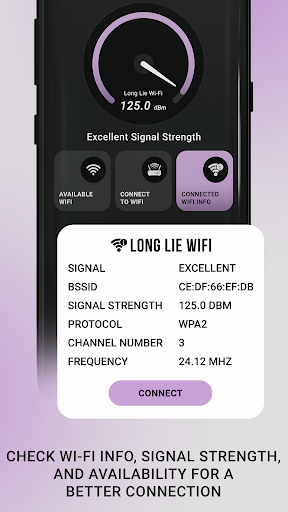
2) Wi-Fi Signal Strength
• Visualize your Wi-Fi signal strength with a speedometer-style gauge, offering real-time readings.
• Assess signal quality with ratings like Fair, Good, and Excellent.
• View detailed information about available Wi-Fi networks, including:
- Signal Strength
- BSSID
- Protocol
- Channel Number
- Frequency
3) Internet Speed Test
• Measure the speed of your internet connection for both Wi-Fi and mobile data.
• Get comprehensive results for:
- Ping Time
- Download Speed
- Upload Speed
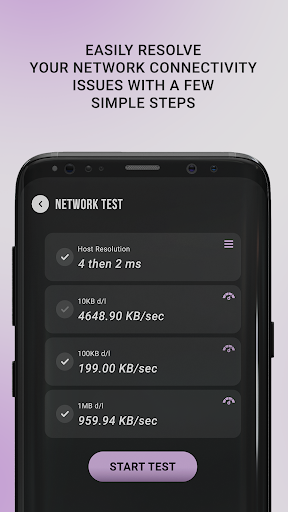
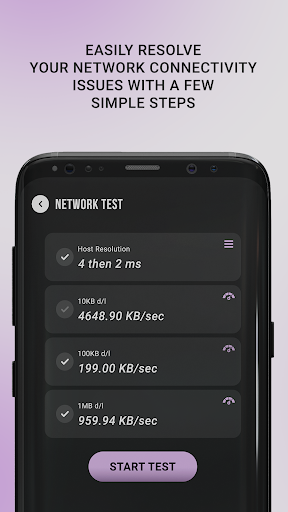
4) Network Test
• Evaluate your network’s efficiency with:
- Host Resolution Test
- Data Speed Test for various file sizes (10KB, 100KB, and 1MB)
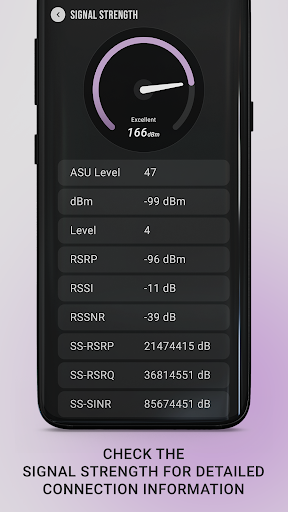
5) Signal Strength Monitor
- Measure signal strength with a speedometer-style display.
- Check signal quality ratings (Good, Fair, Excellent) and view detailed statistics such as:
- ASU Level
- dBm
- RSRP, RSSNR, SINR
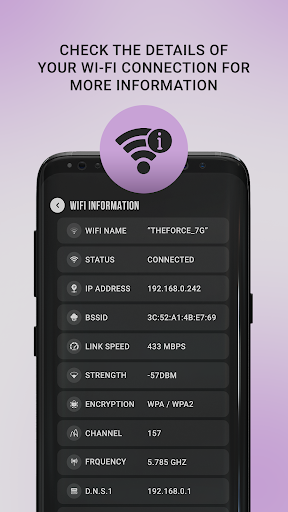
6) Wi-Fi Network Information
• Get detailed information about your connected Wi-Fi network, including:
- Wi-Fi Name and Status
- IP Address
- BSSID
- Link Speed
- Signal Strength
- Encryption Type
- Channel and Frequency
- DNS1 and DNS2
Key Features:
1) Network Refresh
• Manually resolve connectivity issues by refreshing your Wi-Fi and mobile data connection. Simple, step-by-step instructions make the process easy.
2) Wi-Fi Signal Strength
• Visualize your Wi-Fi signal strength with a speedometer-style gauge, offering real-time readings.
• Assess signal quality with ratings like Fair, Good, and Excellent.
• View detailed information about available Wi-Fi networks, including:
- Signal Strength
- BSSID
- Protocol
- Channel Number
- Frequency
3) Internet Speed Test
• Measure the speed of your internet connection for both Wi-Fi and mobile data.
• Get comprehensive results for:
- Ping Time
- Download Speed
- Upload Speed
4) Network Test
• Evaluate your network’s efficiency with:
- Host Resolution Test
- Data Speed Test for various file sizes (10KB, 100KB, and 1MB)
5) Signal Strength Monitor
- Measure signal strength with a speedometer-style display.
- Check signal quality ratings (Good, Fair, Excellent) and view detailed statistics such as:
- ASU Level
- dBm
- RSRP, RSSNR, SINR
6) Wi-Fi Network Information
• Get detailed information about your connected Wi-Fi network, including:
- Wi-Fi Name and Status
- IP Address
- BSSID
- Link Speed
- Signal Strength
- Encryption Type
- Channel and Frequency
- DNS1 and DNS2
What's New
- App performance is now more stable.
- Network refresh based on Wi-Fi and mobile signal strength.
- Network refresh based on Wi-Fi and mobile signal strength.
App Information
Version Name
1.40.1.40.4.4
Version Code
40
File Size
9.9 MB
Minimum OS
Android 7.0+
Target SDK
Android 33
Developer
TriTech Techno Point
Contact
Website
Content Rating
Everyone
Package Name
com.tritech.network.refresherPermissions Required
This app may request the following permissions:
Recent Reviews

Dan Jackson
4.0★
I just got this app, and I turned it on and it refresh my network as advertised, but I'm kind of concerned the frequency of when it will refresh, the options or settings don't allow to set that kind of thing, and so I don't know how frequent it will actually refresh. I have it set to unlimited background data capability and all of my other apps that control other settings, I put on the ignore list so that it could function without interference of any kind.

Ansar M
1.0★
Cannot tell if it is useful or not because the free version is flooded with ads. Ads take up more than half of screen real estate on the most important page and buttons are obscure and not clearly visible. While navigating between screens you will be confronted with a full blown ad page with a miniscule x sign that you have to really strain your eyes to find. Will I buy to find out if the ad free version is worth it? Not at all! Uninstall this.

Eddie Hopper
5.0★
Finally found an app that actually does its job and does it well. I can't count the number of reset apps I've tried that barely worked or didn't even try. Yeah it's wise to run it every couple of hours if you're into heavy data downloads on mobile like I do but it'll boost your access for anything you're doing online.

Moondyne .Joe
1.0★
Be warned every second click YOU WILL get an advert to deal with once you get through the advertising the app seems like it might be handy. My policy of using an app is if the developer is so greedy to put so many adverts in the free edition they already have made enough money from me, NO Thanks I have already given them enough not going to support them any further. Greed doesn't work well in my opinion

Rashid Mussa
1.0★
the solutions that's app given ( weak , no benefits or poor solutions ) . example stop wifi or but phone on fly mode to refresh signals ( all we know stop phone and remove Sim card for 5 or 15 minutes is the solutions) , but you give poor solutions like stop network only. so this my opinion.

Shad0w W0lf
1.0★
DOESN'T DO ANYTHING TO GET BETTER SIGNAL! All it does is turn off your mobile data and then it turns it back on, that is it. Thanks but no thanks, I capable of turning off and on my mobile data all by myself, I'm a big girl. Now I can't help but wonder...... if those four and five star reviews come from people personally involved with the creation of the app, or maybe their friends or family.
Ad slot: In-Content