

ATouch IOS - Screen Recorder
com.tuanfadbg.assistivetouchscreenrecorder
by FA developer
Screenshots



Ad slot: Top Leaderboard
About this app
*** OVER 25 MILLION DOWNLOADS WORLDWIDE ***
*** GREAT RATING 4.9/5 STARS ***
ATouch IOS - Screen Recorder quickly help you to change settings, screen recorder, Screenshot, Volume, Lock the screen (Screen off) and fast access to the favorite application.
Quickly access:
- Screen rotation: switch portrait or landscape
- Change volume: a volume manager, quickly change media volume, ringtone, and alarms
- Brightness: fast change to lower, medium or higher brightness.
- Flashlight: turn on and of the flashlight
- Do not disturb
- Lock the screen (screen off): turn off screen and support to opening screen by fingerprint, face, and iris.
- Screen recorder be like iPhone IOS
- Screenshot, screen capture, screencast
- Notification: open the notification bar
- Pin favorite application in ATouch
Screen Recorder: Fast record anything on your screen.
To start the Screen Recorder: open ATouch, select Device, and select screen recorder icon.
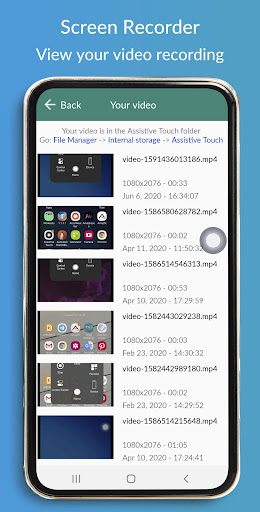
On ATouch, select Your video to view your video recording (from screen recorder)
Change screen recorder settings: Bitrate, Frame rate, and Sound.
Tap on a floating button to open ATouch IOS, touch outside to close.
No limitation of customization: change color, background, button size, button position
The app will be better than if it connects with Control Center IOS or any IOS launcher to be like iPhone.
ATouch connects with Control Center IOS 13 - Screen Recorder to open Control Center and Screen Off and Lock - Fingerprint Support to lock the screen.
Thanks for using my app!
*** GREAT RATING 4.9/5 STARS ***
ATouch IOS - Screen Recorder quickly help you to change settings, screen recorder, Screenshot, Volume, Lock the screen (Screen off) and fast access to the favorite application.
Quickly access:
- Screen rotation: switch portrait or landscape
- Change volume: a volume manager, quickly change media volume, ringtone, and alarms
- Brightness: fast change to lower, medium or higher brightness.
- Flashlight: turn on and of the flashlight
- Do not disturb
- Lock the screen (screen off): turn off screen and support to opening screen by fingerprint, face, and iris.
- Screen recorder be like iPhone IOS
- Screenshot, screen capture, screencast
- Notification: open the notification bar
- Pin favorite application in ATouch
Screen Recorder: Fast record anything on your screen.
To start the Screen Recorder: open ATouch, select Device, and select screen recorder icon.
On ATouch, select Your video to view your video recording (from screen recorder)
Change screen recorder settings: Bitrate, Frame rate, and Sound.
Tap on a floating button to open ATouch IOS, touch outside to close.
No limitation of customization: change color, background, button size, button position
The app will be better than if it connects with Control Center IOS or any IOS launcher to be like iPhone.
ATouch connects with Control Center IOS 13 - Screen Recorder to open Control Center and Screen Off and Lock - Fingerprint Support to lock the screen.
Thanks for using my app!
What's New
- Improve UI/UX
- Update languages
- Screen recorder
- Update languages
- Screen recorder
App Information
Version Name
2.0.7.13.11
Version Code
97
File Size
6.5 MB
Minimum OS
Android 5.0+
Target SDK
Android 34
Developer
FA developer
Contact
Website
Content Rating
Teen
Package Name
com.tuanfadbg.assistivetouchscreenrecorderPermissions Required
This app may request the following permissions:
Recent Reviews

Rei Kl
4.0★
hi‚ i’ve been using this since the very first. this is a great app‚ i totally love this one but there’s an issue that keeps on occuring of course. the issue here is the audio‚ even i turned on the audio‚ made the volumes higher ( even the ringtone ) yet i still wasn’t able to hear any sounds / audio . please fix it‚ i’m saying this for your good as well‚ because people might delete this because of the “audio” issue. i’m saying this so you can fix it quickly‚ thanks.

Ritch Anellie
5.0★
this app is amazing it make it easier to go to my favourite app and other apps too! it's so useful!

Ariihyunaqq 33
2.0★
The app is great. I really oive this, but there is something that i have been getting annoyed, so when you enter the app, you will get a ad or when u press the floating button a ad will show and when your done customizing your button, a ad pops up. I seriously get annoyed with this, and i wanted to turn off my button but it wont. As it says its already off but it isnt off! Fix this immediately!

Danyale
1.0★
Lags the game I'm attempting to record so that the first 10 seconds is nothing and it usually kills me in-game. Then when I try to share it, upload it or anything, it says it's not the right format to play it, even though it says .mp4 format in details. Loads ads at inconvenient times, like when recording in-game battles, so again, I die. Can't do anything with videos that do record, and they aren't good recordings to begin with. Uninstalled.

Shiizuka-! Official
4.0★
I want to give this 5 star but I only give 4 stars. It because the assistive ball. I want to turn off the assistive ball but when I click the home button, it comes back. This is cool but please fix this. One more thing, when I want to zoom the assistive ball at the icon button, the background of the png photo turns black. Sorry but this is my opinion.

•Ämäžîňğły Åmãžïñğ•
1.0★
Well at first it was good, but a few months later I uninstalled it because I was running low on space and didn't really need it for anything, but the button stayed on my screen. I have tryed resetting, powering off, installing it again and uninstalling it again, still didn't work. Please fix this it's geetting really annoying. Don't recommend this unless you want to end up like me.
Ad slot: In-Content