

Millimeter - screen ruler app
com.vistechprojects.millimeter
by vistech.projects
Screenshots





Ad slot: Top Leaderboard
About this app
Millimeter is a simple free screen ruler app. You can measure small objects that fit the device screen with this ruler. There are NO ADs in the app for the best experience and real full-screen measurements (with subscription).
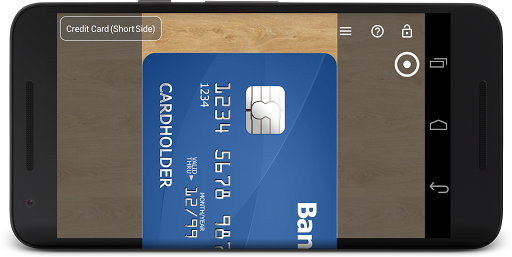
☛ ANY DEVICE can be calibrated for accurate measurements in Calibration Mode, where common standard objects (coins, credit cards, etc) can be used as a reference.
You can also customize your app by purchasing extra features or modes.
📏 What you can do in the free version of the on-screen ruler:
- Calibrate Millimeter with custom or standard objects
- Ruler Mode for the measure in metric units.
💳
You can upgrade your free version to Pro by subscribing and unlocking extra modules and features that add the following functionality:
- Units: millimeter (mm), inch (in).
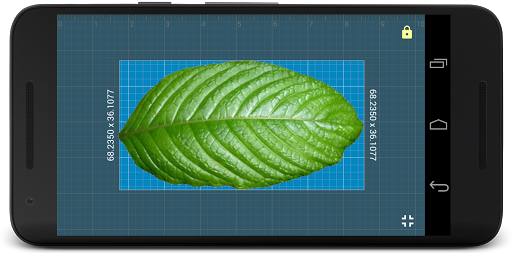
- Additional vertical ruler for 2D measurements (📐)
- Area measurement for 2D measurements (⬛)
- Calculate W/H ratio of the rectangular objects in 2D
- Spirit / bubble level for checking incline or tilt angle 🔮
- Parts Mode to split length or objects in equal parts
- Thread per inch ( TPI ) measurement pattern (🔩) in Parts mode (https://youtu.be/M1Qrbs2bgCY)
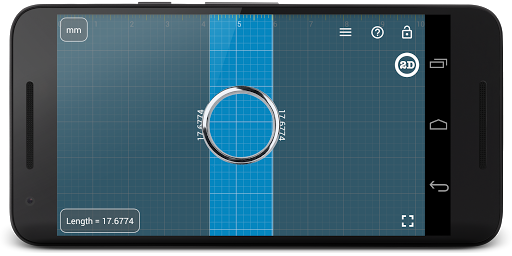
- Circle Mode to measure circular objects (🔴)
- Split circle into equal sector / angle
- Protractor / Goniometer Mode - measure angles
- Lock / Unlock rulers in any mode for better usability (🔒)
- Fine grid (1mm for millimeter units) 👍
- Fractions for inch units.
- Snap to fractions when moving sliders
- Decimal scale for inch units
- Variable sliders/rulers speed: top or right side of the screen - fast,
bottom and left - slow.
- Use full-screen mode for better user experience
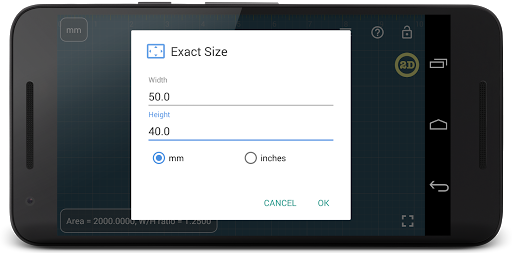
- Set exact size, length, diameter, number of parts manually with keyboard input (⌨)
- Change background to BW night mode for power saving (🔋) and better visualization (🌓)
Use this screen ruler in different areas to measure small objects that fit your phone or tablet screen: jewelry, jewels, rings 💍 , stones, screws, bolts, buttons diameter, nuts, knitting needles, knitting patterns, washers, insects, mosaic tile, hooks, thread, frame wrap angle, etc.
Supported languages:
- English, German, Russian, Japanese, and French languages.
📖 More about the app: http://goo.gl/304nJB
☎ If you have any problems with the app on your device, please contact [email protected] first, and we will help you. Thank you.
VisTech.Projects Team.
☛ ANY DEVICE can be calibrated for accurate measurements in Calibration Mode, where common standard objects (coins, credit cards, etc) can be used as a reference.
You can also customize your app by purchasing extra features or modes.
📏 What you can do in the free version of the on-screen ruler:
- Calibrate Millimeter with custom or standard objects
- Ruler Mode for the measure in metric units.
💳
You can upgrade your free version to Pro by subscribing and unlocking extra modules and features that add the following functionality:
- Units: millimeter (mm), inch (in).
- Additional vertical ruler for 2D measurements (📐)
- Area measurement for 2D measurements (⬛)
- Calculate W/H ratio of the rectangular objects in 2D
- Spirit / bubble level for checking incline or tilt angle 🔮
- Parts Mode to split length or objects in equal parts
- Thread per inch ( TPI ) measurement pattern (🔩) in Parts mode (https://youtu.be/M1Qrbs2bgCY)
- Circle Mode to measure circular objects (🔴)
- Split circle into equal sector / angle
- Protractor / Goniometer Mode - measure angles
- Lock / Unlock rulers in any mode for better usability (🔒)
- Fine grid (1mm for millimeter units) 👍
- Fractions for inch units.
- Snap to fractions when moving sliders
- Decimal scale for inch units
- Variable sliders/rulers speed: top or right side of the screen - fast,
bottom and left - slow.
- Use full-screen mode for better user experience
- Set exact size, length, diameter, number of parts manually with keyboard input (⌨)
- Change background to BW night mode for power saving (🔋) and better visualization (🌓)
Use this screen ruler in different areas to measure small objects that fit your phone or tablet screen: jewelry, jewels, rings 💍 , stones, screws, bolts, buttons diameter, nuts, knitting needles, knitting patterns, washers, insects, mosaic tile, hooks, thread, frame wrap angle, etc.
Supported languages:
- English, German, Russian, Japanese, and French languages.
📖 More about the app: http://goo.gl/304nJB
☎ If you have any problems with the app on your device, please contact [email protected] first, and we will help you. Thank you.
VisTech.Projects Team.
What's New
v2.3.6
- fixes and improvements for new versions of Android
- snap to fractions option (paid) in Pro
- variable slide speed option (fast: top or right, slow: bottom or left) (paid) in Pro
- decimal grid in inches(paid) in Pro
v2.3 New features:
- new Level feature available in Pro
v2.2:
- Fine grid
- lock screen
- 2D ruler
- multi-touch support (for easy measurements when the object touches the screen)
v2.1: Protractor Mode( paid) in Pro: https://goo.gl/wquu2s
- fixes and improvements for new versions of Android
- snap to fractions option (paid) in Pro
- variable slide speed option (fast: top or right, slow: bottom or left) (paid) in Pro
- decimal grid in inches(paid) in Pro
v2.3 New features:
- new Level feature available in Pro
v2.2:
- Fine grid
- lock screen
- 2D ruler
- multi-touch support (for easy measurements when the object touches the screen)
v2.1: Protractor Mode( paid) in Pro: https://goo.gl/wquu2s
App Information
Version Name
2.0.4
Version Code
19
File Size
2.1 MB
Min SDK
Android 15+
Target SDK
Android 22
Developer
vistech.projects
Contact
Website
Content Rating
Everyone
Package Name
com.vistechprojects.millimeterPermissions Required
This app may request the following permissions:
Recent Reviews
jessica siu
5.0★
I used an 8mm earring for measurement and it's really accurate. Even with default calibration it shows what it has to show. With the size of a credit card for calibration it comes as a handy tool too if the default falls short, so it's a well done indeed. So now I can at least have an idea when I online shop how big an object is.

X
5.0★
Works as good as I need it to! Checked with a caliper, the initial generic calibration was actually within about 0.2% of being correct (was set initially upon app startup at 4.07"). A clear ruler that can fit flat on your screen would work well for your calibration. Remember, calibrate at the largest size measurement device you can accurately align with on the screen. While app can calibrate with a coin, calibration will have less error at I.E., 5.00" vs 0.75".

Ric Buch
4.0★
Does what it says without annoying ads. Screen size calibration didn't work precisely with a Poco F3. I recommend calibration with a credit card.

Richard Bowerbank
5.0★
What a super little app for positioning tables, diagrams, pictures, etc in documents, pdfs. Best using it as a pop-up app overlaying say an Adobe document, as it can be faded (made see through), and it is easy to go back and forth. Just brilliant. And feedback!

A Google user
5.0★
UPDATED REVIEW: When I 1st installed this app, I tried calibrating w/a CC. I couldn't get it 2 work, since I was unable 2 use my keyboard. Maybe it was operator error, OR maybe there ought 2 B better instructions 4 calibrating this way. After getting my screen size 4 my Galaxy S9, (FYI it's 146.5mm, 14.65cm or 5.8 in, 4 those who need it) I chose the 3rd option 4 calibrating w/my screen size. WOO-HOO! It worked! So apparently it was operator error. I revoke my 1 star & give u 5 star's! Thanks!

Nonamehere
5.0★
Super easy to use, simple interface, accurate, and has quite a bit of functionality. Edited to add: no annoying pop up ads!
Ad slot: In-Content