
iLauncher for OS - Theme, Icon
com.webgenie.ioslauncher
by Launcher Developer
Screenshots


Ad slot: Top Leaderboard
About this app
iLauncher is a launcher based on the Launcher3, it is very small, powerful and smooth. Using flat design to make the interface more cool and beautiful.
It can completely change the appearance and operation of your phone, giving you an unprecedented experience: simple, elegant, modern!
iLauncher is under developing in 2017 for the new coming Phone X. It is a good launcher for Android users who want experience flat design on Android. With iLauncher, you will be able to customize your android phone theme to make it looks cool.
FEATURES:
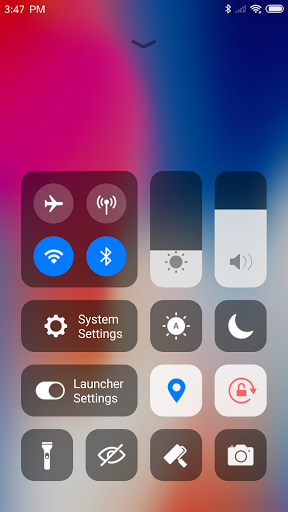
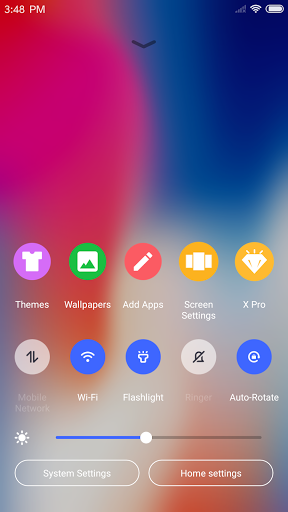
Fast Control Center
We support Two types of control centers, One is the flat style by default and one is classic style, you can change it in Launcher settings.
Swipe down to open Control Center; Set WiFi, Network, Brightness, Volume, Take Photo quickly.
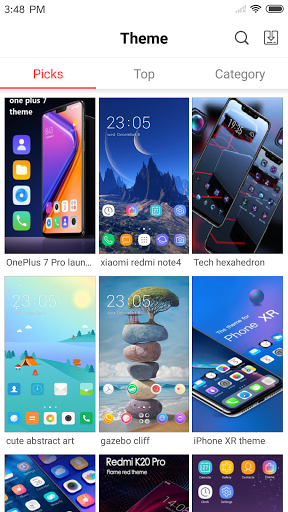
Various Themes
We offer thousands of themes in theme store, We also custom icon pack for popular apps to flat style.
Latest Wallpaper and Icon Sets
We design a Wallpaper Center to provide various wallpapers, support rich icons for Phone X and give you a comprehensive experience.
Powerful App Manager
Swipe up to open App Manager; Find local apps and drop them to desktop quickly.
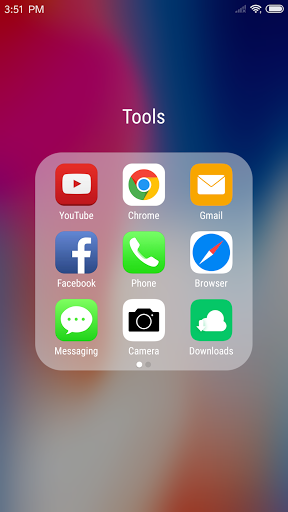
Flat Style Folder
We design a Flat Style Folder, you can drop an app to another to create a folder.
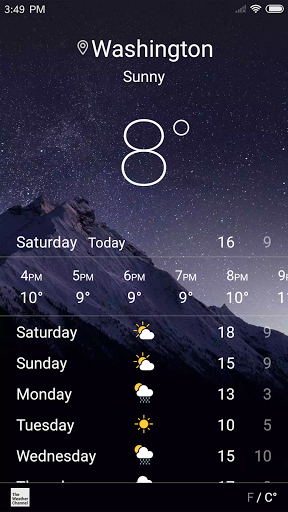
Weather and Time widget
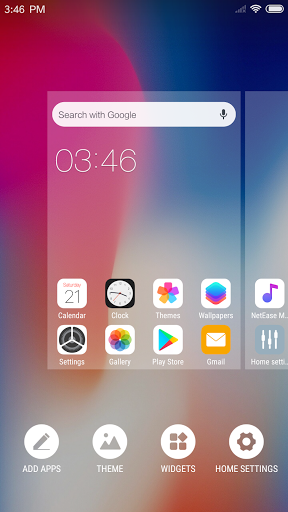
We provide a Weather and Time widget in the left screen page.
Hide Apps
Hide important apps from home screen. It’s a very sophisticated approach to open and hide your apps.
Customizable
Decide for yourself the number of rows and columns of your launcher. You can also change the label of each app and replace the icon with your own image.
3D Touch
We provide a convenient 3D Touch menu on shortcut, You can easily modify the title, add widgets, go to the app details page, etc.
Screen Locker
Double tap on the desktop to lock screen, you need to install a Locker plugin app.
Less Permissions
We are very concerned about privacy, It will not ask for a permission until the feature that needs it is actually used.
We request Storage permission to save downloaded themes and wallpapers, to get the wallpaper currently used by the android system.
We are working hard to add new features. New features will be added step by step in the future release, and welcome to provide feedback.
It can completely change the appearance and operation of your phone, giving you an unprecedented experience: simple, elegant, modern!
iLauncher is under developing in 2017 for the new coming Phone X. It is a good launcher for Android users who want experience flat design on Android. With iLauncher, you will be able to customize your android phone theme to make it looks cool.
FEATURES:
Fast Control Center
We support Two types of control centers, One is the flat style by default and one is classic style, you can change it in Launcher settings.
Swipe down to open Control Center; Set WiFi, Network, Brightness, Volume, Take Photo quickly.
Various Themes
We offer thousands of themes in theme store, We also custom icon pack for popular apps to flat style.
Latest Wallpaper and Icon Sets
We design a Wallpaper Center to provide various wallpapers, support rich icons for Phone X and give you a comprehensive experience.
Powerful App Manager
Swipe up to open App Manager; Find local apps and drop them to desktop quickly.
Flat Style Folder
We design a Flat Style Folder, you can drop an app to another to create a folder.
Weather and Time widget
We provide a Weather and Time widget in the left screen page.
Hide Apps
Hide important apps from home screen. It’s a very sophisticated approach to open and hide your apps.
Customizable
Decide for yourself the number of rows and columns of your launcher. You can also change the label of each app and replace the icon with your own image.
3D Touch
We provide a convenient 3D Touch menu on shortcut, You can easily modify the title, add widgets, go to the app details page, etc.
Screen Locker
Double tap on the desktop to lock screen, you need to install a Locker plugin app.
Less Permissions
We are very concerned about privacy, It will not ask for a permission until the feature that needs it is actually used.
We request Storage permission to save downloaded themes and wallpapers, to get the wallpaper currently used by the android system.
We are working hard to add new features. New features will be added step by step in the future release, and welcome to provide feedback.
What's New
1. Fixed some errors
App Information
Version Name
3.4.8
Version Code
1138
File Size
9.5 MB
Minimum OS
Android 6.0+
Target SDK
Android 33
Developer
Launcher Developer
Contact
Website
Content Rating
Everyone
Package Name
com.webgenie.ioslauncherPermissions Required
This app may request the following permissions:
Recent Reviews

Matty Volt
5.0★
very good app, I like the features and designs. But for some reason my phone doesn't have "Display Over Other Apps features." Hoping some day someone will make another app, that doesn't involve that feature.

Isa
4.0★
It was great it worked for a long time until some things started changing. The edit icon feature for changing the image of your apps no longer function stating that there was an "error". I was unable to find a solution for this. But that was not the only thing. Later the launcher did not consistently work. While pressing the home button, it always asks which app you would like to use. Of course I select the iLauncher and I select the option "Always". Despite this, it still asks for permission..

Malika bondok
5.0★
I really love the app i have tried a lot of apps and it was fake but this one is just perfect it has a lot of themes and wallpaper best app you should try it 💖🥰

MaryLou Bailey
1.0★
It was my favorite launcher until I decided to add folders to my phone. It is near impossible to get an app to go into the desired folder. The folder either moves or the app passes over the folder and refuses to go inside. I even bought the PRO VERSION. I requested help from development but no answer. I even emailed them at the contact provided below the application. Still nothing!! Stand behind your application or provide a refund!!!
Charles Osei
5.0★
itel turn to iphone but left with something and that is I want every app I will go looks like iphone even the battery icon will looks like iphone

Kai Xin
5.0★
This launcher is the best so far i hv used. I love how that when i hv a dark bg the words change to white, and vice versa for a light bg. Also, the app drawer option is really convenient, to keep main screen clean! I love the simple controls! Also, when i swipe the screen, my wallpaper doesn't move, not like in the other app. I highly recommend u to install this! Good job developer!
Ad slot: In-Content