

WiFi Master: WiFi Auto Connect
com.halo.wifikey.wifilocating
by LINKSURE NETWORK HOLDING
Screenshots


Ad slot: Top Leaderboard
About this app
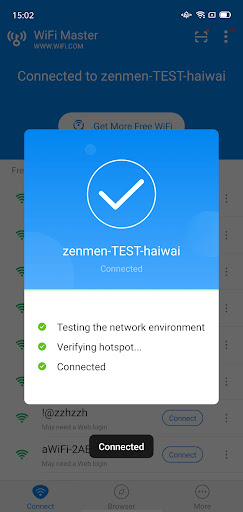
WiFiMaster is a tool that gives you access to open hotspots and WiFi near you. We have secure WiFi hotspots shared by our users around the world. You can find wifi nearby and connect to stable internet.
Main Features of WiFiMaster
- WiFiMaster makes it possible for you to get Wi-Fi easily.
- Get stable internet connection fast and stay connected.
- All shared wifi passwords will not be revealed. They’re all encrypted to protect users’ privacy and security.
- When you connect to the wifi we provided, your info will also be private. The internet connection is safe and secure.
-Auto-connect to Wi-Fi as soon as it’s available. Get free Internet automatically!
Built-in Web Browser
- After connecting to wifi, users can use our built-in browser to surf the internet.
- Safe and private browsing. Your online activities will be completely anonymous.
WiFiMaster's network tools include:
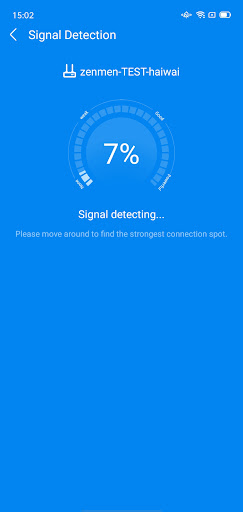
- WiFi signal detection
- Anti-scraping network scanning
- Network Security check
Discover Free WiFi Notification: One-click connection to secure free WiFi
Disclaimer: WiFiMaster is not a hacking tool. It does not assist in unlocking passwords of Wi-Fi hotspots that are not shared by the users. Hacking is illegal.
If you have any feedback or suggestion, we’d love to hear them. Email us at: [email protected].
Main Features of WiFiMaster
- WiFiMaster makes it possible for you to get Wi-Fi easily.
- Get stable internet connection fast and stay connected.
- All shared wifi passwords will not be revealed. They’re all encrypted to protect users’ privacy and security.
- When you connect to the wifi we provided, your info will also be private. The internet connection is safe and secure.
-Auto-connect to Wi-Fi as soon as it’s available. Get free Internet automatically!
Built-in Web Browser
- After connecting to wifi, users can use our built-in browser to surf the internet.
- Safe and private browsing. Your online activities will be completely anonymous.
WiFiMaster's network tools include:
- WiFi signal detection
- Anti-scraping network scanning
- Network Security check
Discover Free WiFi Notification: One-click connection to secure free WiFi
Disclaimer: WiFiMaster is not a hacking tool. It does not assist in unlocking passwords of Wi-Fi hotspots that are not shared by the users. Hacking is illegal.
If you have any feedback or suggestion, we’d love to hear them. Email us at: [email protected].
What's New
- More stable experience, taking much less phone memory!
- More hotspots available to be connected in the updated version
- Bug Fixed
Suggestions? [email protected]
- More hotspots available to be connected in the updated version
- Bug Fixed
Suggestions? [email protected]
App Information
Version Name
5.4.27
Version Code
2404261
File Size
41.7 MB
Minimum OS
Android 6.0+
Target SDK
Android 33
Developer
LINKSURE NETWORK HOLDING
Contact
Website
Content Rating
Everyone
Package Name
com.halo.wifikey.wifilocatingPermissions Required
This app may request the following permissions:
Recent Reviews

A Google user
1.0★
Have tried using for few months now, but giving up. One thing it does very well, is to tell you it is using phone battery. It does not find wifi ... I would be in center with starbucks, comcast, bestbuy and several local medical offices ... All of which offer wifi, and it does not find any of them. Before giving up, i went out of town and tryed to use, same problems.

Richard Pratt
2.0★
been using this for a few years to connect to WiFi rather than asking every place I go for their WiFi. Unfortunately they have now resorted to endless amount of mostly unstoppable ads. it has been getting worse and worse to the point is faster and easier to ask for the WiFi and password rather than deal with the ads.

dragon khadka
5.0★
I want to say that Wi-Fi master is Very reliable, easy and useful application, very thank you Google Play store and Wi-Fi master for this application provide to all of us.. 🙏

Jan Vincent Canonizado
1.0★
Useless app does not have the option to locate wifi even if it's already beside it.. and asking for location but it's already turned on.

Honeylee Sabulao
5.0★
good apps, can help to connect wifi

evan tjahjadi
1.0★
i thought you knew the password on every wifi, it's just like you need to put the password which I haven't still known what the hell the password is, and there was no connect button. this app sucks.
Ad slot: In-Content