
Background Eraser
com.handycloset.android.eraser
by handyCloset Inc.
Screenshots
Ad slot: Top Leaderboard
About this app
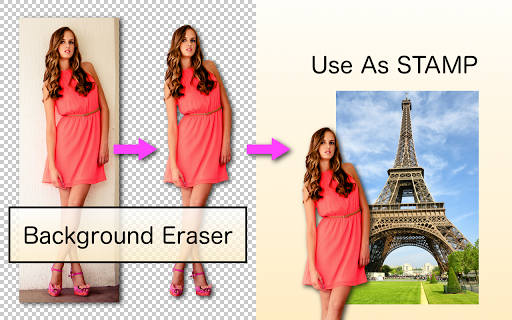
This is an application for cutting pictures and for making a picture's background transparent.
The resulting images can be used as stickers with other apps to make a photomontage, collage.
- - - Features - - -
"Magic" mode
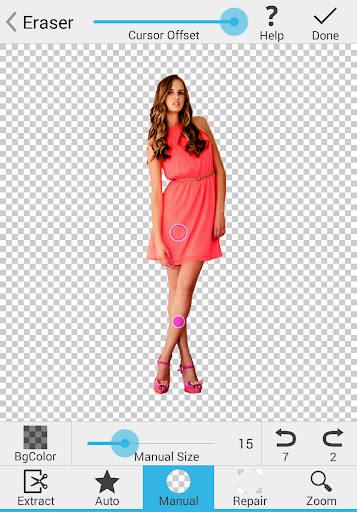
- Detects image edges to erase easily & accurately.
"Auto" or "Color" mode
- Erases similar pixels automatically.
It's very important to make a picture's background transparent accurately
if you want to superimpose photos and make good composite photos.
By using this app, you can do it better.
The resulting images can be used as stickers with other apps to make a photomontage, collage.
- - - Features - - -
"Magic" mode
- Detects image edges to erase easily & accurately.
"Auto" or "Color" mode
- Erases similar pixels automatically.
It's very important to make a picture's background transparent accurately
if you want to superimpose photos and make good composite photos.
By using this app, you can do it better.
What's New
Minor bug fixes.
App Information
Version Name
4.3.0
Version Code
29
File Size
240.7 MB
Min SDK
Android 29+
Target SDK
Android 33
Developer
handyCloset Inc.
Contact
Website
Content Rating
Teen
Package Name
com.handycloset.android.eraserPermissions Required
This app may request the following permissions:
Recent Reviews

Bob Boberson
5.0★
If you're looking to remove the background from an image there's simply no better free app out their. This app is simple and straight forward while being extremely efficient. It does exactly what it promises, nothing more nothing less. I end up using it more than any of my other (five) photo editing apps and in 2+ years it's never let me down. (Bonus Points for having the least obtrusive ads I've seen in an app.) UPDATE: gotta take away those bonus points but still a good app

A Google user
5.0★
its been years and its all I'll ever use, even when on my computer, i turn to my phone just to use this app. it does not show pop up ads unless you hit "finish" in top right corner, which i often do just to support the app, even though you don't have to to save your photos; you can edit multiple pictures or even leave the app without ever having to hit that button and see an add, but I do it out of respect. they have created an amazing app that does exactly what i need it to without annoying ads
A Google user
5.0★
This app is AWESOME!!! Hands down 1 of my 2 favorite editing apps!! And the other one could not be anywhere near as good as it is without this one!! it has changed my ads, logos, business cards, letterhead, everything forever!!! SO glad I found it!! If you are on the fence... I'm telling you... YOU WON'T REGRET IT!!!! Yes there are some ads but very quick and easy to dismiss and they dont pop up until you are done editing. no waiting 15-30 seconds before you can "x" them. SUPER AMAZING!!!

Kate Marshall
5.0★
Fantastic App! I've used it daily for probably 2+ years and routinely recommend it to others! Unlike any other app of its kind it gives you the ability to fine tune your work, working closely along lines and even allows you to work with shadowing. Many others don't even allow you to save as a png without adding a new background like this does. I have yet to find another free app that allows me to get a clean enough removal of the backgroud to create an image that doesn't look photoshopped like I can with this. Only drawback is that its not available for pc. Id love to be able to use it on my laptop as well. Any hope of that happening at some point? Also to those that complain about ads... They really are minimal for a free app. Really just one that pops up after you finish each image... And if you simply use your back button to go back to the beginning instead you can avoid it... Not that its all that lengthy anyway but if your really in a rush you can work around it.
A Google user
5.0★
Does exactly as it says. Cuts out whatever you don't want in an image and very efficiently too. You can do it manually for any detailed spots. Or use the auto cut which cuts out any similar color all at once which can be very helpful. The"mouse" can be offset so the "eraser" isn't right under your finger, but above it, so you can better see what you're doing. All in all the best image cutout tool I've used yet.
A Google user
5.0★
I honestly love this app it's really easy to use and super efficient. Once apon a time I got a new device and for some reason I couldn't find this app to use for my pictures so I tried other similar apps, literally none could compare. If i could change/ask for a few things it would be to (A) Make there be a way to go back to past pictures that were worked on and fix things. I can't tell you how many times I accidentally click 'Done.' (B) Please add more colors for the backgrounds. ♥️
Ad slot: In-Content