

Update Phones
com.hexamob.allandroidupdates
by HEXAMOB S.L.
Screenshots


Ad slot: Top Leaderboard
About this app
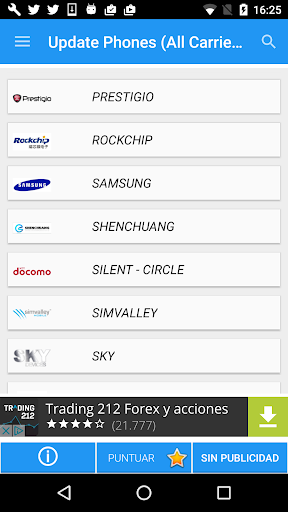
Software Update for Android, updates for Pie (Android 9 or Android P) only available for mobile phones listed. The updates are so easy to install that you simply need to download a software on your phone (firmware), this application includes links to download the latest version of Android on your mobile. Select your brand and it will give you links to the update for the Android version . It has automatic search for your phone and almost all existing operators.
With this application you can update the software of your phone with the official support of the manufacturer or operator and you can update your phone.
Includes Tutorial to update OTA methods, links to download software for PCs from manufacturers (Samsung Kies, Lg Pc Suite, Sony Companion, ...).
Without using an installation wizard directly on your device, you must search for the manufacturer's software to perform the update process. In general, this software is usually available on the manufacturer's official website. However, we have compiled the required software for different manufacturers so you can easily find the resources you need to carry out an Android update on your device. As soon as you have downloaded the software manufacturer, you should simply connect your Android mobile device or tablet with a USB cable and carry out the installation process.
If you are going to update to Android or update your mobile version through OTA, the option will appear automatically when a new version is available. After accepting (should) a download, it will start to install, reconfigure the phone and leave it ready to use. You can also search for an OTA manually by going to "settings => about => update software" or something similar.
Keep in mind that you have a Wi-Fi connection and a sufficient battery before carrying out the update, otherwise you will get a semi-installed update that turns your device into a piece of brick.
As not all devices can get an uninterrupted connection to the Internet, some manufacturers offer the option to download it to your computer and connect the device to perform the installation with the PC.
With this application you can update the software of your phone with the official support of the manufacturer or operator and you can update your phone.
Includes Tutorial to update OTA methods, links to download software for PCs from manufacturers (Samsung Kies, Lg Pc Suite, Sony Companion, ...).
Without using an installation wizard directly on your device, you must search for the manufacturer's software to perform the update process. In general, this software is usually available on the manufacturer's official website. However, we have compiled the required software for different manufacturers so you can easily find the resources you need to carry out an Android update on your device. As soon as you have downloaded the software manufacturer, you should simply connect your Android mobile device or tablet with a USB cable and carry out the installation process.
If you are going to update to Android or update your mobile version through OTA, the option will appear automatically when a new version is available. After accepting (should) a download, it will start to install, reconfigure the phone and leave it ready to use. You can also search for an OTA manually by going to "settings => about => update software" or something similar.
Keep in mind that you have a Wi-Fi connection and a sufficient battery before carrying out the update, otherwise you will get a semi-installed update that turns your device into a piece of brick.
As not all devices can get an uninterrupted connection to the Internet, some manufacturers offer the option to download it to your computer and connect the device to perform the installation with the PC.
What's New
Update for Android, smartphones and tablets
Fixed Bugs
Fixed Bugs
App Information
Version Name
1.7
Version Code
17
File Size
15.3 MB
Minimum OS
Android 5.0+
Target SDK
Android 22
Developer
HEXAMOB S.L.
Contact
Website
Content Rating
Everyone
Package Name
com.hexamob.allandroidupdatesPermissions Required
This app may request the following permissions:
Recent Reviews

Jeffrey Welch
1.0★
Waste of time and storage space. The latest system update for my phone is out, but I can't download it unless I'm on wifi. I don't know if it's AT&T's system or Samsung, but with Sprint I could use mobile data to update right away. I found out with the last update that if I wait, it will eventually allow the update over the air. I was hoping this app could force the update, but it does absolutely nothing that the built in apps didn't already do with every single phone I've owned.

A Google user
1.0★
I read their lack-of-privacy policy, & I wanted to jump in bed and pull the covers over my face. No app with ads should also be so promiscuous with your personal info, not that the latter is ok anyway. I did check a little further and and it offered nothing helpful to my issues. A total waste & risky to boot.
A Google user
2.0★
Okay for anyone looking in the comments for whether this is a legible app...It might be. First of all there is a ton of supported OSs but most of them dont work. If you have a well known os then it might be easy for you to find an update here but if thats the case you wouldn't need an 3rd party update software coz your os developers will distribute it themselves, ie, in short this so is useless for MOST of the people. Pros?few tips like how to force check for ota updates through your dialer.
A Google user
1.0★
It doesn't even get me to wireless update from settings (which doesn't work anyway, that's why I installed this app), even less to provide an alternative way of updating the phone. I could search the web for better guides, no need to install an app for that.. (guides from app doesn't match the phone anyway)
A Google user
2.0★
Constantly saying it has no connection. I gave 2 stars though bc I found out how to "force check" for an update on my phone from this app, even though it said no connection. I couldn't get it to do anything else though, so I deleted it.
A Google user
1.0★
Do not install this app! It is a total scam to obtain credit card numbers and has nothing to do with phone updates. I haven't found any way to back out or cancel. Thank god I I used a maxed card and I can cancel it.
Ad slot: In-Content