

HondaLink
com.honda.hondalink.connect
by American Honda Motor Co., Inc.
Screenshots



Ad slot: Top Leaderboard
About this app
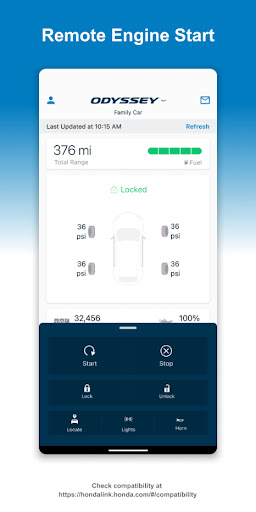
Enhance your Honda vehicle experience with the HondaLink® app. You are in control, with the ability to check your vehicle status, schedule service appointments, or take advantage of one of the many remote command features.
Check your vehicle compatibility:
https://mygarage.honda.com/s/hondalink-product-compatibility
What are some things HondaLink is capable of?
Check Your Vehicle Status
• Monitor your fuel level and total mileage
• Check if your doors, trunk or hood are open
• Check if your lights are left on or not
Remote Commands
• Precondition the temperature in your car
• Lock or unlock the door
• Locate your car
• Flash your lights or activate your horn
Service and Safety
• Get recall notifications and maintenance reminders
• Schedule service appointments
• Access useful guides for your vehicle
Charging
• Monitor charging status
• Set a charging schedule
• Find charging stations
*Available HondaLink features may differ depending on the model, model year and country. Check to make sure your vehicle is compatible. HondaLink subscription package may be required.
Check your vehicle compatibility:
https://mygarage.honda.com/s/hondalink-product-compatibility
What are some things HondaLink is capable of?
Check Your Vehicle Status
• Monitor your fuel level and total mileage
• Check if your doors, trunk or hood are open
• Check if your lights are left on or not
Remote Commands
• Precondition the temperature in your car
• Lock or unlock the door
• Locate your car
• Flash your lights or activate your horn
Service and Safety
• Get recall notifications and maintenance reminders
• Schedule service appointments
• Access useful guides for your vehicle
Charging
• Monitor charging status
• Set a charging schedule
• Find charging stations
*Available HondaLink features may differ depending on the model, model year and country. Check to make sure your vehicle is compatible. HondaLink subscription package may be required.
What's New
Minor bug fixes and usability enhancements.
If you are having trouble with the HondaLink, please let us know via the app by going to Support > Customer Support > Customer Feedback.
If you are having trouble with the HondaLink, please let us know via the app by going to Support > Customer Support > Customer Feedback.
App Information
Version Name
5.0.4
Version Code
330
File Size
93.9 MB
Minimum OS
Android 6.0+
Target SDK
Android 33
Developer
American Honda Motor Co., Inc.
Contact
Website
Content Rating
Everyone
Package Name
com.honda.hondalink.connectPermissions Required
This app may request the following permissions:
Recent Reviews

Clinton Foster
1.0★
Useless and bad. Mileage and oil life are always way off from what the dash says. Not even close. Sends notification every time you open the door, and again when you start the car. No way to turn it off without disabling all notifications. Any real app in a competitive market wouldn't survive in this state. Probably nothing has been fixed for you years.

Andrew Watson
2.0★
The app hardly functions. The only thing I can use it for is for checking if my car is locked and how much gas it has (which is useful, I won't lie). Any time I try any of the other functions (remote start, lock/unlock, lights, etc.) the app crashes. It crashes no matter what I do. If I so much as touch a control icon, the app crashes. If it worked, the app would be an easy 4 or 5 (subscription is pricey, so probably 4).

Michael Rossario
1.0★
Just got the prologue and was very excited. until the dealership tried to walk me though installing and linking this app. I get to the section where you scan the code on the car to link it. And I get stuck due to " service currently unavailable" popup message. so I was stuck at the dealer an extra hour because they wouldn't let me leave before setting the app up. eventually they let me go home but the message never went away and I cannot link the app to my car. a big disappointment from Honda.

Ty Rost
1.0★
This app really doesn't do much or add any value. First of all, even though I'm connected to my truck's Bluetooth, the app continues to say that I need to connect to my truck's blue tooth for more features. I've connected several times and finally gave up. It only tells me basic info about my truck such as model and VIN. Big deal. The myQ garage integration is pretty weak when you need to pay $2 a month you have a garage door opener on your console screen when Homelink is free.

Brian Holdridge
1.0★
The app doesn't appear to allow a password to be pasted in from a password manager. It also does not allow biometric login either. For those reasons, it is a massive pain to use. I really cannot speak to how the app performs because I cannot get much past the login. It keeps wanting me to login in again after a brief period "refreshing". Overall, it was a big fail.

Ash
1.0★
I've only used the app for the 3 month trial period (which is ridiculously short compared to other makes like Subaru that provide 3 year trials on apps that actually work). Out of the 10 times I've tried to use it, it has only worked to unlock my car once, and that took about 5 minutes to go through. The other times have been me standing across the street trying to either unlock, locate, or sound the horn. None ever worked. Save your money and get a tile if you're worried about tracking.
Ad slot: In-Content