
AutoGuard Dash Cam - Blackbox
com.hovans.autoguard
by Ben Yoo
Screenshots


Ad slot: Top Leaderboard
About this app
Your smart phone can be clever as you with AutoGuard, the best Blackbox application, will give you wonderful experiences.
Key Features
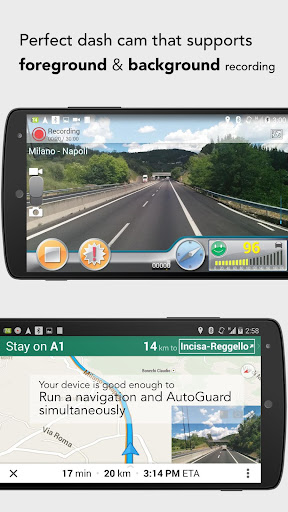
- (Pro) Background recording: Multitasking with other apps (like navigation)
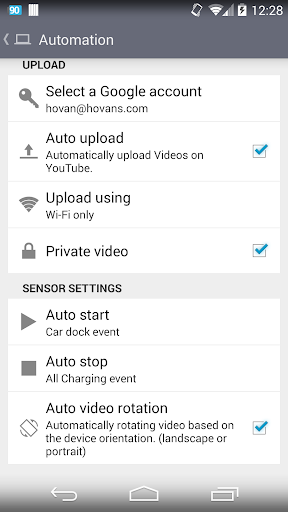
- Upload videos on YouTube.com with captions for location and time information
- Capture photos at important situation automatically
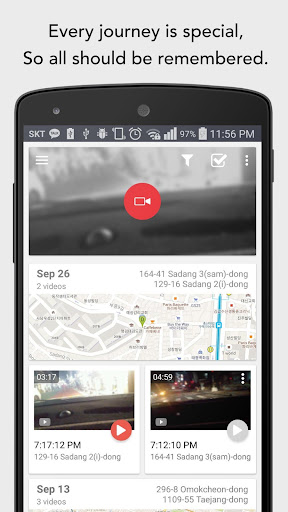
- Show the video and map information on one screen
- Automatically starts video recording when connect with bluetooth devices (It will show notification popup after Android 11 because of Android privacy restrictions.)
- Records driving video, speed, GPS, and nearest address
- Supports high resolutions
- Traces path driven on 3D Google maps
AutoGuard records various lengths of video, acceleration, latitude, longitude, and speed.
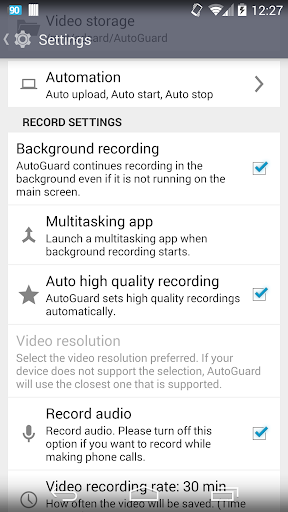
The video recorded can be limited to save space on your phone. After the space is filled it will automatically delete the oldest videos, unless marked to be saved.
AutoGuard Pro can be set to automatically start with bluetooth devices and run in the background.
You can adjust video resolution, bitrates, the sensitivity of the accelerator, and GPS update time.
With Pro Version(AutoGrard Pro Unlocker), you are ad free, can sync your videos on Youtube.com & Multitask AutoGuard with other apps such as Navigation or Mp3.
Visit AutoGuard's home and get more valuable information!
http://feedback.hovans.com
--------------------
Why AutoGuard needs the contact permission?
- List up Gmail accounts for uploading videos to Youtube.
- Referral check.
AutoGuard doesn't need any other information rather than your gmail address.
Anyone who wants to help translating will be welcome.
Thanks. =:)
Key Features
- (Pro) Background recording: Multitasking with other apps (like navigation)
- Upload videos on YouTube.com with captions for location and time information
- Capture photos at important situation automatically
- Show the video and map information on one screen
- Automatically starts video recording when connect with bluetooth devices (It will show notification popup after Android 11 because of Android privacy restrictions.)
- Records driving video, speed, GPS, and nearest address
- Supports high resolutions
- Traces path driven on 3D Google maps
AutoGuard records various lengths of video, acceleration, latitude, longitude, and speed.
The video recorded can be limited to save space on your phone. After the space is filled it will automatically delete the oldest videos, unless marked to be saved.
AutoGuard Pro can be set to automatically start with bluetooth devices and run in the background.
You can adjust video resolution, bitrates, the sensitivity of the accelerator, and GPS update time.
With Pro Version(AutoGrard Pro Unlocker), you are ad free, can sync your videos on Youtube.com & Multitask AutoGuard with other apps such as Navigation or Mp3.
Visit AutoGuard's home and get more valuable information!
http://feedback.hovans.com
--------------------
Why AutoGuard needs the contact permission?
- List up Gmail accounts for uploading videos to Youtube.
- Referral check.
AutoGuard doesn't need any other information rather than your gmail address.
Anyone who wants to help translating will be welcome.
Thanks. =:)
What's New
🐛 Bug fixes: Fixes GPS issues when recording in the background.
App Information
Version Name
8.1.4215
Version Code
4215
File Size
12.1 MB
Minimum OS
Android 12+
Target SDK
Android 31
Developer
Ben Yoo
Contact
Website
Content Rating
Everyone
Package Name
com.hovans.autoguardPermissions Required
This app may request the following permissions:
Recent Reviews

Shane Ridley-Stevens
1.0★
I used this app for a number of years, but it seemed that with every update, more glitches appeared. This app used to record great at night. It used to be accurate at documenting speed. Today, no matter what my speed was, it registered 0 mph. Other times, it would range from 1 to 9 mph while at a stop.

Mike Briock
5.0★
The only issue I have is at times there seems to be a focusing issue. The camera with go out of focus and refocus several times. Other than that, this app is perfect. I synced it with my AT&T DriveMode app and they work great together. I set the video file to avi and can upload on my laptop and watch. For some reason the speed does not show when watching on computer. Overall a great app. though.

A Google user
1.0★
when it works it's great. However when I go to play them back it plays just audio and shows a screenshot of when it started. If I try to FF it will just restart and do the same thing. on the off chance I can get the video to play, the slider jumps to the end of the "video" and starts playing Video only. I turned the audio recording on and off a couple times and I managed to get it to work properly for a day or 2. I was stubborn and paid for the pro version thinking it would be better, nope
A Google user
1.0★
Refund please. Tried this app both paid and free on 3 separate devices and not only does none of the needed info save on their YouTube uploads. You know, what you'd need in court. Much more of a memory hog than others I've tried and I don't see how this app wouldn't fry your phone seeing as how it keeps them running so hot. Keeps freezing and unreliable. Not what I need in an emergency. I bought this last night. Feel free to issue a refund now.

Bill Berry
5.0★
Been using this app in my rig for a year. Very reliable and easy to use. This app has saved my butt! One time when another rig ran into me all I had to do was show the video to the state trooper and they took care of it from there. Kudos! Edit: recent install to my new phone now requires a sign in to Google to cloud my data. I do not believe in sharing my data with the cloud unless I myself allow it. Should have left it alone. Fail!

Night Tow
5.0★
I have been using this app without issues for a very long time, 10 or 11 years. Today I installed this app on a different phone, but it won't allow me to utilize the pro version. I paid for the pro version a long time ago and now I do not have access to the pro features. I used to Be able to download the Pro app, which is no longer available leaving me with the free version. The free version locks me out of the features that I use most. This is my most used app, it must work. Please help!!!!!!!!
Ad slot: In-Content