

Hyundai Bluelink Europe
com.hyundai.bluelink.eu.ux20
by Hyundai Motor Europe
Screenshots



Ad slot: Top Leaderboard
About this app
[IMPORTANT: UK/Irish specification models are fitted with door deadlocks. If a vehicle is locked remotely, it must be unlocked using the key fob.]
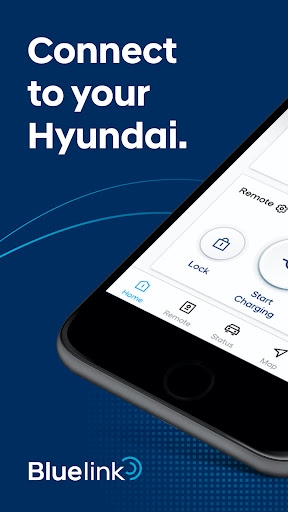
Winner of the 2021 iF Design Award, Hyundai Bluelink Europe takes linking your smartphone to your Hyundai to another level: The new Bluelink app enhances your Hyundai driving experience even further with a whole new look and even more Connected Car features. Find your Hyundai, or use the map feature to find parking, fuelling stations, nearby restaurants, or other points-of-interest. Then simply send the destination to the navigation system in your car.
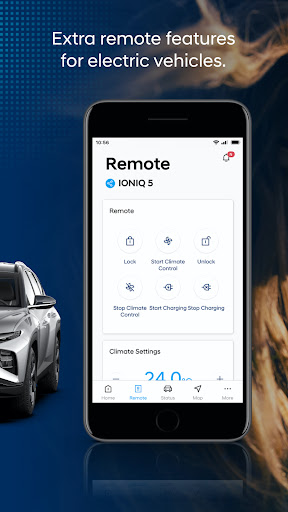
You can also use your phone as a remote to lock or unlock your car, and, if you drive a Hyundai electric vehicle, the app lets you control charging, as well as cooling or heating.
Here’s a list of our most popular connected car features:
1. Find my car: Never forget where you parked again. A map pins your Hyundai’s exact location.
2. Send to car: Find parking spaces, fuel or charging stations, restaurants or other points of interest and send the destination to your in-car navigation system.
3. Vehicle report: Monthly reviews of vehicle starts, driving and idle time, driving distance.
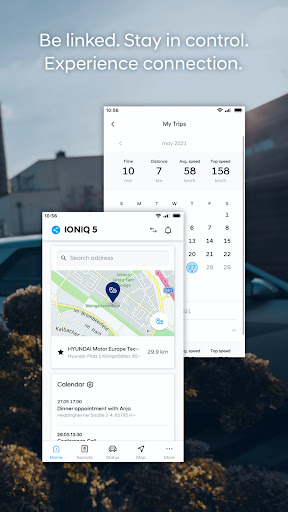
4. My trips: See a summary of previous trips including journey time, distance driven, average and top speeds.
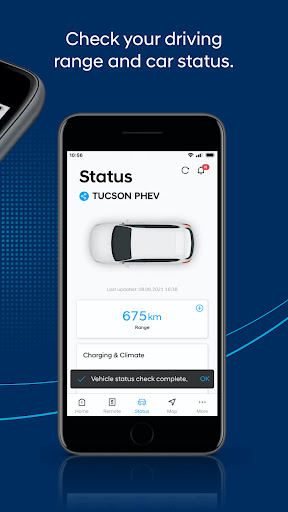
5. Vehicle status: Check in on fuel or charging level, doors and windows, heat or air conditioning, and battery level and lamps.
6. Remote door lock/unlock: Lock and unlock your vehicle.
7. Remote climate control (EV only): Set the temperature and activate the air conditioning remotely.
8. Remote charging (EV & PHEV): Check and control the charging process.
9. Alarm: Receive notifications when the door locks are compromised.
10. User Profile: Save your profile and car settings to the Bluelink-Cloud for backups and transfers to a new Hyundai.
11. Valet Parking Mode (select models): Monitor your car (location, driving time, driving distance and top speed) while somebody else is driving.
12. Last Mile Navigation: If your destination can’t be reached by car, the app can take you there on foot.
13. Calendar: Sync your phone’s calendar with the app.
14. Personalisation: Turn features on and off and customise your app’s home screen.
15. Widgets: Vehicle remote and vehicle status are accessible on your phone’s lock screen without opening the app.
Winner of the 2021 iF Design Award, Hyundai Bluelink Europe takes linking your smartphone to your Hyundai to another level: The new Bluelink app enhances your Hyundai driving experience even further with a whole new look and even more Connected Car features. Find your Hyundai, or use the map feature to find parking, fuelling stations, nearby restaurants, or other points-of-interest. Then simply send the destination to the navigation system in your car.
You can also use your phone as a remote to lock or unlock your car, and, if you drive a Hyundai electric vehicle, the app lets you control charging, as well as cooling or heating.
Here’s a list of our most popular connected car features:
1. Find my car: Never forget where you parked again. A map pins your Hyundai’s exact location.
2. Send to car: Find parking spaces, fuel or charging stations, restaurants or other points of interest and send the destination to your in-car navigation system.
3. Vehicle report: Monthly reviews of vehicle starts, driving and idle time, driving distance.
4. My trips: See a summary of previous trips including journey time, distance driven, average and top speeds.
5. Vehicle status: Check in on fuel or charging level, doors and windows, heat or air conditioning, and battery level and lamps.
6. Remote door lock/unlock: Lock and unlock your vehicle.
7. Remote climate control (EV only): Set the temperature and activate the air conditioning remotely.
8. Remote charging (EV & PHEV): Check and control the charging process.
9. Alarm: Receive notifications when the door locks are compromised.
10. User Profile: Save your profile and car settings to the Bluelink-Cloud for backups and transfers to a new Hyundai.
11. Valet Parking Mode (select models): Monitor your car (location, driving time, driving distance and top speed) while somebody else is driving.
12. Last Mile Navigation: If your destination can’t be reached by car, the app can take you there on foot.
13. Calendar: Sync your phone’s calendar with the app.
14. Personalisation: Turn features on and off and customise your app’s home screen.
15. Widgets: Vehicle remote and vehicle status are accessible on your phone’s lock screen without opening the app.
App Information
Version Name
2.0.17
Version Code
10386
File Size
117.0 MB
Minimum OS
Android 5.0+
Target SDK
Android 33
Developer
Hyundai Motor Europe
Contact
Website
Content Rating
Everyone
Package Name
com.hyundai.bluelink.eu.ux20Permissions Required
This app may request the following permissions:
Recent Reviews

Alastair Wilson
1.0★
Charging schedule is terrible. randomly starts charging when you don't want & it shut off charging at 4:45 this morning for no reason, so not enough charge this morning! Good to control functions from eg turn on climate. Unnecessarily confusing controls. You have to get in the car to change the charge rate, why not from the app? Would be nice to see energy consumption on journeys you select, not just average for the month.

Graham Gillies
1.0★
I purchased a 2021 HYUNDAI IONIC 5. It came with the trial version of HYUNDAI BLUELINK. I was emailed to tell me the free trial was ending. I should then use the app to go the store & select my plan. in the store I am told that my HYUNDAI Ionic 5 is not compatible with the HYUNDAI app!!!! I have so far emailed 5 times to HYUNDAI customer care BUT HAVE NOT HAD ANY REPLY!!!!!! Absolutely pathetic level of customer service & care!!!!!

Colin Talamona
1.0★
I bought the car second-hand, and the subscription expired just two weeks after the purchase date. When it ended, it wiped all data, not only in the app but also directly from the car (presets, navigation, etc.). Since then, I have been unable to purchase a new subscription because the car no longer connects to Bluelink. Hyundai Europe has not responded to any of my contact requests for over a month.

Andrew D
2.0★
Suddenly my saved locations, car settings and back-ups in the app have disappeared. Support seems near non-existant - after emailing on 13th Aug, got a reply 13 days later stating, "We are currently experiencing an unusually high volume of inquiries"... and to email if there's still a problem, which I did... and I'm still waiting. Have reduced rating to 2/5 until this is properly resolved. The irony is they expect me to pay £9.99/m for 'pro services' from October. Car is just a year old!

I Kreil
1.0★
Hostile! When you do not pay for a subscription, they wipe all data not just from the app but also from your car settings. It not only stops updating maps but removes all radar warnings, address book entries, fav.charging stations, + non-map settings. No response to email, no phone support. They try to upsell remote battery conditioning, surround view monitor, etc. yet may not support this for your car despite the necessary available hardware. You only find out after you purchased a subscription

Greg
1.0★
No fix release for >4 months!?! Nothing works! Joke, no mileage or system update availability notification. I'm not even going to waste time listing the bugs this time - there's no point. No one cares. Notifications are false, status updates are wrong, and trust is gone. I still have to manually confirm everything, which defeats the purpose. It also freezes and ignores input at random - unacceptable in a brand-new vehicle. Bloatware! Goodbye! Don't bother with your copy/paste responses!!!
Ad slot: In-Content