

Internet Speed Meter
com.internet.speed.meter
by DynamicApps
Screenshots


Ad slot: Top Leaderboard
About this app
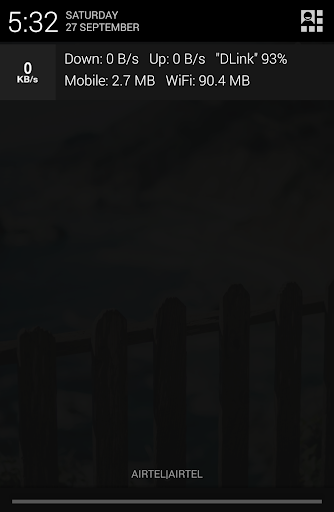
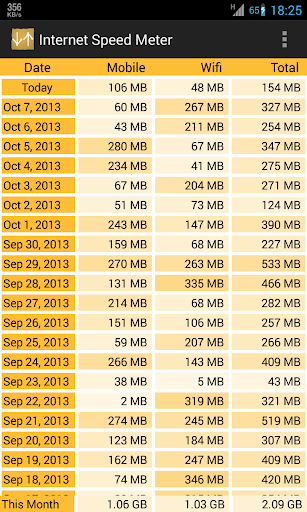
Internet Speed Meter displays your internet speed in status bar and shows the amount of data used in notification pane. This helps you to monitor network connection anytime while using your device.
Lite Features
- Real time speed update in status bar and notification.
- Daily traffic usage in notification.
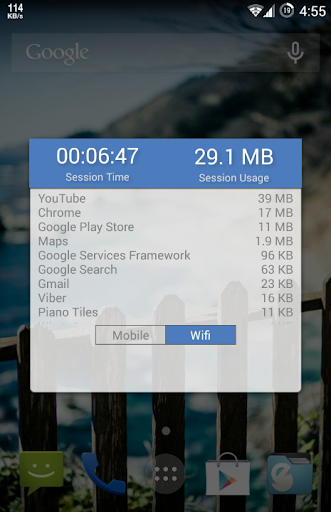
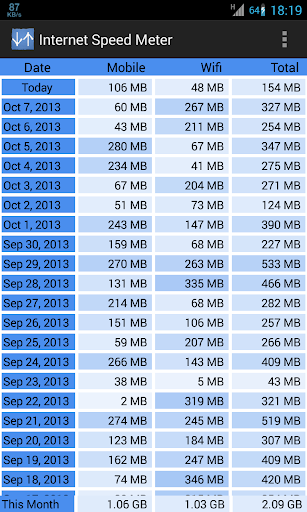
- Separate stats for Mobile network and WiFi network.
- Monitors your traffic data for the last 30 days.
- Battery efficient
Pro Features
Notification Dialog
A notification dialog appears when you tap the notification having
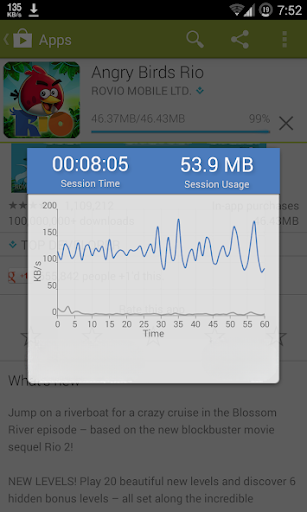
- Graph to monitor last minute internet activity
- Time and usage of current session
Smarter notifications
Notification appears only when you are connected to internet.
Themes support
You can manually select the color of UI.
Blue status bar icon
Option to choose between blue or white status bar icon. (only for KitKat and below versions of Android)
Upload and Download Speed
Option to show upload and download speed in separate notifications.
Warning: Do not move this app to SD card. It will stop (Force close) when you remove the card.
Lite Features
- Real time speed update in status bar and notification.
- Daily traffic usage in notification.
- Separate stats for Mobile network and WiFi network.
- Monitors your traffic data for the last 30 days.
- Battery efficient
Pro Features
Notification Dialog
A notification dialog appears when you tap the notification having
- Graph to monitor last minute internet activity
- Time and usage of current session
Smarter notifications
Notification appears only when you are connected to internet.
Themes support
You can manually select the color of UI.
Blue status bar icon
Option to choose between blue or white status bar icon. (only for KitKat and below versions of Android)
Upload and Download Speed
Option to show upload and download speed in separate notifications.
Warning: Do not move this app to SD card. It will stop (Force close) when you remove the card.
What's New
Added support for Android 15
App Information
Version Name
1.4.7
Version Code
22
File Size
2.8 MB
Min SDK
Android 10+
Target SDK
Android 21
Developer
DynamicApps
Contact
Content Rating
Everyone
Package Name
com.internet.speed.meterPermissions Required
This app may request the following permissions:
Recent Reviews

Chaunce Woodmansee
5.0★
This app is extremely useful. When combined with the speed meter built into my VPN app, I can always tell if there is data leaking out of the tunnel. I like how it lets me know from the lock screen if erroneous data is transferring while the phone is idle-even with the power&data saver on. I'd like to see more statistics, like the total amount of data transferred while idle and background usage, but I'm not complaining either. It's just as great having something so lightweight and stable.

A Google user
5.0★
Simple. Lightweight. Easy to configure and use. I have used this app for moar than several years across multiple OS-s and devices. And I still love it. This app needs an update for stability for newer devices. No update in nearly two years. It doesn't seem to track monthly data usage correctly. And some apps aren't detected using data..It shows usage, but nothing listed. It also won't calculate for tethered data, either.
A Google user
5.0★
I had been using the free version of this app for a long time. I didn't need any of the paid version features. But, the free version had served me so well in showing download and upload speeds in an effective and discrete way at the same time, and also in keeping such a perfect track of data amounts, that the only honorable thing for me to do was to buy the paid version. And I just did that. A+!
A Google user
1.0★
The data recording has gotten messed up. On multiple occasions, it showed more than 1.5 GB was used when it hadn't even crossed a couple of hundred MB. The app freezes in the notification bar frequently and I have to touch and open it up to unfreeze. What is going on? How does the free version work better than this? Please fix these issues.

Jitendra Chhaba
1.0★
Showing wrong data usage. I have been using your Internet Speed Meter Pro version for almost 5-6 months. I always have seen that this app is showing wrong data usage. I'm attaching a screen of the morning time. The data was off whole night. I switched my data on and instantly this app is showing my data usage of 2.67 GB. How could that be possible? I face this problem a lot. I tried every possible way to get it solved but couldn't. Please solve this problem as soon as possible.

mikejeep47
3.0★
Great app, but needs to be updated for Android 8+. No longer shows what apps are actively using data, which was one of the most useful features. On Android 16, it seems to shut down randomly without any notifications.. the icon just disappears.
Ad slot: In-Content