

Join by joaoapps
com.joaomgcd.join
by joaomgcd
Screenshots

Ad slot: Top Leaderboard
About this app
Join allows you to easily do stuff remotely on your Android and PC devices like SMS, notifications, clipboard, and much more!
As Featured on:
☑ Android Police: In short: this app is powerful http://goo.gl/MbEi96
☑ Android Headlines: Join clearly has a lot to offer http://goo.gl/Bwvivq
☑ AndroidGuys: Best thing since Pushbullet http://goo.gl/zSYUaj
And more!!
☑ 30 day trial - one time $4.99 payment to unlock
Try the app for free for a month, then unlock it with a one time payment to continue using it
☑ Notifications
Receive notifications from Android and interact with them on any device using your Google account. For example, you can reply to a Whatsapp message from your PC. Notifications use the standard Windows Action Center with the Windows 10 app. Make sure to enable the Notification Sync settings in the Android app.
☑ SMS, MMS and Group messages from any web browser
Be it Android, PC, or even iOS, you can send SMS messages from any web browser with your Google account: http://joaoapps.com/join-sms-from-anything-with-a-browser/
☑ Clipboard Sharing
You can manually or automatically share your clipboard between devices. On Android you get a handy clipboard bubble for easy sharing. Think chat heads for your clipboard
☑ Google Assistant
Use Join with Google Assistant and Tasker to control anything anywhere: https://joaoapps.com/google-assistant-ifttt-join-tasker-awesomeness/
☑ Remote Writing
Write stuff directly in any Android app from your PC or any other device. To do this, Join uses an accessibility service on your device. Important: this service is optional and is ONLY used to remotely write text on your device. It doesn't collect or share any personal data.
☑ Open web pages remotely
Quickly open a web page on another device. For example, you can send a page from your PC to your phone or from your phone to your PC
☑ Files
Send files from any device to any other device and optionally automatically open the file when it arrives.
☑ Installing Apps Remotely
On your request, Join allows you to send an an APK (app file) from your PC and receive it on your Android device where the prompt to install it will show up! Note: installing APKs remotely requires the REQUEST_INSTALL_PACKAGES permission.
☑ File Browsing
With the Join Desktop app, you can remotely browse all files on your Android device from your PC: https://joaoapps.com/join/desktop. Note: This feature requires the permission to Manage All Files on your device, as it functions just like a remote file browser/manager.
☑ Screenshots
Get a quick screenshot from your Android device on your other devices
☑ Wallpaper
Quickly set your Android or PC wallpaper while browsing the web in Chrome
☑ Location
Find your Android device by getting its location or making it ring really loud
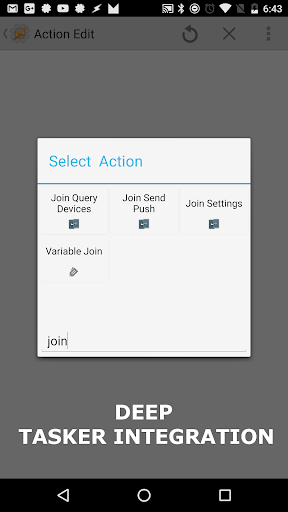
☑ Deep Tasker Integration
Make Join your own by pushing stuff from Tasker, changing any of the app's settings and querying your devices. You can totally make your own customized Join app if you want :)
☑ End-to-end encryption
Join can send any sensitive data encrypted if you set a password
☑ Google Drive as storage
Your personal data (like your SMS messages for example) is kept privately on your Google Drive. Shared files are also kept there so that you can easily access them later.
Join uses a server on Google App Engine (https://cloud.google.com/appengine/) to optimize and simplify message pushing from device to device.
This app uses Accessibility services
As Featured on:
☑ Android Police: In short: this app is powerful http://goo.gl/MbEi96
☑ Android Headlines: Join clearly has a lot to offer http://goo.gl/Bwvivq
☑ AndroidGuys: Best thing since Pushbullet http://goo.gl/zSYUaj
And more!!
☑ 30 day trial - one time $4.99 payment to unlock
Try the app for free for a month, then unlock it with a one time payment to continue using it
☑ Notifications
Receive notifications from Android and interact with them on any device using your Google account. For example, you can reply to a Whatsapp message from your PC. Notifications use the standard Windows Action Center with the Windows 10 app. Make sure to enable the Notification Sync settings in the Android app.
☑ SMS, MMS and Group messages from any web browser
Be it Android, PC, or even iOS, you can send SMS messages from any web browser with your Google account: http://joaoapps.com/join-sms-from-anything-with-a-browser/
☑ Clipboard Sharing
You can manually or automatically share your clipboard between devices. On Android you get a handy clipboard bubble for easy sharing. Think chat heads for your clipboard
☑ Google Assistant
Use Join with Google Assistant and Tasker to control anything anywhere: https://joaoapps.com/google-assistant-ifttt-join-tasker-awesomeness/
☑ Remote Writing
Write stuff directly in any Android app from your PC or any other device. To do this, Join uses an accessibility service on your device. Important: this service is optional and is ONLY used to remotely write text on your device. It doesn't collect or share any personal data.
☑ Open web pages remotely
Quickly open a web page on another device. For example, you can send a page from your PC to your phone or from your phone to your PC
☑ Files
Send files from any device to any other device and optionally automatically open the file when it arrives.
☑ Installing Apps Remotely
On your request, Join allows you to send an an APK (app file) from your PC and receive it on your Android device where the prompt to install it will show up! Note: installing APKs remotely requires the REQUEST_INSTALL_PACKAGES permission.
☑ File Browsing
With the Join Desktop app, you can remotely browse all files on your Android device from your PC: https://joaoapps.com/join/desktop. Note: This feature requires the permission to Manage All Files on your device, as it functions just like a remote file browser/manager.
☑ Screenshots
Get a quick screenshot from your Android device on your other devices
☑ Wallpaper
Quickly set your Android or PC wallpaper while browsing the web in Chrome
☑ Location
Find your Android device by getting its location or making it ring really loud
☑ Deep Tasker Integration
Make Join your own by pushing stuff from Tasker, changing any of the app's settings and querying your devices. You can totally make your own customized Join app if you want :)
☑ End-to-end encryption
Join can send any sensitive data encrypted if you set a password
☑ Google Drive as storage
Your personal data (like your SMS messages for example) is kept privately on your Google Drive. Shared files are also kept there so that you can easily access them later.
Join uses a server on Google App Engine (https://cloud.google.com/appengine/) to optimize and simplify message pushing from device to device.
This app uses Accessibility services
What's New
- Updated FCM Library from legacy to v1. Let me know if anything breaks.
App Information
Version Name
1.0.8
Version Code
53
File Size
3.7 MB
Minimum OS
Android 5.0+
Target SDK
Android 23
Developer
joaomgcd
Contact
Website
Content Rating
Everyone
Package Name
com.joaomgcd.joinPermissions Required
This app may request the following permissions:
Recent Reviews

bahrta sai
2.0★
I would give a better rating if the chrome extension didn't constantly change names. I have renamed it numerous times because it keeps changing its own name. Until that is fixed, I can't reasonably give it 5 ⭐. The features are irrelevant if you don't know the current name of the device your sending it to. This is been doing this for a while, but I just hadn't updated my reading until now, because I hoped it would stop acting up. I'm tempted to just switch back to Pushbullet. It never did this.

Peter Ramirez
3.0★
Was hoping that Join could function as my replacement for Pushbullet, which I've been looking to rid myself of for quite some time. Enter Join. It's very useful when it works, but as others have noted the problem is it isn't very reliable. In my own case, this mostly applies to notification mirroring---sometimes they will be mirrored and sometimes they will not be---but I also have issues sending texts occasionally. If it was more reliable this would be an easy 5-stars.

Dan Gomolchak
5.0★
App does what it says and does it well. There is a bit of a learning curve but not too difficult. I use this primarily to send incoming sms and sync to the Android head unit in my car. I only have one complaint: unable to change the duration of the alert banner. I want it to remain on the screen until I choose to dismiss instead of automatically after 5 seconds... But I'm able to use another app to work around this limitation like "Notification Pop-up".

Steve Hogan
2.0★
It kind of works for sending texts from a pc but not very well. Even though I use it rather frequently, the texts usually don't show up on the app. The last text on the app (which should be the most recent) was sent 7 months ago. I can't even see the text I just sent, nor the reply which showed up momentarily as a pc notification. The app seems to hold onto image texts that say "View Image." And yeah, you can't see the images.

A Google user
1.0★
Didn't work. Dev not helpful at all, simply sent a link to their FAQ which I already had viewed. Blamed pretty much every issue on Google, Android, or your device. PC interface is poor: Creates a full screen for every person you try to message. There is no tabbing system to easily switch. Messages sometimes were sent, often not, but never appeared on my phone, just the other user's messages, so it could be difficult to determine the context of their responses.
A Google user
4.0★
It's way more reliable than PushBullet, but what keeps me from switching is the lack of support for Win10 and Firefox. While yes, it is possible to use them, the functionality is limited. If you keep Chrome open all the time, this will work for you. One of my other complaints with the Windows app is that it uses the notification center. Normally, I would love that sort of integration, but that means that I can't have the notifications show up on a second monitor, where I won't miss them while in-game.
Ad slot: In-Content