

Homebase: Employee Scheduling
com.joinhomebase.homebase.homebase
by Homebase Team Management
Screenshots




Ad slot: Top Leaderboard
About this app
Homebase helps small businesses manage their work schedules, time clocks, payroll, HR, and more. Managers who use Homebase save their team 5+ hours a week. Join now and see why 100,000+ small businesses trust Homebase to conquer their workday. Attendance tracking, clock in and out, manage labor costs, and utilize our sales tracker- all with Homebase.
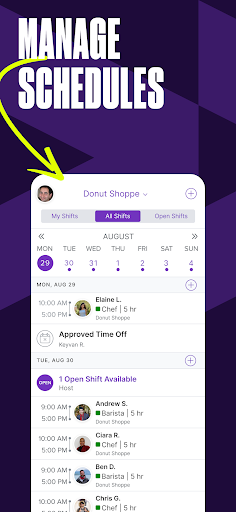
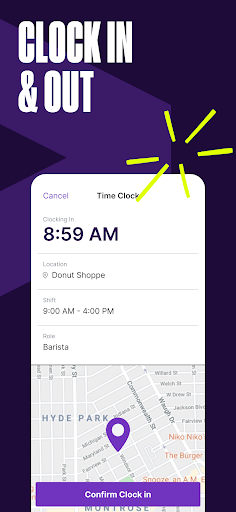
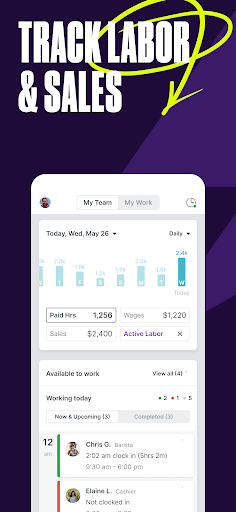
Manage multiple teams or departments, quickly build, edit, and share schedules. Clock in and out directly from your phone. Payroll app capabilities help to manage your team on the go. Send messages to individual employees or the whole team with our built-in Homebase messaging. Check sales, scheduled labor costs, and labor as a percentage of sales with our tools for time management.
Scheduling shifts is no longer chaotic with Homebase. Timesheets help you build, share, and automate work schedules based on labor costs, sales forecasts, and team availability. Schedule shifts and notify your team when you update the schedule through in-app or email alerts. Time off requests, track hours, trade shifts, and update their availability with our business scheduling.
Top-rated app built for small businesses:
Best Time Clock 2023 - The Motley Fool
Best Scheduling 2023 - Investopedia
Best HR & Employee App 2023 - The Webby Awards
Best Payroll for Hourly Teams 2024 - USA Today
Best Payroll for Small Business 2024 - CNN Underscored
Best employee communication tool ever! - Theresa Fouquette, Owner, Bliss Small Batch Creamery
Schedule shifts, streamline payroll, HR, hiring, team performance, and create timesheets, and track team attendance—all in one place. Homebase is the payroll app that allows for top-tier business scheduling and management. . Download Homebase today, and start tracking.
HOMEBASE FEATURES
PAYCHECK & PAYROLL APP
- Payroll app management made simple with automated calculations with our paycheck app
- In a few clicks, generate timesheets with our payroll app
- Time sheets and paycheck processing is streamlined with in-app clock-in & clock-out
- Payroll app that works with providers like Gusto, Intuit Quickbooks Online Payroll, or Square Payroll app
BUSINESS SCHEDULING AND SHIFT MANAGEMENT
- Use templates to quickly build & share schedules
- Send shift reminders
- Use an employee availability tracker
- Manage time-off requests
TIME MANAGEMENT AND ATTENDANCE TRACKING
- See hours, breaks, overtime, clock-in, and clock-out time- all with business scheduling
- Get alerts when employees are late or approaching overtime in their shifts.
- Clock in with top POS systems like Clover, Square, Toast, & more
TEAM ATTENDANCE AND EMPLOYEE TOOLS
- Payroll app capabilities that make wages seamless
- Clock in and out directly with Homebase management tools
- Schedule shifts, see shift notes, expected earnings, & team attendance
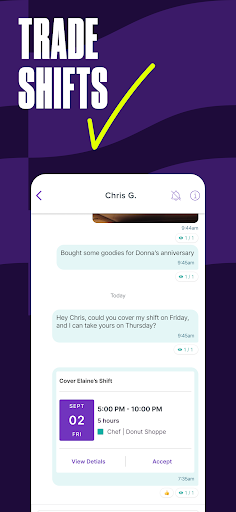
- Request & accept shift trades
- Time-off requests & updated availability for business scheduling
TEAM COMMUNICATION
- Create group chats & connect with the team in real-time
- Message employees & coworkers across your company
Get support via phone, email, & chat.
Homebase Plans
- Free basic plan for up to 20 employees
- Essentials plan for $24.49/mo with advanced scheduling
- Plus plan for $59.99/mo with hiring & PTO
- All-in-one plan for $99.95/mo with onboarding & HR
- Payroll, Tip Manager, Task Manager, Background Checks, & more available as add-on
In-app upgrades: You can subscribe to a paid plan for additional features. The Account charges the payment upon confirmation of purchase. Subscription automatically renews unless auto-renew is turned off at least 24 hours before the end of the current period. Your account will be charged for renewal within 24 hours prior to the end of the current period. Auto-renewal may be disabled at any time by going to your settings after purchase. For more information, see the Terms of Use and Privacy Policy.
Terms of use: https://app.joinhomebase.com/terms
Privacy policy: https://app.joinhomebase.com/privacy
Manage multiple teams or departments, quickly build, edit, and share schedules. Clock in and out directly from your phone. Payroll app capabilities help to manage your team on the go. Send messages to individual employees or the whole team with our built-in Homebase messaging. Check sales, scheduled labor costs, and labor as a percentage of sales with our tools for time management.
Scheduling shifts is no longer chaotic with Homebase. Timesheets help you build, share, and automate work schedules based on labor costs, sales forecasts, and team availability. Schedule shifts and notify your team when you update the schedule through in-app or email alerts. Time off requests, track hours, trade shifts, and update their availability with our business scheduling.
Top-rated app built for small businesses:
Best Time Clock 2023 - The Motley Fool
Best Scheduling 2023 - Investopedia
Best HR & Employee App 2023 - The Webby Awards
Best Payroll for Hourly Teams 2024 - USA Today
Best Payroll for Small Business 2024 - CNN Underscored
Best employee communication tool ever! - Theresa Fouquette, Owner, Bliss Small Batch Creamery
Schedule shifts, streamline payroll, HR, hiring, team performance, and create timesheets, and track team attendance—all in one place. Homebase is the payroll app that allows for top-tier business scheduling and management. . Download Homebase today, and start tracking.
HOMEBASE FEATURES
PAYCHECK & PAYROLL APP
- Payroll app management made simple with automated calculations with our paycheck app
- In a few clicks, generate timesheets with our payroll app
- Time sheets and paycheck processing is streamlined with in-app clock-in & clock-out
- Payroll app that works with providers like Gusto, Intuit Quickbooks Online Payroll, or Square Payroll app
BUSINESS SCHEDULING AND SHIFT MANAGEMENT
- Use templates to quickly build & share schedules
- Send shift reminders
- Use an employee availability tracker
- Manage time-off requests
TIME MANAGEMENT AND ATTENDANCE TRACKING
- See hours, breaks, overtime, clock-in, and clock-out time- all with business scheduling
- Get alerts when employees are late or approaching overtime in their shifts.
- Clock in with top POS systems like Clover, Square, Toast, & more
TEAM ATTENDANCE AND EMPLOYEE TOOLS
- Payroll app capabilities that make wages seamless
- Clock in and out directly with Homebase management tools
- Schedule shifts, see shift notes, expected earnings, & team attendance
- Request & accept shift trades
- Time-off requests & updated availability for business scheduling
TEAM COMMUNICATION
- Create group chats & connect with the team in real-time
- Message employees & coworkers across your company
Get support via phone, email, & chat.
Homebase Plans
- Free basic plan for up to 20 employees
- Essentials plan for $24.49/mo with advanced scheduling
- Plus plan for $59.99/mo with hiring & PTO
- All-in-one plan for $99.95/mo with onboarding & HR
- Payroll, Tip Manager, Task Manager, Background Checks, & more available as add-on
In-app upgrades: You can subscribe to a paid plan for additional features. The Account charges the payment upon confirmation of purchase. Subscription automatically renews unless auto-renew is turned off at least 24 hours before the end of the current period. Your account will be charged for renewal within 24 hours prior to the end of the current period. Auto-renewal may be disabled at any time by going to your settings after purchase. For more information, see the Terms of Use and Privacy Policy.
Terms of use: https://app.joinhomebase.com/terms
Privacy policy: https://app.joinhomebase.com/privacy
What's New
- Custom images can now be uploaded for conversation avatars in messaging.
App Information
Version Name
4.40
Version Code
12743
File Size
96.3 MB
Minimum OS
Android 12+
Target SDK
Android 34
Developer
Homebase Team Management
Contact
Website
Content Rating
Everyone
Package Name
com.joinhomebase.homebase.homebasePermissions Required
This app may request the following permissions:
Recent Reviews

kitgar61
2.0★
The countdown that used to show up whenever I would clock out for break is gone with the latest update. I don't know why you would get rid of it, it was super helpful. Now I have to constantly watch the clock to make sure I clock in from break when time is up. I don't use the clock back in reminder in settings because it's never accurate. It always notifies me too late. I hope the countdown timer returns in the next update.

Cynna B.
1.0★
This app is supposed to have a feature where it would sync to our Google Calendar however often you scheduled it to. Mine was for 24 hours. This feature didn't always work, I usually had to open the app to make it do so manually, but it was a feature I relied on. This issue only got worse, not better, and now it doesn't sync to calendar at all. If I try to disable it and enable, I now cannot even select a Google Calendar for it to sync to.

Lukas
3.0★
Always been a great app for the jobs I've used it with throughout the years, up until recently. Messages don't get sent or receieved on time (ex: sends a message at 10:30am, won't show until 10:35am), and as of now it has logged me out of my account and won't log back in. Met with an error message every time. Managers can't figure it out either.

Kat Fujioka
1.0★
It worked great until a recent update. They completely ruined the message center. It is genuinely UNUSABLE. It locks everything in its own tab, and I have to dig and dig and dig. Every damn time, I get a notification. also, half my chats are just missing and can no longer DM, anyone. Good luck getting rid of the notification dot on the app because that's permanent now. Used to just all be in one big list, I didnt have to do 8 extra things just to read a message. wish I could give lower than 1.

Melanie J
1.0★
Do NOT use pay any day or instant pay, and DO NOT open a homebase spending account by any means. Only use this app as a time clock and messaging platform. The terms of their money accounts are unclear until you are already stuck with one and unable to close it until four weeks after you open it (two paydays). You will be trapped in endless loops of drafting between accounts, and longer than normal ACH clearing times (5-7 days). Their solution is to use cashapp instead of their card. Crazy!

MMA PRESTIGE
2.0★
Notification alerts are malfunctioning. I searched the settings and disabled the alerts. I went back into settings and put alerts back on. I even uninstalled and reinstalled the app but the alert notifications don't work properly. This error didn't happen until recently when there was an update 😕 I accepted the update otherwise I couldn't use the app anymore. I contacted the supervisor in charge of the app group and was unable to help. I can't receive upcoming schedules and messages.
Ad slot: In-Content