

Viewer for MS Access ACCDB-MDB
com.kmsoft.access_db_viewer
by Km4Dev
Screenshots





Ad slot: Top Leaderboard
About this app
********** Viewer For Access database for Android **********
allow you to Open Access database for Android ( ACCDB or MDB (Jet) format.) to
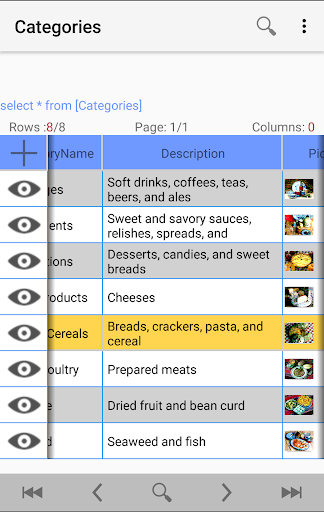
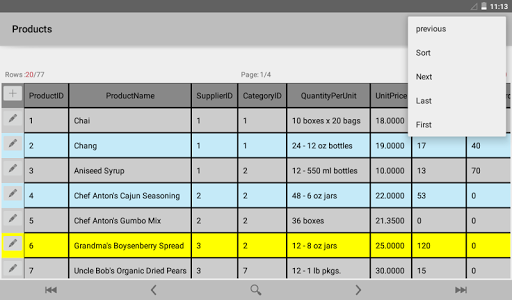
open table Rows with Paging, Sorting and Filtering ,
Support All ms Access database Version
* Microsoft Access 2000, 2003 ,2007 ,2010 ,2013 2016
Features
• Open All ms Access database Version
• open ACCDB database or MDB database .
• open table data with paging list.
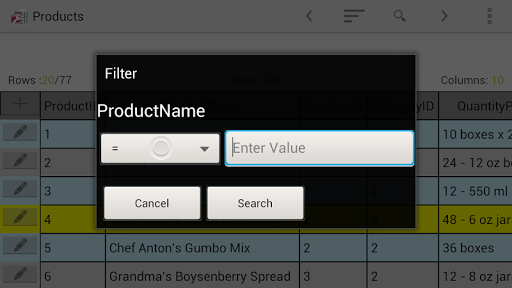
• Filter on specific column Data(With many options)
• Sort table data by column
• View Row Detail Form
• support Big database (Tested on 350MB 2,5 million Rows).
• Open encrypt database with Password
• View record relationships
• open cloud database by click on File
Notes:
- This application does not support Insert Data, Edit Data and Delete Rows, Also it does not display queries and forms (I'm working on this).
- This App required "All Files Access Permission" To Open database File from Internal Storage
If you face any problems or you have any suggest on our database app please contact us.
[email protected]
allow you to Open Access database for Android ( ACCDB or MDB (Jet) format.) to
open table Rows with Paging, Sorting and Filtering ,
Support All ms Access database Version
* Microsoft Access 2000, 2003 ,2007 ,2010 ,2013 2016
Features
• Open All ms Access database Version
• open ACCDB database or MDB database .
• open table data with paging list.
• Filter on specific column Data(With many options)
• Sort table data by column
• View Row Detail Form
• support Big database (Tested on 350MB 2,5 million Rows).
• Open encrypt database with Password
• View record relationships
• open cloud database by click on File
Notes:
- This application does not support Insert Data, Edit Data and Delete Rows, Also it does not display queries and forms (I'm working on this).
- This App required "All Files Access Permission" To Open database File from Internal Storage
If you face any problems or you have any suggest on our database app please contact us.
[email protected]
What's New
remove old version then install this version
1.9.3 Bug fixes and performance improvements.
Filter with Multicolumn
1.6.7 Open encrypt database with Password ( Full support)
Deep Searching (you can filter the result)
1.2.6 View record relationships ( limited support)
1.2.2 The LIKE operator is added to search in String Columns
Ex: Km*Dev or *Km*
Ex2: Km4D?v
1.9.3 Bug fixes and performance improvements.
Filter with Multicolumn
1.6.7 Open encrypt database with Password ( Full support)
Deep Searching (you can filter the result)
1.2.6 View record relationships ( limited support)
1.2.2 The LIKE operator is added to search in String Columns
Ex: Km*Dev or *Km*
Ex2: Km4D?v
App Information
Version Name
1.2.6
Version Code
12
File Size
3.0 MB
Minimum OS
Android 5.0+
Target SDK
Android 23
Developer
Km4Dev
Contact
Content Rating
Everyone
Package Name
com.kmsoft.access_db_viewerPermissions Required
This app may request the following permissions:
Recent Reviews

Oldies Alternative
5.0★
I've been using this app for a while now and have just noticed that it is only able to view the first 205 entries out of a current 430. I'm not sure if this always been a problem or if I only recently noticed it. Any help would be appreciated. EDIT: Problem fixed. It was not an app fault but a problem with Dropbox. Not sure why but after saving database in a different folder it worked properly.

A Google user
4.0★
This is a good start to being able to view (and benefit from) MS Access being on Android. Yes, it's not live, updatable, syncable, yada, yada, but that's not what it's designed to do. It simply gives you the ability to see your "last uploaded" database and associated information on your phone or tablet. When I'm on the go, and need to view a record and don't have my laptop, this works great. Just needs more tutorial help on how to get MS Access onto your phone from your computer - it's a process

vinay prajapathi
1.0★
This new filter type is horrible .. it's completely useless. The previous one was simple and easy . And the operator option (like , not like , contains , start with , end with ) is not helpful , like should be default ( contains is not working properly)

Barry Gabel
3.0★
The app works well BUT there is a problem with keeping the data up to date. In order to import an updated database from onedrive you have to clear the data in settings/apps/access ms db viewer/stotage and then reimport the database. It would simplify the process if an, [Update] button was added next to each database on the 'start page' which did the above automatically.

Mohamed Abdo
5.0★
Excellent application and I found what I was searching for for a long time. This is the only application which helped me viewing my access database. I hope you enable editing data. I will share the experience. I splitted it and uploaded the backend file to onedrive. Now I can see all data on my cell phone. But the database must be closed on desktop in order to be refreshed on onedrive then it will appear on cell phone. Not a big problem and not the defect of this application.

Dan B.
5.0★
3/2/25 Updated 5 Star Review: I was surprised to receive an email in response to my review from the developer asking for details. I was amazed to receive a rapid FREE updated app that addressed all my issues! Original 2/7/25 1 Star Review: Lately, on my old Samsung Note 10 + and my new Samsung S25 Ultra all I see is a message to compact and repair on PC. I've done that twice and copied the result to my phones with no improvement. An update must have broken this app.
Ad slot: In-Content